
Comparexpert
Comparison Between Company


GreenGeeks vs Bluehost 2026: The Ultimate Hosting Comparison Guide
Choosing the right web hosting provider is essential for building a fast, secure, and reliable website. GreenGeeks and Bluehost are two well-known hosting companies that offer a variety of hosting services including shared hosting, WordPress hosting, VPS, and dedicated servers. While both providers deliver solid performance and beginner-friendly tools, they differ in areas such as pricing, performance, sustainability, and WordPress features.
Table of Contents
GreenGeeks vs Bluehost: General info
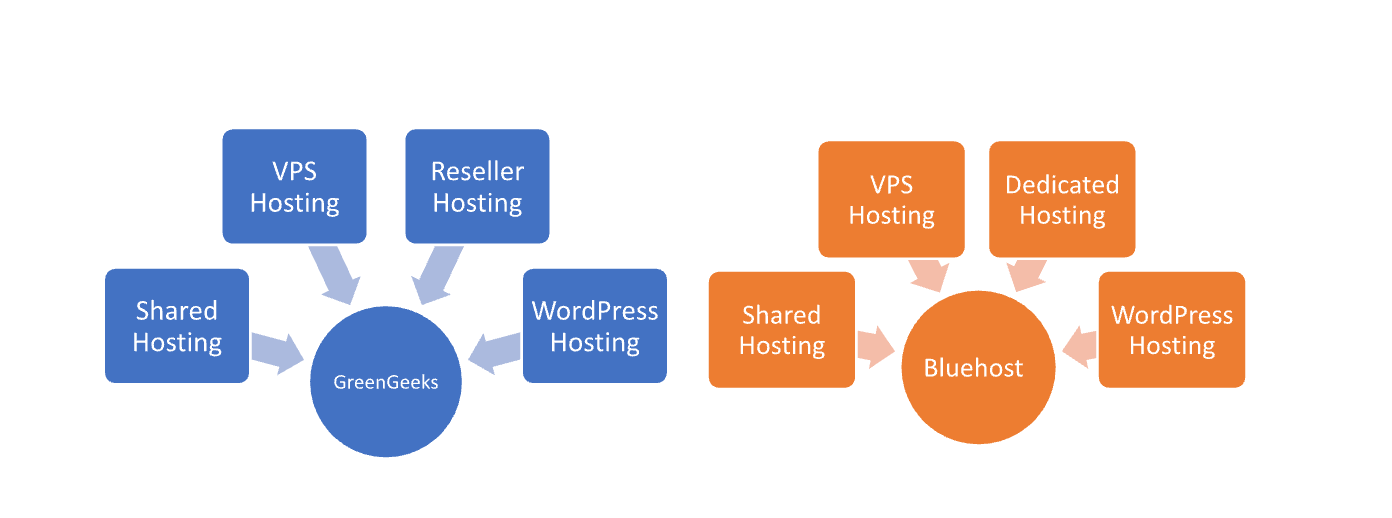
GreenGeeks, an eco-friendly web hosting provider, was formed in 2008. Known for its commitment to sustainability, GreenGeeks uses renewable energy to power its services and offers various hosting solutions, including shared, WordPress, reseller, and VPS hosting. It emphasizes security, speed, and customer support with 24/7 service and a 99.9% uptime guarantee.
Bluehost, founded in 2003, is a popular web hosting company recommended by WordPress.org. It provides a range of hosting services, including shared, VPS, dedicated, and WordPress hosting, aimed at beginners and small businesses. Bluehost is known for its affordable pricing, user-friendly interface, and comprehensive support.
While both providers offer a range of hosting options, GreenGeeks stands out for its green energy commitment, while Bluehost is more mainstream, widely used for WordPress hosting, and has a larger market presence.
GreenGeeks vs Bluehost : Overview:
| GreenGeeks | Bluehost |
| Founded in 2008 | Founded in 2003 |
| Focuses on eco-friendly hosting | Known for beginner-friendly and WordPress-focused hosting |
| Offers Shared, VPS, Reseller, and WordPress hosting | Offers Shared, VPS, Dedicated, and WordPress hosting |
| 99.9% uptime guarantee | 99.9% uptime guarantee |
| Uses 300% renewable energy offset | No specific green energy initiatives |
| Provides 24/7 support via phone, chat, and email | Provides 24/7 support via phone and chat |
| Includes a free domain for the first year | Includes a free domain for the first year |
| Offers a free SSL certificate | Offers a free SSL certificate |
| Provides free website migration | Provides free website migration |
| Starting price is $2.95/month | Starting price is $2.95/month |
GreenGeeks vs Bluehost : Features
GreenGeeks:
GreenGeeks is an eco-friendly web hosting provider known for its high-performance hosting services and commitment to sustainability. The company offers shared, VPS, reseller, and WordPress hosting with features like free SSL, SSD storage, daily backups, and a 99.9% uptime guarantee.
Bluehost:
Bluehost is a popular web hosting provider recommended by WordPress and widely used by beginners and businesses. It offers shared, VPS, dedicated, and WordPress hosting with features such as a free domain for the first year, one-click WordPress installation, free SSL, and 24/7 customer support.
| Feature | GreenGeeks | Bluehost |
|---|---|---|
| Founded | 2008 | 2003 |
| Hosting Types | Shared, VPS, Reseller, WordPress | Shared, VPS, Dedicated, WordPress |
| Uptime Guarantee | 99.9% | 99.9% |
| Renewable Energy Usage | 300% (eco-friendly hosting) | No |
| Customer Support | 24/7 via phone, chat, email | 24/7 via phone, chat |
| Free Domain | 1st year free | 1st year free |
| Free SSL Certificate | Yes | Yes |
| Money-Back Guarantee | 30 days | 30 days |
| Website Migration | Free | Free |
Pricing and Plans
Both hosting providers offer competitive introductory pricing for beginners. Typically, shared hosting plans for Bluehost and GreenGeeks start around $2.95 per month, making them affordable options for small websites and blogs.
However, renewal prices are higher for both providers. Bluehost’s renewal price can increase to around $11.99 per month, while GreenGeeks renews at a similar rate.
Bluehost often includes additional tools such as AI website builders and eCommerce integrations in some plans, which can add extra value for beginners launching a new website or online store.
| Pricing | GreenGeeks | Bluehost |
|---|---|---|
| Starting Price | ⭐⭐⭐⭐ ($2.95/month) | ⭐⭐⭐⭐ ($2.95/month) |
| Renewal Price | ⭐⭐⭐⭐ ($10.95/month) | ⭐⭐⭐⭐ ($9.99/month) |
| Money-Back Guarantee | ⭐⭐⭐⭐ (30 days) | ⭐⭐⭐⭐ (30 days) |
| Domain Renewal | ⭐⭐⭐ (usually $15–$20/year) | ⭐⭐⭐ (usually $15–$20/year) |
| Additional Features | ⭐⭐⭐⭐ (includes free SSL, website migration) | ⭐⭐⭐⭐ (includes free SSL, website migration) |
Eco-Friendly Hosting
One of the biggest differences between the two providers is sustainability. GreenGeeks is known for its environmentally friendly hosting, matching 300% of its energy consumption with renewable energy credits to reduce its environmental impact.
Bluehost, on the other hand, does not have a comparable environmental program. For businesses that prioritize sustainability, GreenGeeks stands out as a greener hosting option.
Hosting Management:
| GreenGeeks | Bluehost |
| Control Panel | cPanel |
| Website Builder | Free website builder included |
| One-Click Installs | Available for popular applications |
| Email Hosting | Included with most plans |
| Backup Options | Daily backups included |
| Staging Environment | Available with higher-tier plans |
| Performance Monitoring | Performance metrics provided |
| Security Features | Free SSL, SiteLock integration |
Ease of Use:
GreenGeeks:
- Control Panel: Uses cPanel, which is familiar and user-friendly for many.
- Website Builder: Includes a simple, drag-and-drop website builder.
- Setup Process: Streamlined onboarding process with easy-to-follow setup guides.
- Support: 24/7 support via chat, email, and phone to assist with any issues.
- Interface: Clean and intuitive dashboard, though slightly less polished compared to some competitors.
Bluehost:
- Control Panel: Also uses cPanel, which is widely recognized and easy to navigate.
- Website Builder: Provides a user-friendly website builder with drag-and-drop functionality.
- Setup Process: Known for an easy setup process with clear instructions, especially for WordPress users.
- Support: 24/7 support via phone and chat, with extensive knowledge base articles.
- Interface: User-friendly interface, particularly geared towards beginners and WordPress users.
Hosting Provided by GreenGeeks vs Bluehost
What Our Customers Have to Say
GreenGeeks:
- Positive Feedback: Customers appreciate the eco-friendly approach and responsive customer support. Many users report satisfaction with the hosting performance and uptime.
- Criticisms: Some users mention that the pricing can be higher upon renewal, and a few have found the user interface less modern compared to other providers.
Bluehost:
- Positive Feedback: Users praise Bluehost for its easy-to-use interface, strong WordPress integration, and reliable customer support. It’s often recommended for beginners and small businesses.
- Criticisms: There are occasional complaints about higher renewal rates and performance issues under heavy traffic. Some users have also reported long wait times for customer support.
Performance and Speed
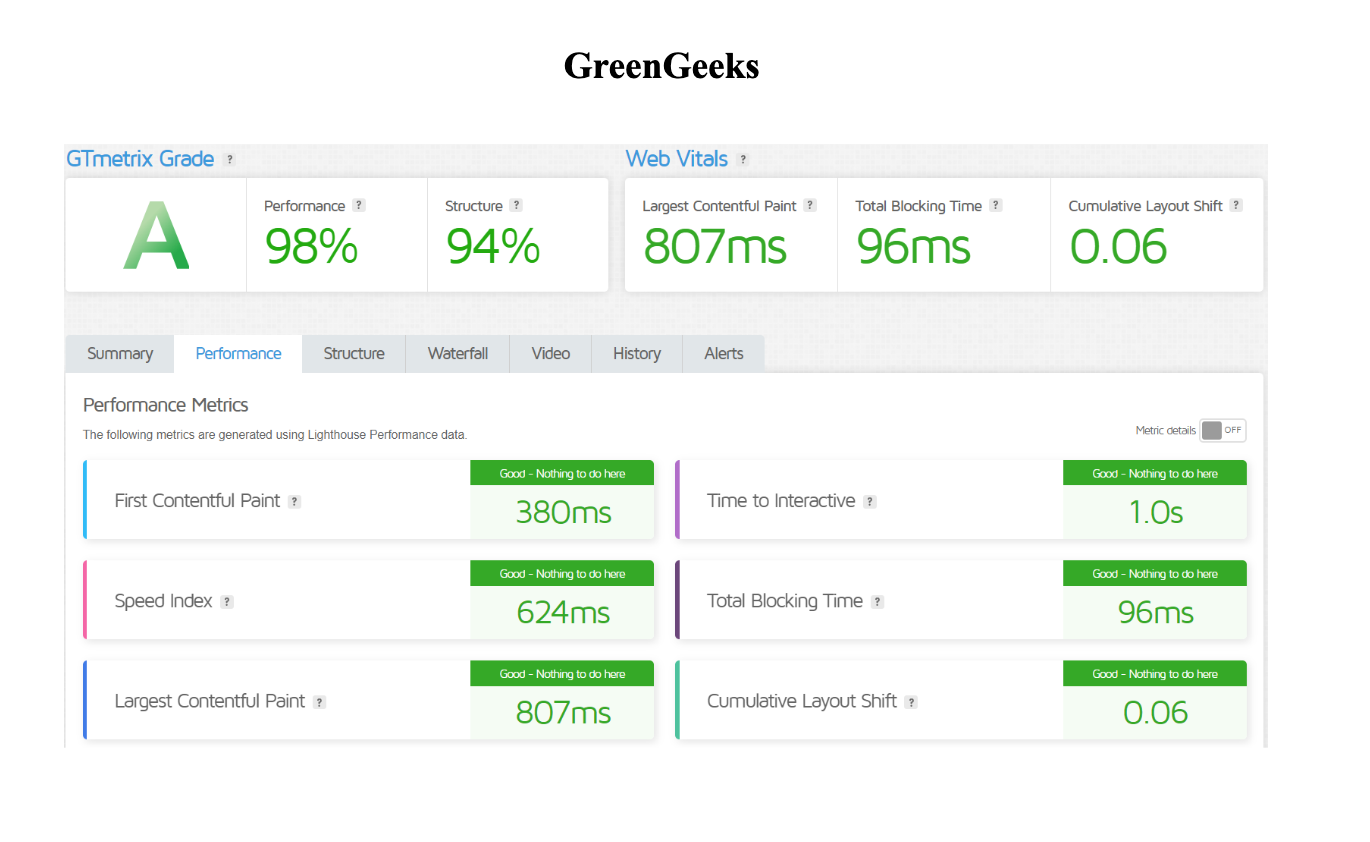
When it comes to website speed, both hosts provide reliable performance, but GreenGeeks often has a slight advantage due to its advanced performance technologies. GreenGeeks uses LiteSpeed web servers, LSCache, HTTP/3 support, and NVMe SSD storage, which can significantly improve loading speeds and website responsiveness.
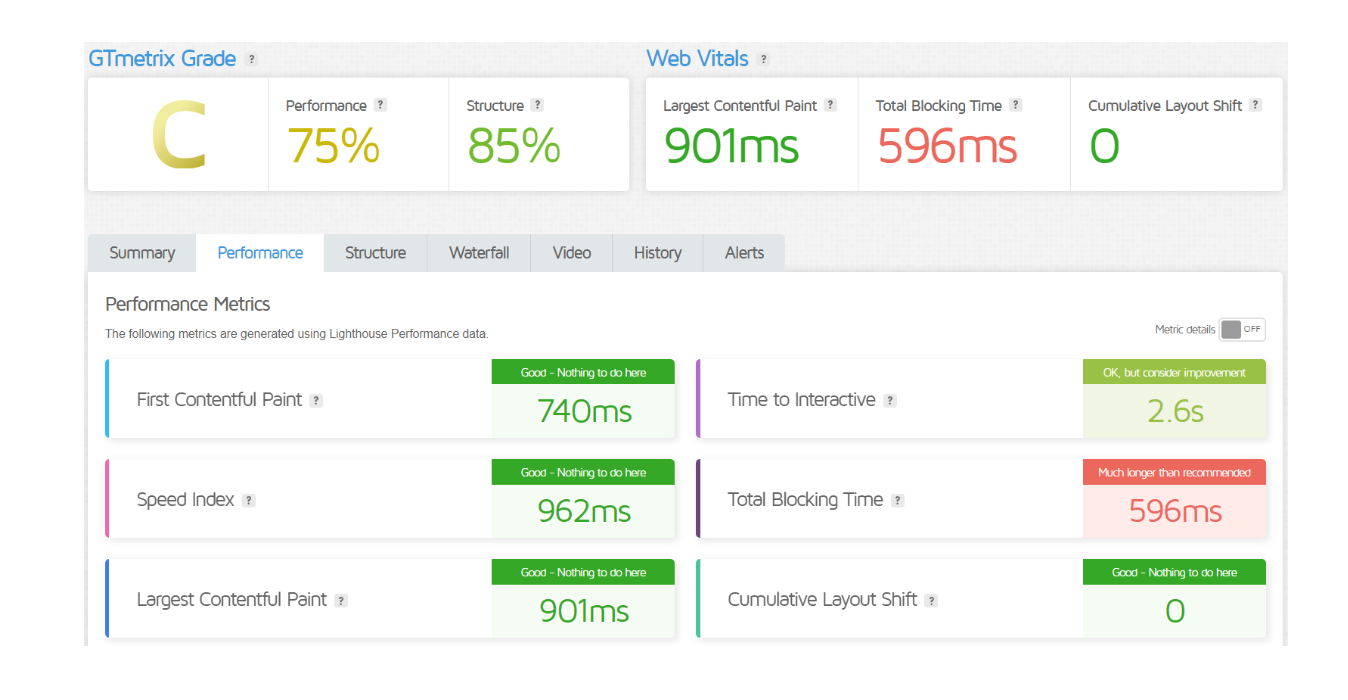
Bluehost also offers good performance with optimized WordPress hosting environments and SSD storage. However, some independent tests suggest that GreenGeeks can deliver faster page load times in head-to-head comparisons.
If website speed is a top priority for SEO and user experience, GreenGeeks may be the better choice.
GTMetrix:
GreenGeeks
Bluehost
Advantage and Disadvantage
Advantage
| GreenGeeks | Bluehost |
| Eco-Friendly Hosting | Beginner-Friendly Interface |
| 300% Renewable Energy Offset | Strong WordPress Integration |
| Free Daily Backups | Comprehensive Support Resources |
| Free Website Migration | User-Friendly Website Builder |
| 24/7 Support with Multiple Channels | Scalable Hosting Plans |
| Free SSL Certificate | Competitive Pricing for Initial Term |
Disadvantages:
| GreenGeeks | Bluehost |
| Higher renewal rates after the initial term | Higher renewal rates after the initial term |
| User interface can be less modern | Performance issues reported under heavy traffic |
| Limited server locations compared to competitors | Occasional long wait times for customer support |
| Additional features can be pricey | Some users find upsells and add-ons aggressive |
Security Features
Both hosting providers offer essential security features such as:
- Free SSL certificates
- Malware protection
- DDoS protection
- Daily backups (depending on plan)
However, GreenGeeks generally provides a more comprehensive security suite, while Bluehost focuses on basic security features with optional paid upgrades for advanced protection.
For users looking for stronger built-in security tools, GreenGeeks may offer a slight advantage.
| Security Feature | GreenGeeks | Bluehost |
|---|---|---|
| Free SSL Certificate | ⭐⭐⭐⭐⭐ | ⭐⭐⭐⭐⭐ |
| Daily Backups | ⭐⭐⭐⭐ | ⭐⭐⭐⭐ |
| SiteLock Integration | ⭐⭐⭐⭐ | ⭐⭐⭐⭐ |
| DDoS Protection | ⭐⭐⭐⭐ | ⭐⭐⭐⭐ |
| Malware Scanning | ⭐⭐⭐⭐ | ⭐⭐⭐⭐ |
| Firewall Protection | ⭐⭐⭐⭐ | ⭐⭐⭐⭐ |
| Get Started | Choose GreenGeeks | Choose Bluehost |
Customer Support:
GreenGeeks:
- Support Channels: 24/7 support via phone, chat, and email.
- Response Time: Generally quick and responsive.
- Expertise: Support team is knowledgeable about hosting and eco-friendly features.
- Additional Resources: Comprehensive knowledge base, FAQs, and tutorials available.
Bluehost:
- Support Channels: 24/7 support via phone and chat.
- Response Time: Typically prompt, though Some users report occasional lengthier wait periods.
- Expertise: Strong support for WordPress-related issues and general hosting queries.
- Additional Resources: Extensive knowledge base, video tutorials, and community forums.
Final Recommendations
| Aspect | GreenGeeks | Bluehost |
|---|---|---|
| Best For | Eco-conscious users and those looking for reliable, green hosting solutions | Beginners, WordPress users, and those seeking a widely recommended host |
| Pricing | Competitive starting price; higher renewal rates | Competitive starting price; slightly lower renewal rates |
| Performance | Good performance with a focus on sustainability | Strong performance, particularly for WordPress |
| Customer Support | Responsive 24/7 support with phone, chat, and email | Responsive 24/7 support with phone and chat; extensive knowledge base |
| Features | Includes free SSL, daily backups, SiteLock; eco-friendly practices | Includes free SSL, daily backups, and a user-friendly interface; strong WordPress integration |
| Security | Comprehensive security features, including free SSL and malware scanning | Strong security features, including free SSL and SiteLock integration |
| Ease of Use | User-friendly with a straightforward interface; eco-friendly focus may appeal to some | Highly user-friendly, especially for WordPress users; intuitive interface |
| Get Started | Choose GreenGeeks | Choose Bluehost |
Frequently Asked Questions
GreenGeeks: Both GreenGeeks and Bluehost start at $2.95/month for their basic plans. However, GreenGeeks’ renewal rates are higher compared to Bluehost’s.
Bluehost: Offers competitive pricing with slightly lower renewal rates compared to GreenGeeks.
GreenGeeks: Provides a 99.9% uptime guarantee.
Bluehost: Also offers a 99.9% uptime guarantee. Both providers are reliable in terms of uptime.
GreenGeeks: Specializes in eco-friendly hosting, using 300% renewable energy to offset carbon emissions.
Bluehost: Does not have specific eco-friendly initiatives or green energy practices.
GreenGeeks: Offers 24/7 support via phone, chat, and email with a reputation for responsive service.
Bluehost: Provides 24/7 support via phone and chat, with an extensive knowledge base. Some users report occasional lengthier wait periods.
GreenGeeks: Yes, GreenGeeks includes a free SSL certificate with all plans.
Bluehost: Yes, Bluehost also includes a free SSL certificate with its hosting plans.
GreenGeeks: Offers free website migration, SiteLock integration, and daily backups. Emphasizes eco-friendly practices.
Bluehost: Provides a user-friendly interface, strong WordPress integration, and free website migration. Has a focus on beginner users.
GreenGeeks: Offers optimized WordPress hosting with staging environments.
Bluehost: Highly recommended for WordPress by WordPress.org, with a strong focus on WordPress features and ease of use.
Table of Contents
Explore More