

Comparexpert
Comparison Between Company



Kinsta vs SiteGround: Which Hosting Is Better in 2026?
Choosing the right web hosting provider is one of the most important decisions for your website. Two of the most popular hosting providers today are Kinsta and SiteGround. Both companies offer high-performance hosting, excellent support, and strong security features.
However, they serve slightly different audiences and use different infrastructure.
In this detailed comparison, we’ll analyze performance, pricing, features, security, customer support, and ease of use to help you decide which hosting provider is best for your website.
Table of Contents
Kinsta vs SiteGround: General info
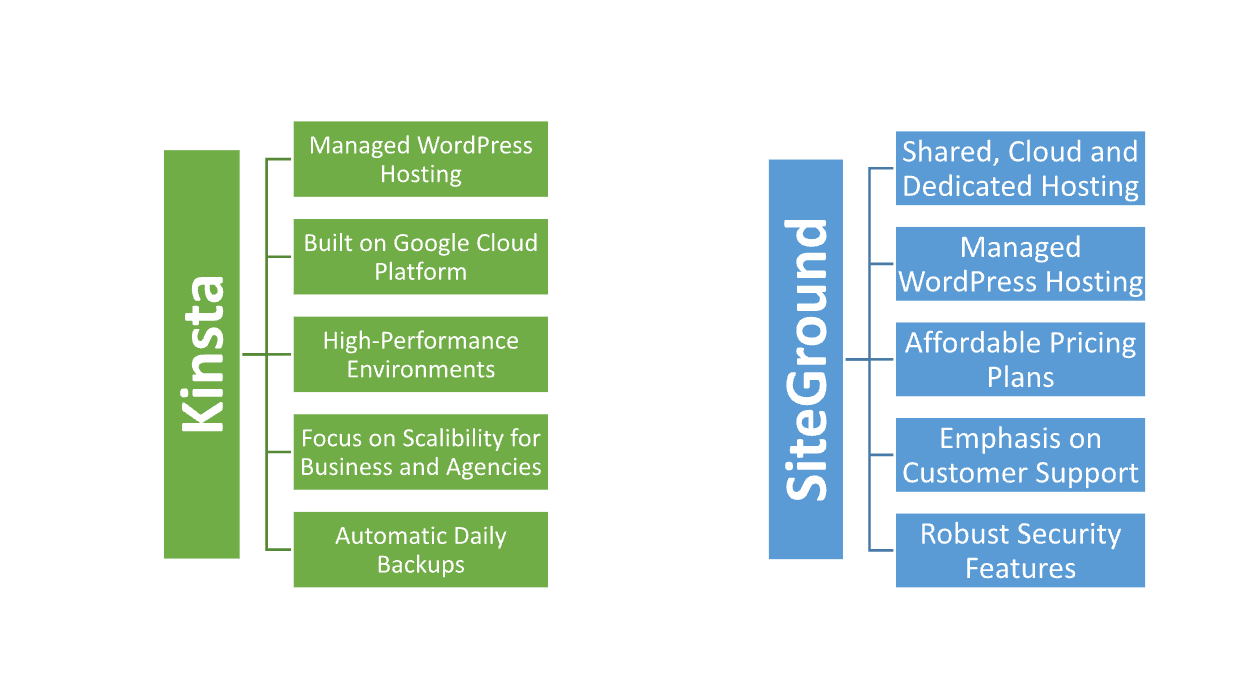
Kinsta is a premium managed WordPress hosting provider built on Google Cloud, known for its high performance, reliability, and scalability, ideal for businesses and developers. It offers speed-optimized environments, automatic backups, and a user-friendly dashboard but comes at a higher cost.
SiteGround provides a wider range of hosting services, including shared, cloud, and dedicated hosting, with a focus on affordability and excellent customer support. It offers strong security features, daily backups, and easy-to-use tools, making it popular for small to medium-sized websites, though its managed WordPress hosting isn’t as high-performance as Kinsta’s.
In short, Kinsta is best for those seeking top-tier WordPress performance, while SiteGround is more affordable and versatile with strong support.
Overview:
| Kinsta | SiteGround |
| Premium managed WordPress hosting | Versatile hosting: shared, cloud, dedicated, and WordPress |
| Built on Google Cloud Platform | Also uses Google Cloud infrastructure |
| Focused on high performance and scalability | Balances performance with affordability |
| Excellent uptime (99.9%–100%) | Reliable uptime (99.9%) |
| 24/7 support via live chat | 24/7 assistance by live chat, phone, and tickets |
| Higher pricing tier | More budget-friendly, especially for smaller sites |
| Ideal for high-traffic and business sites | Suitable for small to medium-sized websites |
| No email hosting | Email hosting included |
| Developer-focused features | Beginner-friendly with cPanel |
Performance:
Kinsta offers superior performance, especially for WordPress websites, due to its use of the Google Cloud Platform, which provides faster loading times, high scalability, and consistent uptime. With features like server-level caching, a content delivery network (CDN), and isolated environments for each site, Kinsta excels in handling high traffic and delivering top-tier speed and reliability.
SiteGround also performs well, particularly for small to medium-sized websites. It uses Google Cloud as well, but its shared hosting environment can slow down under heavy traffic compared to Kinsta. However, SiteGround’s custom optimizations, built-in caching, and free CDN still deliver solid performance, though not as optimized for high-demand WordPress environments as Kinsta.
Features:
| Kinsta | SiteGround |
| Managed WordPress Hosting | Shared, Cloud, Dedicated, Managed WordPress |
| Google Cloud Platform | Google Cloud Platform |
| 99.9% – 100% uptime | 99.9% uptime |
| 24/7 Live Chat support | 24/7 Live Chat, Phone, Ticketing Support |
| Server-level caching and CDN included | Built-in caching and free CDN |
| Automatic daily backups | Automatic daily backups |
| No email hosting | Email hosting included |
| Proactive monitoring and security features | Robust security features |
| Developer-friendly tools (SSH, staging) | User-friendly tools (cPanel, staging) |
| Premium pricing | Affordable pricing with scalable plans |
| Choose Kinsta | Choose SiteGround |
Ease of Use:
Kinsta:
- User-Friendly Dashboard: Intuitive interface specifically designed for managing WordPress sites.
- One-Click Staging: Easily create staging sites for testing without technical know-how.
- Automatic Backups: Daily backups are handled automatically, simplifying site management.
- Performance Optimization: Built-in features like server-level caching and CDN require minimal configuration.
- Developer Tools: SSH access and Git integration for advanced users, while remaining easy for beginners.
SiteGround:
- Familiar cPanel Interface: Uses a widely recognized control panel, making it easy for users familiar with cPanel.
- Quick Setup Process: Streamlined onboarding process for new users, with guided steps for website creation.
- Free Site Migration: Offers free migration service, simplifying the transition for new customers.
- Resource Management: User-friendly tools for managing resources and tracking usage.
- Customer Support: 24/7 support through multiple channels helps users quickly resolve any issues.
Pricing Comparison
| Pricing Plan | Kinsta | SiteGround |
|---|---|---|
| Basic Plan | Starting at $35/month | Starting at $3.99/month |
| Traffic Included | 10 GB storage, 25,000 visits | 10 GB storage, ~10,000 visits |
| Email Hosting | Not included | Included |
| Free CDN | Yes | Yes |
| Daily Backups | Yes | Yes |
| Support | 24/7 live chat | 24/7 live chat, phone, ticketing |
| Money-Back Guarantee | 30 days | 30 days |
| Higher-Tier Plans | Up to $600/month (high traffic) | Up to $40/month (GrowBig) |
| Get Started | Choose Kinsta | Choose SiteGround |
Hosting Provided:
Hosting Management:
| Feature | Kinsta | SiteGround |
|---|---|---|
| User Interface | Intuitive, custom dashboard for WordPress | User-friendly cPanel interface |
| Performance Management | Built-in server-level caching, CDN, and performance monitoring | Built-in caching, free CDN, and performance optimizations |
| Backups | Automatic daily backups with one-click restore | Daily backups with easy restore options |
| Staging Environments | One-click staging sites for testing | Staging feature available for WordPress sites |
| Developer Tools | SSH access, Git integration, and site cloning | Git integration, staging, and WP-CLI support |
| Security Features | Free SSL, DDoS protection, and malware scanning | Free SSL, daily security checks, and proactive monitoring |
| Updates | Automatic updates for WordPress and plugins | Automatic updates available for WordPress |
| Site Migration | Free migrations with expert assistance | Free migrations with customer support |
| Resource Allocation | Managed resources tailored for performance | Shared resources, with limits based on plan |
What Our Customers Have to Say
Kinsta:
- Performance Praise: Many customers highlight the exceptional speed and reliability of their websites hosted on Kinsta, often noting faster load times compared to previous providers.
- Excellent Support: Users frequently commend Kinsta’s customer support for its responsiveness and expertise, with many reporting quick resolutions to technical issues.
- User-Friendly Interface: Customers appreciate the intuitive dashboard that makes managing WordPress sites straightforward, even for those with limited technical skills.
SiteGround:
- Strong Customer Service: SiteGround is often lauded for its friendly and knowledgeable support team, with users noting the effectiveness of live chat and phone support.
- Value for Money: Many customers feel they receive great value for their investment, especially for shared hosting plans, appreciating the features included at competitive prices.
- Ease of Use: Users enjoy the familiar cPanel interface, making it easy to manage hosting settings and website files, particularly for beginners.
GTMetrix:
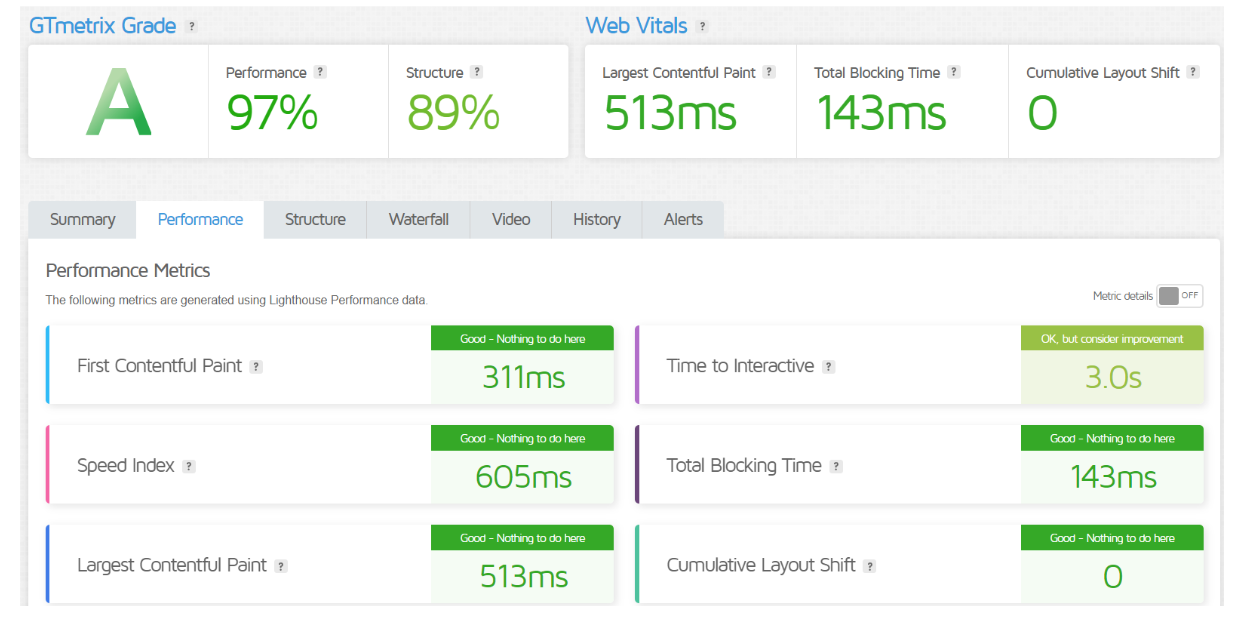
Kinsta
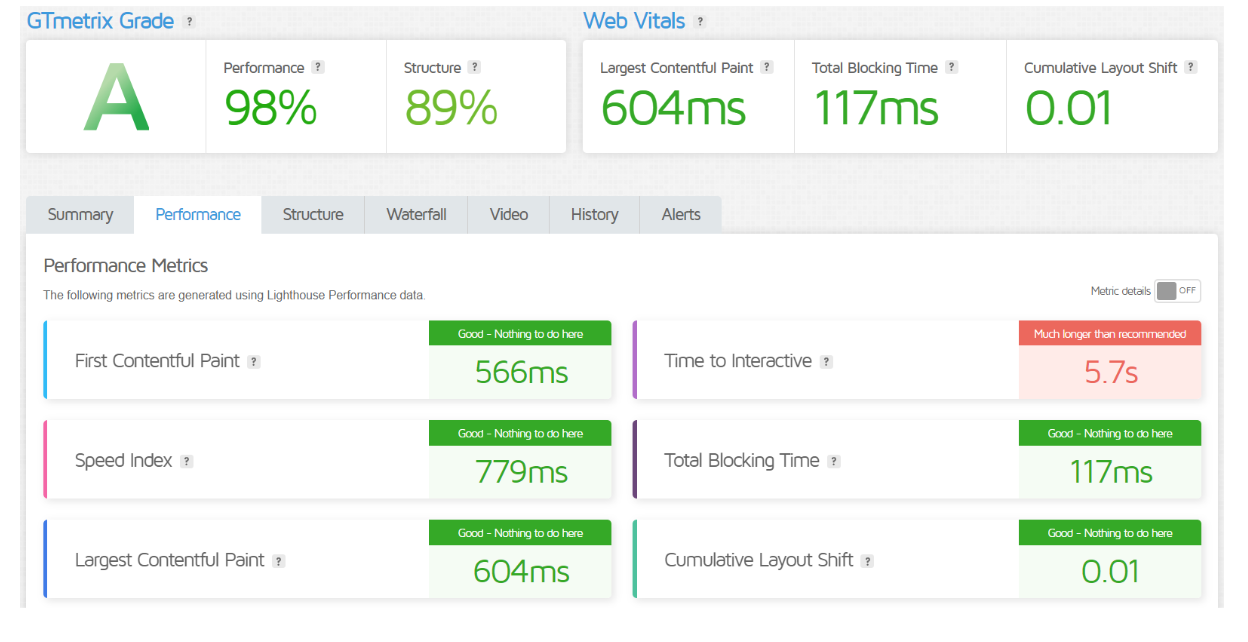
SiteGround
Advantage and Disadvantage:
Advantages:
| Kinsta | SiteGround |
| Superior performance and speed | Affordable pricing plans |
| Built on Google Cloud Platform for reliability | Wide range of hosting options (shared, cloud, dedicated) |
| 24/7 expert support with fast response times | 24/7 assistance by live chat, phone, and tickets |
| Intuitive, user-friendly dashboard | Familiar cPanel interface for easy management |
| Automatic daily backups | Daily backups and restore options |
| One-click staging for testing | Free site migration service |
| Enhanced security features | Strong security protocols and monitoring |
| Developer-friendly tools (SSH, Git access) | Beginner-friendly with easy setup |
| Focused on high traffic and scalability | Good for small to medium-sized websites |
Disadvantages:
| Kinsta | SiteGround |
| Higher pricing, especially for lower tiers | Limited resources on lower-tier plans |
| No email hosting included | Can become expensive as traffic increases |
| No phone support, only live chat | Performance may lag under heavy traffic for shared plans |
| Focused solely on WordPress hosting | Shared hosting can lead to slower speeds for some users |
| Limited customization options for advanced users | Some users report occasional downtime |
Customer Support:
Kinsta:
- 24/7 Live Chat: Available round the clock with WordPress experts.
- No Phone Support: Support is provided only through live chat and tickets.
- Proactive Monitoring: Kinsta’s support team actively monitors sites and resolves issues before they escalate.
- Expert-Level Assistance: The support team is highly trained, with a deep focus on WordPress-specific issues.
- Fast Response Times: Users often report quick resolutions and minimal waiting times for support.
SiteGround:
- 24/7 Live Chat, Phone, and Ticketing: Multiple support channels available at all times.
- Comprehensive Knowledge Base: Offers a vast library of tutorials and guides for self-help.
- Beginner-Friendly Support: Known for catering well to new users and non-technical customers.
- Quick Response Times: Users praise the fast and efficient responses through live chat and phone.
- Support for Multiple Hosting Types: Expertise in handling a variety of hosting-related issues beyond WordPress.
Final Recommendations
| Aspect | Kinsta | SiteGround |
|---|---|---|
| Best For | High-performance WordPress sites, agencies, and developers | Small to medium-sized websites, beginners, and budget-conscious users |
| Pricing | Higher-tier pricing, premium features | Affordable pricing, more options for budget users |
| Performance | Superior performance, optimized for WordPress | Good performance, especially for shared hosting |
| Ease of Use | Custom dashboard, easy for WordPress users | Familiar cPanel, beginner-friendly |
| Customer Support | 24/7 live chat with WordPress experts | 24/7 support via live chat, phone, and tickets |
| Security | Strong WordPress-focused security features | Robust security for a variety of hosting types |
| Email Hosting | Not included | Included with all plans |
| Scalability | Excellent scalability for high-traffic sites | Limited scalability on shared hosting plans |
| Site Migration | Free expert-managed migrations | Free migrations for new users |
| Final Recommendation | Ideal for businesses needing top-tier WordPress hosting and performance | Best for users seeking versatile, affordable hosting with strong support |
| Get Started | Choose Kinsta | Choose SiteGround |
Frequently Asked Questions
Kinsta is optimized specifically for WordPress, offering superior performance, while SiteGround provides good WordPress hosting at a more affordable price.
No, Kinsta does not include email hosting, requiring users to use third-party email services.
Yes, SiteGround offers more budget-friendly plans, especially for shared hosting, whereas Kinsta is premium-priced.
Both have excellent customer support, but SiteGround offers more channels (phone, live chat, and tickets), while Kinsta focuses on live chat.
Both offer free site migration, with Kinsta providing expert-managed migrations and SiteGround offering it for new customers.
Kinsta is better suited for high-traffic websites with its scalable infrastructure and dedicated resources.
Yes, both Kinsta and SiteGround provide free SSL certificates for all plans.
Table of Contents
Explore More