

Comparexpert
Comparison Between Company


Kinsta vs WP Engine (2026): Which Managed WordPress Hosting Is Better?
When it comes to managed WordPress hosting, two names dominate the industry: Kinsta and WP Engine. Both platforms provide high-performance hosting optimized specifically for WordPress, but they differ in pricing, infrastructure, ease of use, and features.
In this comparison, we’ll break down Kinsta vs WP Engine in detail, covering performance, security, pricing, features, and support to help you decide which hosting provider is the best fit for your website.
Table of Contents
General Info of Kinsta vs WP Engine
Kinsta and WP Engine are two popular managed WordPress hosting platforms designed for performance, reliability, and user experience. Kinsta focuses on providing cloud-based, high-speed hosting with a user-friendly dashboard. It utilizes the Google Cloud Platform for its infrastructure, offering excellent scalability and speed, especially for websites with significant traffic.
WP Engine, on the other hand, is a long-standing leader in the managed WordPress hosting space, offering a range of features including automated backups, security measures, and expert support. It also uses Google Cloud Platform along with AWS and has more extensive developer tools, such as staging environments and local development features.
Both platforms emphasize performance, but Kinsta is often noted for its more transparent pricing and modern dashboard, while WP Engine excels in advanced features for developers and businesses looking for premium support and tools.
Overview
| Aspect | Kinsta | WP Engine |
|---|---|---|
| Infrastructure | Google Cloud Platform (premium tier) | Google Cloud Platform + AWS |
| Dashboard | Custom-built, user-friendly dashboard | Traditional WordPress dashboard |
| Caching | Built-in server-side caching | EverCache proprietary caching |
| CDN | Free CDN via KeyCDN | Free CDN via Cloudflare |
| Backup Options | Automatic daily backups | Automated daily and on-demand backups |
| Support | 24/7 live chat support | 24/7 live chat + phone support on higher tiers |
| Migration Services | Unlimited free migrations | Free migrations (with limits) |
| Data Centers | 35+ global data centers | 20+ global data centers |
| Scaling | Automatic scaling for traffic surges | Built-in scalability for high traffic |
| Get Started | Choose Kinsta | Choose WP Engine |
Infrastructure and Technology
Kinsta Infrastructure
Kinsta uses Google Cloud Platform (GCP) and runs on C2 and C3D high-performance machines. This allows websites hosted on Kinsta to benefit from Google’s premium network and fast processing capabilities.
Key infrastructure features include:
- Google Cloud Premium Tier network
- LXD container technology
- Automatic scaling
- Isolated site environments
Because of this architecture, each website runs in its own container, which helps improve both security and performance.
WP Engine Infrastructure
WP Engine uses a combination of Google Cloud Platform and Amazon Web Services. Their infrastructure is built for enterprise-level WordPress hosting and supports millions of high-traffic websites.
Important infrastructure features include:
- Global data centers
- Proprietary EverCache technology
- Advanced server optimization
- Automatic scaling for traffic spikes
WP Engine’s caching system significantly improves page load speed and server response times.
Features:
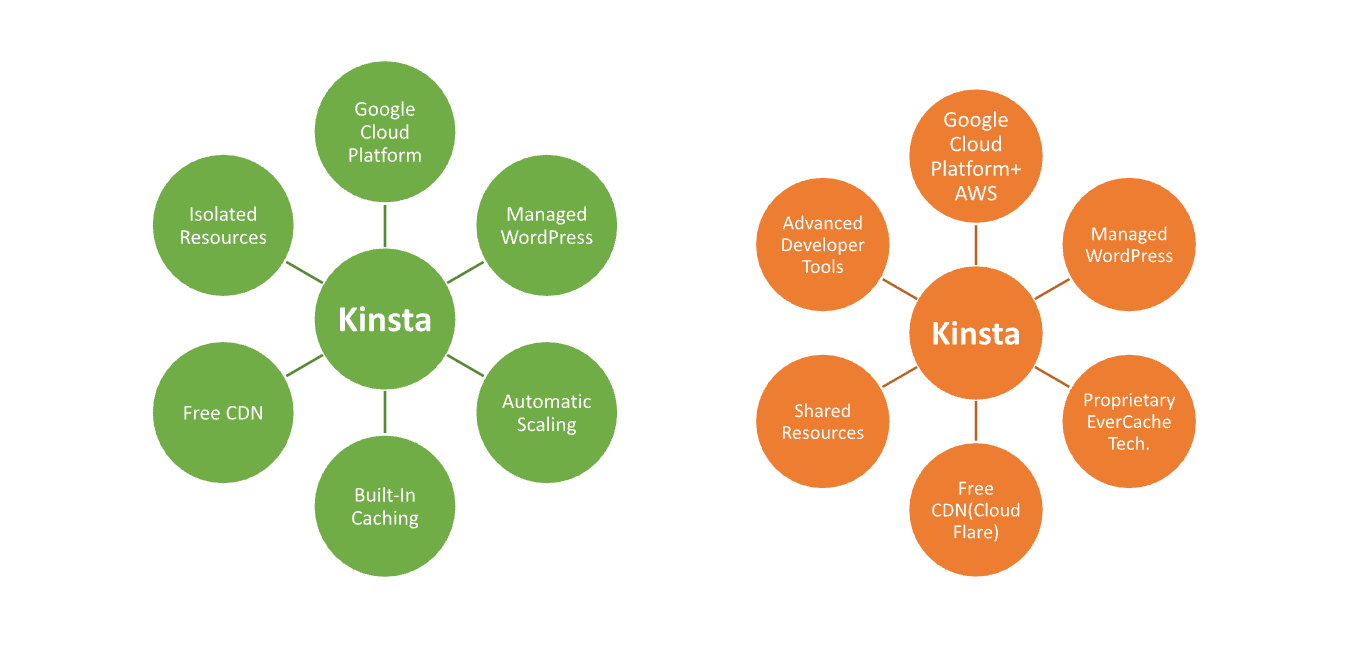
| Kinsta | WP Engine |
| Google Cloud Platform (premium tier) | Google Cloud Platform + AWS |
| Custom-built dashboard | More traditional WordPress dashboard |
| Automatic daily backups | Automated daily and on-demand backups |
| Free CDN (KeyCDN integration) | Free CDN (via Cloudflare) |
| Built-in caching (server-side) | EverCache proprietary caching |
| Unlimited free migrations | Free migrations (with limited number) |
| Isolated site resources | Shared resources with scalable plans |
| 24/7 live chat support | 24/7 live chat and phone support (higher tiers) |
| Application performance monitoring (APM) | APM for higher-tier plans |
| 35+ global data centers | 20+ global data centers |
Performance and Speed
Performance is one of the most important factors when choosing managed WordPress hosting.
Kinsta Performance
Kinsta focuses heavily on speed optimization through:
- Cloudflare integration
- Edge caching
- Fast PHP processing
- Built-in performance monitoring
Because Kinsta runs on Google Cloud’s premium network, websites generally experience very low latency and fast loading speeds globally.
WP Engine Performance
WP Engine delivers strong performance with:
- EverCache proprietary caching
- Global CDN
- Server-level caching
- Advanced page optimization
WP Engine is particularly optimized for high-traffic WordPress websites and enterprise projects.
Pricing Plans:
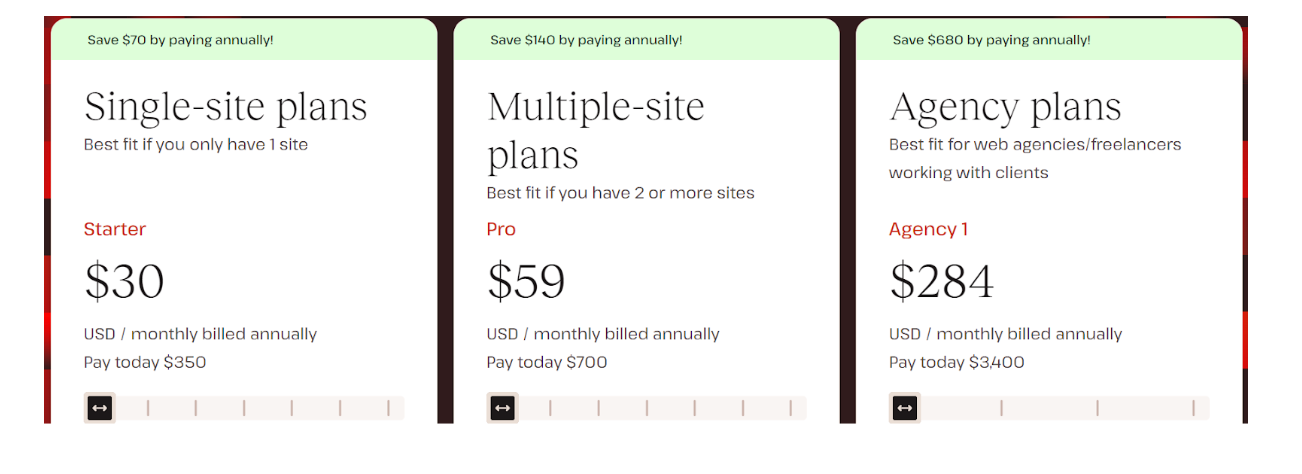
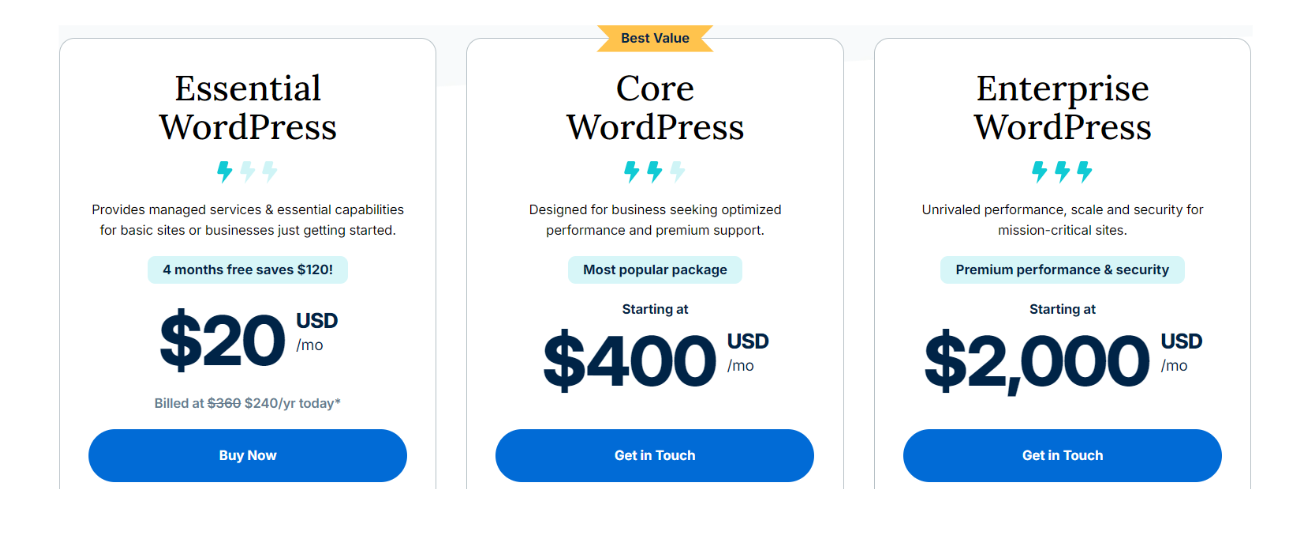
| Plan | Kinsta Pricing | WP Engine Pricing |
|---|---|---|
| Entry-Level | Starts at $35/month ★ | Starts at $24/month ★ |
| Mid-Tier | Starts at $115/month ★★ | Starts at $59/month ★★ |
| Higher-Tier / Business | Starts at $340/month ★★★ | Starts at $114/month ★★★ |
| Enterprise | Custom pricing ★★★★ | Custom pricing ★★★★ |
| Free Trial / Guarantee | 30-day money-back guarantee | 60-day money-back guarantee |
| Get Started | Choose Kinsta | Choose WP Engine |
Kinsta
WP Engine
Hosting Management:
Kinsta:
- User-Friendly Dashboard: Custom-built interface designed for easy navigation and management.
- Automatic Backups: Daily backups with the option for on-demand backups.
- Free Migrations: Unlimited free site migrations handled by the Kinsta team.
- Resource Isolation: Each site runs in its own container for better performance and security.
- Built-In Caching: Advanced server-side caching for faster load times.
- 24/7 Expert Support: Access to WordPress experts via live chat.
- Performance Monitoring: Application Performance Monitoring (APM) included.
- Staging Environment: Easy-to-use staging environment for testing changes before going live.
WP Engine:
- Traditional Dashboard: Familiar WordPress dashboard layout for management.
- Automated Backups: Daily backups with simple restore options.
- Limited Free Migrations: Free migrations included, but may have limits based on the plan.
- Shared Resources: Sites share resources on the server, affecting performance during high traffic.
- EverCache Technology: Proprietary caching system for optimized performance.
- 24/7 Support: Live chat and phone support available, especially for higher-tier plans.
- Developer Tools: Advanced developer features, including Git integration and SSH access.
- Staging Environments: Staging environments available for all plans, with easy push-to-live options.
Hosting Provided:
Ease of Use:
Kinsta:
- User-Friendly Interface: Kinsta features a custom-built dashboard that is intuitive and straightforward, making it easy for users of all skill levels to navigate.
- One-Click Features: The platform provides one-click options for tasks like backups, migrations, and staging, streamlining the user experience.
- Built-in Monitoring: Performance metrics and error logs are easily accessible, helping users quickly identify issues.
- 24/7 Support: Kinsta offers responsive support via live chat, ensuring users can get help whenever needed.
WP Engine:
- Familiar Dashboard: WP Engine’s dashboard resembles the traditional WordPress interface, which may be more familiar to seasoned WordPress users.
- Comprehensive Tools: It includes a variety of developer tools, which can be beneficial for experienced users but might overwhelm beginners.
- Migration Assistance: While WP Engine offers migration services, the process may be more complex than Kinsta’s unlimited free migrations.
- Support Options: 24/7 support is available, with phone support for higher-tier plans, though some users report longer wait times.
Advantage and Disadvantage:
Advantages:
| Kinsta | WP Engine |
| Intuitive, custom-built dashboard | Familiar WordPress-centric interface |
| Google Cloud Platform (premium tier) | Uses both Google Cloud and AWS |
| Isolated resources for better performance | EverCache system for optimized caching |
| Unlimited free migrations | Free migrations with limits |
| Built-in server-side caching | Advanced developer tools (Git, SSH) |
| 24/7 live chat support with fast response | 24/7 live chat and phone support (higher tiers) |
| 35+ global data centers | Integrated CDN through Cloudflare |
| Automatic scaling for traffic surges | Strong scalability, especially for enterprises |
| Easy-to-use staging environments | Developer-friendly staging environments |
| Lower starting price for business plans | More robust features for larger enterprises |
Disadvantages:
| Kinsta | WP Engine |
| Higher starting price for entry-level plans | Lower-tier plans offer limited phone support |
| Limited to WordPress hosting only | Complex pricing structure with additional fees |
| No phone support | Fewer data centers compared to Kinsta |
| Limited to Google Cloud infrastructure | Shared resources can lead to slower performance |
| Lacks built-in email hosting | Developer tools can overwhelm beginners |
| Higher pricing for additional site add-ons | Migration services have limitations |
What Our Customers Have to Say
Kinsta:
- Ease of Use: Customers frequently praise Kinsta for its user-friendly dashboard and seamless navigation, making it easy for both beginners and experienced users.
- Performance: Users appreciate the speed and stability, especially during high-traffic periods, attributing the performance to Kinsta’s isolated resources and Google Cloud infrastructure.
- Support: Kinsta’s 24/7 live chat support is highly rated for its quick response times and knowledgeable WordPress experts.
- Migration Services: Many customers highlight the ease of site migration, noting that Kinsta handles the process efficiently and at no extra cost.
WP Engine:
- Developer Tools: Customers who are developers or run large sites often praise WP Engine for its advanced tools, such as Git integration, SSH access, and EverCache technology.
- Performance: WP Engine receives positive feedback for handling traffic surges effectively and offering solid uptime, though some users mention slightly slower speeds compared to competitors.
- Support: While WP Engine’s support is generally appreciated, some users mention longer wait times for response, especially for lower-tier plans. Higher-tier customers, however, report excellent service.
- Scalability: WP Engine is well-regarded for its ability to scale with growing businesses, though some users find its pricing structure to be more rigid compared to Kinsta.
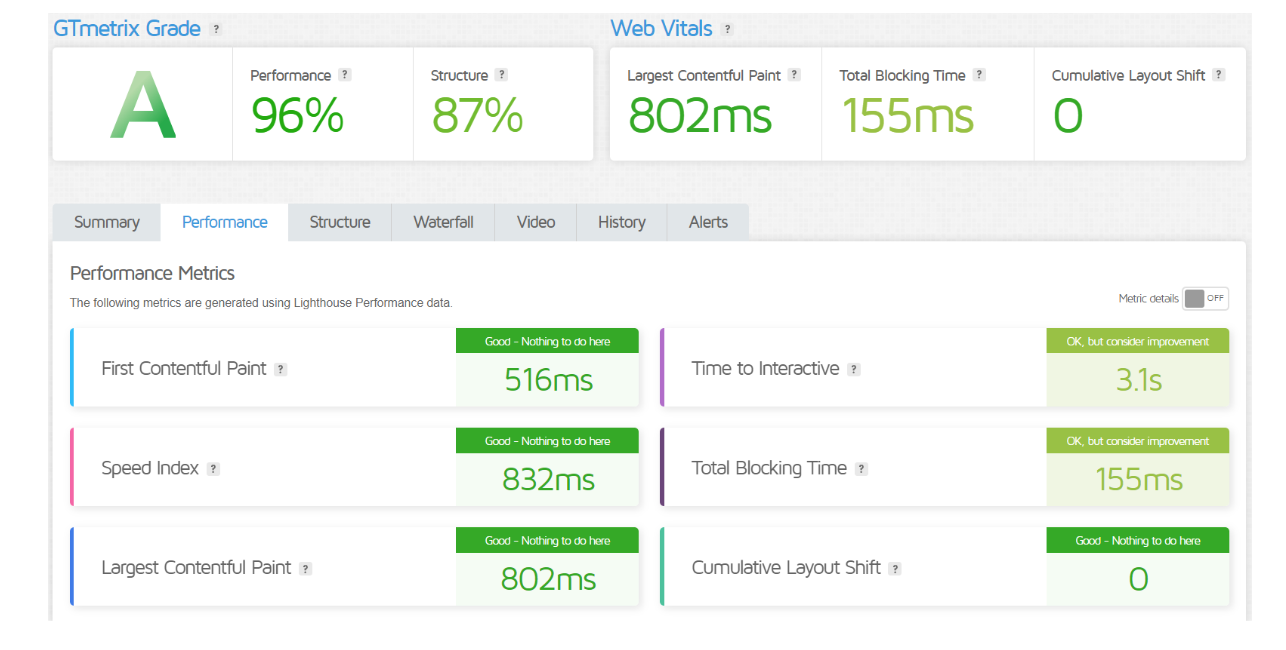
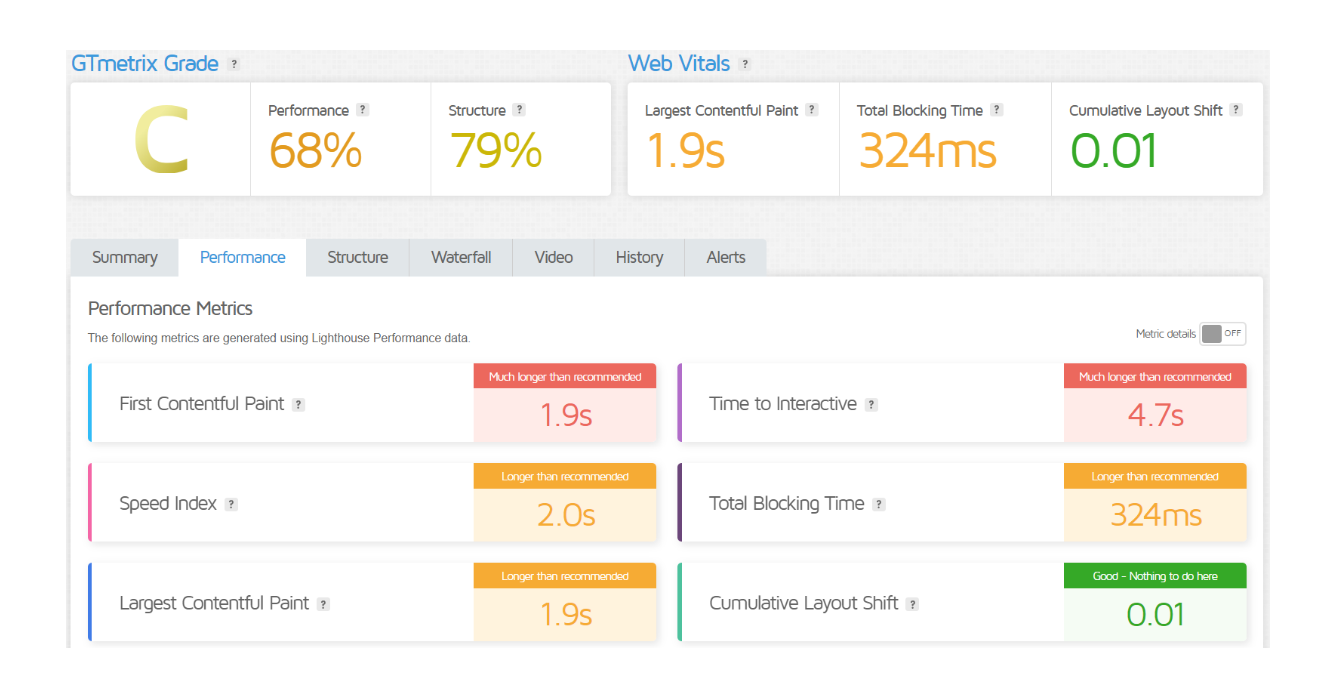
GTMetrix:
Kinsta
WP Engine
Security Features
Both platforms provide strong security protections.
| Aspect | Kinsta | WP Engine |
|---|---|---|
| Daily Backups | Automatic daily backups, up to 14–30 days | Daily and on-demand backups for all plans |
| SSL Certificates | Free SSL via Let’s Encrypt for all sites | Free SSL via Let’s Encrypt for all plans |
| DDoS Protection | Integrated DDoS detection and blocking | DDoS protection with Cloudflare integration |
| Firewall | Google Cloud’s enterprise-level firewall | Advanced firewall and EverCache protection |
| Malware Scanning | Automatic malware scans and removal support | Automated malware scans and proactive monitoring |
| Hack Fix Guarantee | Free site cleanup in case of hacks | Free hack recovery services |
| Security Monitoring | 24/7 monitoring with uptime checks every 2 mins | 24/7 proactive threat detection and monitoring |
| Two-Factor Authentication | Two-factor authentication (2FA) available | Two-factor authentication (2FA) available |
| Get Started | Choose Kinsta | Choose WP Engine |
Review
WP Engine
Kinsta

Customer support:
Kinsta:
- 24/7 Live Chat: Available through the custom dashboard, with a focus on quick responses.
- WordPress Experts: Support team is staffed by WordPress specialists to handle complex issues.
- No Phone Support: Support is only offered through live chat and email, with no phone option.
- Multilingual Support: Available in several languages to serve worldwide clientele.
- Response Time: Generally quick, with average response times under 2 minutes.
- Extensive Knowledge Base: Includes guides, tutorials, and troubleshooting tips for self-help.
WP Engine:
- 24/7 Live Chat: Available for all users across all plans.
- Phone Support: Offered for higher-tier plans (Professional level and above).
- WordPress Experts: Team of WordPress specialists available for technical assistance.
- Priority Support: Faster response times are offered for premium and enterprise programs.
- Ticket-Based Support: Available for resolving more complex issues, in addition to live chat.
- Extensive Resource Library: Includes a wide range of tutorials, webinars, and articles to assist users.
Final Recommendations
| Criteria | Kinsta | WP Engine |
|---|---|---|
| Best for Ease of Use | Simple, user-friendly dashboard with intuitive features | Familiar WordPress dashboard, better for advanced users |
| Performance | Excellent performance with isolated resources and Google Cloud | Strong performance, especially with caching (EverCache) and traffic management |
| Pricing | Higher entry-level pricing, but clear structure | Lower initial cost, but complex with add-ons and upgrades |
| Support | 24/7 live chat, no phone support, quick response times | 24/7 live chat, phone support for higher tiers, strong developer support |
| Security | Robust with DDoS protection, malware scans, and 2FA | Comprehensive security, with added features for higher-tier plans |
| Scalability | Automatic scaling with isolated containers | Good scalability, shared resources can slow down under heavy load |
| Developer Tools | Minimal developer tools, focused on ease of use | Advanced developer tools like Git integration, SSH, and staging environments |
| Free Migrations | Unlimited free migrations handled by Kinsta | Limited free migrations, more hands-on for users |
| Get Started | Choose Kinsta | Choose WP Engine |
Frequently Asked Questions
Kinsta is a managed WordPress hosting provider that utilizes Google Cloud Platform to offer high-performance hosting services specifically tailored for WordPress sites.
WP Engine is a leading managed WordPress hosting provider known for its premium services, advanced developer tools, and enterprise-level features.
Kinsta typically has a higher starting price but offers transparent pricing without hidden fees. WP Engine starts lower but can become more expensive with add-ons and higher tiers.
Both Kinsta and WP Engine provide excellent performance, but Kinsta is often praised for its use of isolated resources, while WP Engine excels with its caching technology.
Kinsta offers 24/7 live chat support with WordPress experts but no phone support. WP Engine provides 24/7 live chat and phone support for higher-tier plans.
Yes, both Kinsta and WP Engine provide automatic daily backups, with options for on-demand backups as well.
Kinsta is generally considered more user-friendly with its intuitive dashboard, while WP Engine may appeal more to developers due to its advanced features.
Table of Contents
Explore More




