

Comparexpert
Comparison Between Company


Bluehost vs Namecheap (2026): Which Hosting is Better for You?
Choosing the right web hosting provider can make or break your website. Two of the most popular and affordable options are Bluehost and Namecheap.
But which one is better for your needs?
In this detailed comparison, we’ll break down pricing, performance, features, security, and more—so you can confidently choose the best hosting provider.
Table of Contents
General Info of Bluehost vs Namecheap
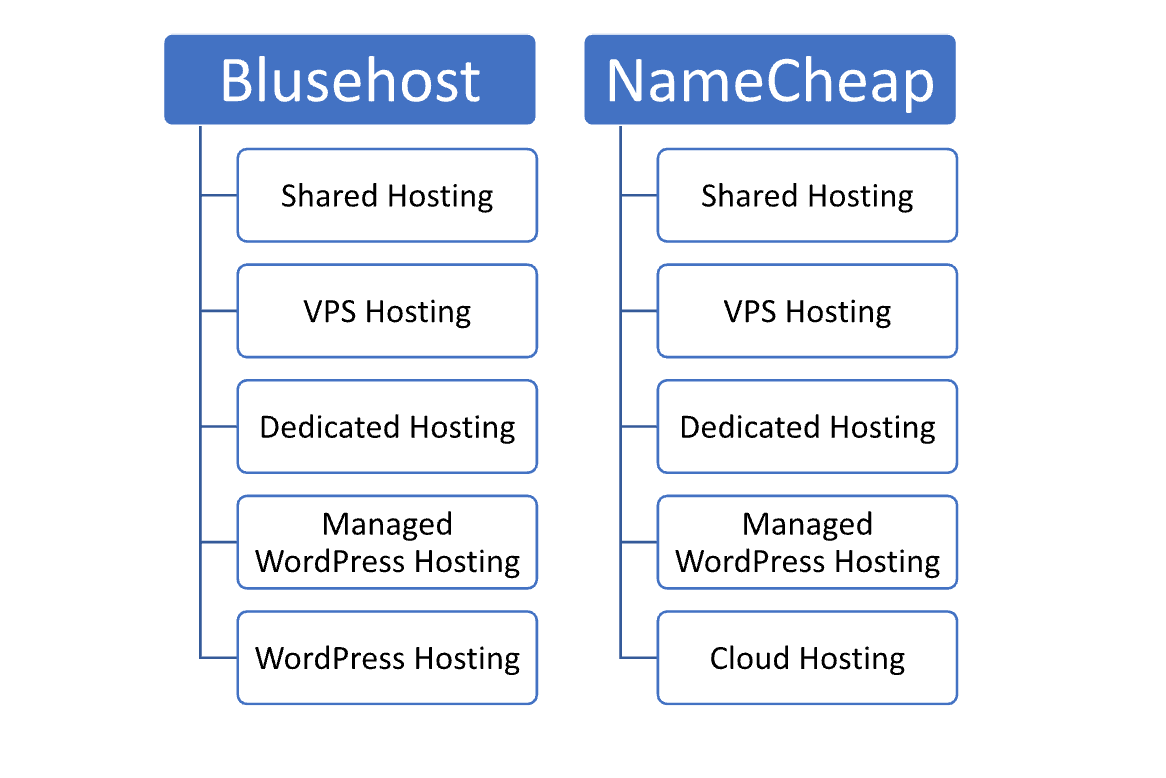
Bluehost and Namecheap are both popular in web hosting and domain registration, but with distinct focuses. Bluehost specializes in web hosting, particularly shared hosting, and offers VPS, dedicated, and WordPress hosting with a user-friendly interface, making it ideal for beginners and small businesses.
Namecheap is known for affordable domain registration and also provides basic hosting options, including shared, VPS, and dedicated servers. Though not as feature-rich as Bluehost, Namecheap offers cost-effective plans and simple domain management, appealing to users seeking reliable, straightforward hosting.
Bluehost emphasizes a feature-rich hosting experience, while Namecheap is preferred for budget-friendly domains and basic hosting. The choice depends on whether users prioritize hosting features (Bluehost) or affordable domains with simple hosting (Namecheap).
Overview
| Aspect | Bluehost | Namecheap |
|---|---|---|
| Primary Focus | Web hosting, especially shared and WordPress hosting | Domain registration and budget hosting |
| Hosting Types | Shared, VPS, dedicated, managed WordPress | Shared, VPS, dedicated |
| Domain Services | Free domain for the first year with hosting | Affordable domain registration |
| Control Panel | User-friendly dashboard | Simple, easy-to-use interface |
| Customer Support | 24/7 support via live chat, phone, email | 24/7 support via live chat, ticket system |
| Performance | Reliable uptime and optimized for WordPress | Competitive uptime, basic performance |
| Ideal For | Beginners, small to medium businesses | Budget-conscious users, smaller websites |
| Get Started | Choose Bluehost | Choose Namecheap |
Performance
In terms of performance, Bluehost is known for its reliable uptime and decent loading speeds, making it suitable for small to medium-sized websites. Its servers are optimized for WordPress, and it offers caching and CDN options, contributing to better performance and page loading times for its users.
Namecheap also provides good performance, though it’s generally more budget-oriented. While its speeds are competitive, especially in its higher-tier plans, it may not match Bluehost’s performance for large or high-traffic sites. Namecheap’s affordability and stability make it ideal for smaller sites without high-performance needs.
Features
| Bluehost | Namecheap |
| Specializes in shared and WordPress hosting | Known for affordable domain registration |
| Offers shared, VPS, dedicated, and managed WordPress hosting | Offers shared, VPS, and dedicated hosting |
| Round-the-clock assistance by phone, email, and live chat | 24/7 support via live chat and tickets |
| Free domain for the first year | Low-cost domain registration |
| User-friendly dashboard | Simple, easy-to-use control panel |
| Built-in caching and CDN options | Basic hosting features, optional CDN |
| Enhanced features for WordPress users | Budget-friendly and straightforward |
Uptime
Bluehost offers a solid uptime guarantee, generally maintaining around 99.9%, which provides reliable performance for small to medium-sized websites. Their infrastructure is designed to handle traffic efficiently, and they offer support to address downtime issues quickly, making it suitable for businesses focused on site availability.
Namecheap also maintains a strong uptime record, close to the industry standard of 99.9%. While it may not have the same level of optimization for high-traffic sites as Bluehost, it offers consistent uptime for its shared and VPS hosting plans, making it a dependable choice for users prioritizing affordability and basic reliability.
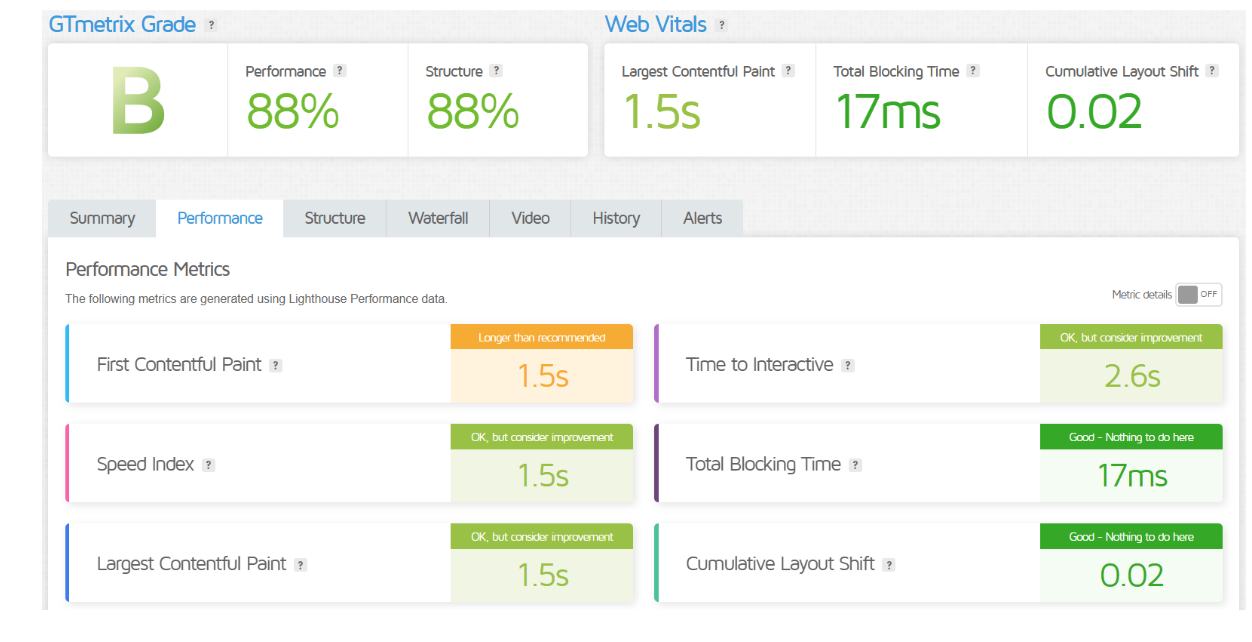
BlueHost Performance
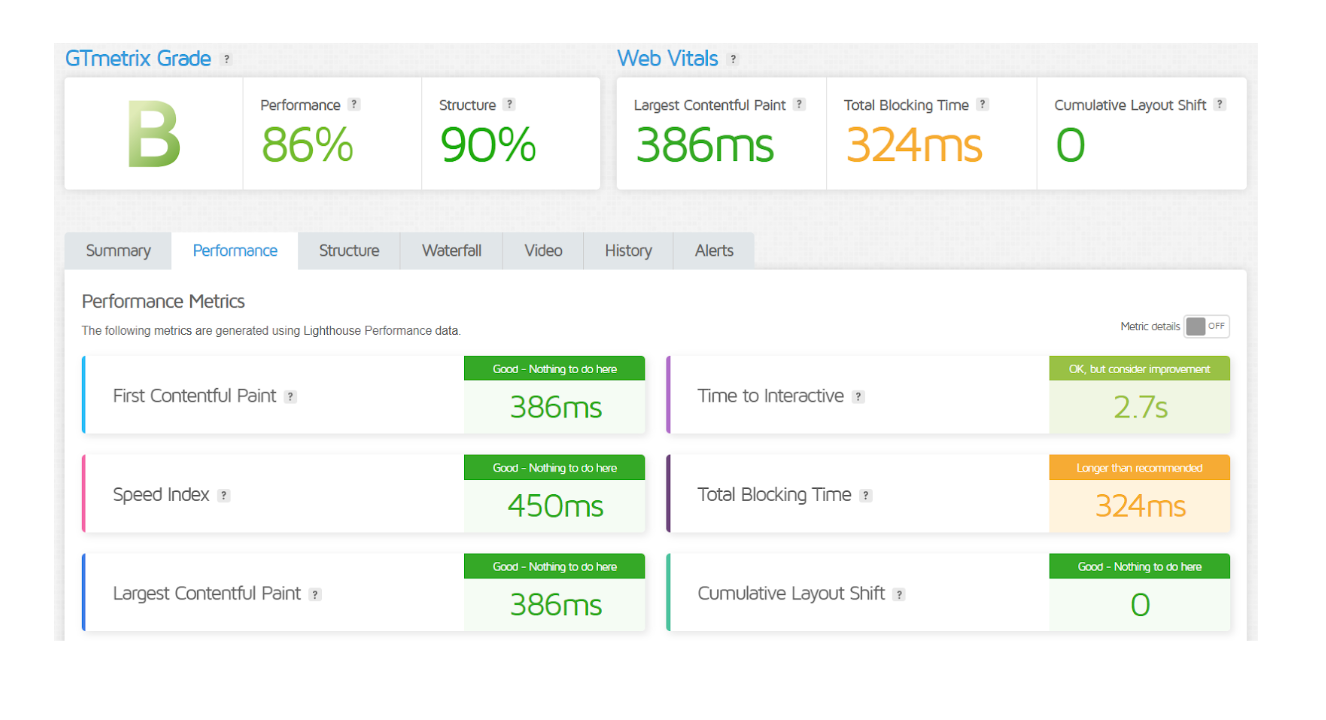
NameCheap Performance
Customer Service
Bluehost is known for its 24/7 customer support through live chat, phone, and email, catering well to beginners and those who may need hands-on help. Their support team is responsive and provides comprehensive assistance, especially for WordPress-related issues, which makes it a good fit for users who value accessible support.
Namecheap also offers 24/7 customer support with live chat and ticket-based assistance, focusing on quick and straightforward responses. Although Namecheap’s support may not be as extensive in technical depth as Bluehost’s, it is highly rated for fast response times and is well-suited for users seeking reliable, budget-friendly support.
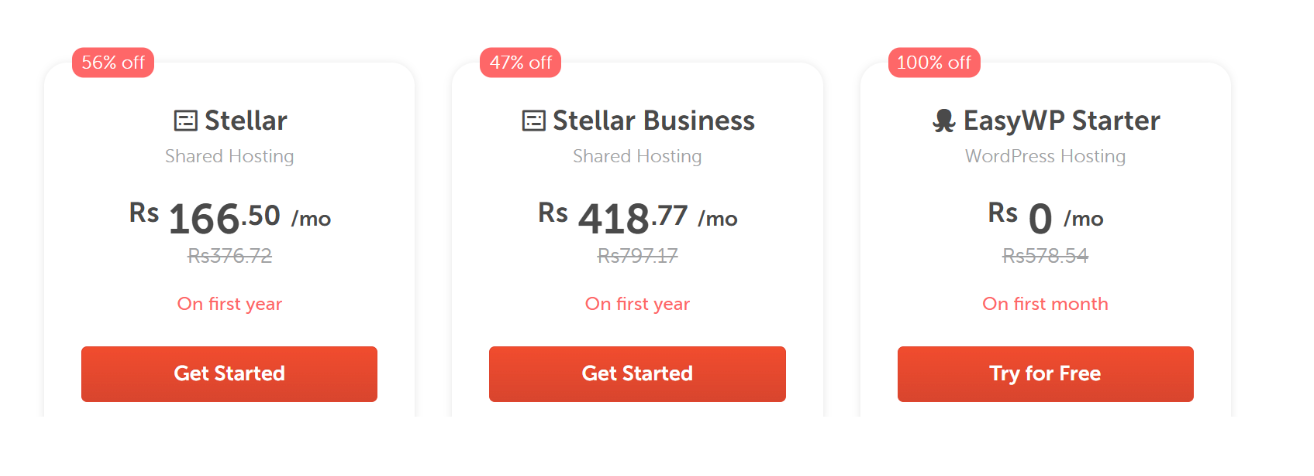
Pricing Comparison
| Hosting Plan | Bluehost Pricing | Namecheap Pricing |
|---|---|---|
| Basic Plan | $2.95/month (3-year term) ⭐⭐⭐⭐⭐⭐ | $1.58/month (shared) ⭐⭐⭐⭐⭐⭐ |
| Plus Plan | $5.45/month (3-year term) ⭐⭐⭐⭐⭐⭐ | $2.68/month (shared) ⭐⭐⭐⭐⭐⭐ |
| Choice Plus Plan | $5.45/month (3-year term) ⭐⭐⭐⭐⭐⭐ | $3.88/month (shared) ⭐⭐⭐⭐⭐⭐ |
| Pro Plan | $13.95/month (3-year term) ⭐⭐⭐⭐⭐ | $5.48/month (VPS) ⭐⭐⭐⭐ |
| VPS Hosting | Starts at $18.99/month ⭐⭐⭐⭐ | Starts at $6.00/month ⭐⭐⭐⭐⭐ |
| Dedicated Hosting | Starts at $79.99/month ⭐⭐⭐⭐ | Starts at $49.88/month ⭐⭐⭐⭐⭐ |
| Managed WordPress | Starts at $19.95/month ⭐⭐⭐⭐ | Starts at $8.88/month ⭐⭐⭐⭐ |
| Get Started | Choose Bluehost | Choose Namecheap |
Bluehost
Namecheap
Hosting Management
| Feature | Bluehost | Namecheap |
|---|---|---|
| Control Panel | cPanel | cPanel |
| One-Click Installations | Yes (WordPress, etc.) | Yes (WordPress, etc.) |
| Website Builder | Yes (WordPress integration) | Yes (Easy Website Builder) |
| Automatic Backups | Yes (with higher plans) | Yes (with higher plans) |
| Staging Environment | Yes (for WordPress) | Limited (available in certain plans) |
| Resource Management | Resource allocation varies by plan | Resource allocation varies by plan |
| Security Features | Free SSL, spam protection | Free SSL, basic security options |
| Performance Optimization | Caching and CDN options | Optional CDN |
| Support Documentation | Extensive knowledge base | Knowledge base available |
| Migration Assistance | Free site migration | Paid migration service available |
| Get Started | Choose Bluehost | Choose Namecheap |
Hosting Provided
Ease of Use:
Bluehost
- User-Friendly Interface: Bluehost offers a clean and intuitive dashboard, making it easy for beginners to navigate and manage their hosting accounts.
- One-Click Installations: The platform provides one-click installations for popular applications like WordPress, simplifying the setup process for users.
- Website Builder Integration: Users can quickly build their websites using integrated tools, enhancing the overall ease of use.
- Comprehensive Support: With round-the-clock assistance by phone, email, and live chat, users can easily get assistance whenever needed.
- Knowledge Base: An extensive library of articles and tutorials helps users find solutions to common issues without needing direct support.
Namecheap
- Simple Control Panel: Namecheap features a straightforward control panel, making it easy for users to manage domains and hosting services.
- Affordable Hosting Plans: Budget-friendly pricing makes it accessible for users looking for basic hosting without overwhelming options.
- Quick Domain Registration: The process for registering a domain is fast and user-friendly, allowing users to get started quickly.
- Live Chat Support: Namecheap provides live chat support for instant assistance, helping users resolve issues efficiently.
- Limited Advanced Features: While it offers basic features, the simplicity can be a benefit for users who prefer fewer complexities in their hosting experience.
Advantage and Disadvantage
Advantages
| Bluehost | Namecheap |
| Strong focus on WordPress hosting | Affordable pricing for domain registration |
| User-friendly interface with easy navigation | Simple and straightforward control panel |
| 24/7 customer support via multiple channels | Responsive live chat support |
| Reliable uptime and fast loading speeds | Good value for basic hosting needs |
| Comprehensive features for site management | Budget-friendly hosting plans |
| Free domain registration for the first year | Wide range of domain extensions and TLDs |
| One-click installations for popular apps | Excellent for small to medium-sized websites |
| Enhanced security features included | Additional services like SSL certificates at low cost |
Disadvantages
| Bluehost | Namecheap |
| Higher renewal rates after initial term | Limited advanced features for hosting |
| Performance may decline during peak times | Support may lack depth for complex issues |
| Upselling of additional services | Migration assistance is a paid service |
| Some users report slower response times in support | VPS performance may not match competitors |
| Limited storage on lower-tier plans | Less optimization for high-traffic sites |
What Our Customers Have To Say
Bluehost:
- Positive Feedback: Users appreciate Bluehost for its reliable uptime, ease of use, and excellent customer support, especially for WordPress hosting.
- User-Friendly Interface: Many customers highlight the intuitive dashboard and one-click installation features, making it accessible for beginners.
- Performance: Customers often note that Bluehost provides good loading speeds and overall performance for their websites.
- Support Experience: Users frequently commend the availability and helpfulness of customer service representatives.
Namecheap:
- Affordability: Customers value Namecheap for its budget-friendly hosting plans and competitive pricing on domain registrations.
- Simple Management: Users find the control panel straightforward and easy to navigate, which simplifies domain and hosting management.
- Good Support: Many customers appreciate the responsive live chat support, though some note that in-depth technical support may be less comprehensive than competitors.
- Basic Hosting Needs: Users often mention that Namecheap is suitable for small websites or those with straightforward hosting requirements.
Security
| Security Feature | Bluehost | Namecheap |
|---|---|---|
| SSL Certificates | Free SSL certificate included | Free SSL certificate included |
| Malware Protection | Basic malware detection and removal | Malware removal available in higher plans |
| Backup Solutions | Automatic backups with higher plans | Backups available but not automatic |
| DDoS Protection | Included with all hosting plans | Basic DDoS protection |
| Firewalls | Advanced firewall protection | Standard firewall protection |
| Two-Factor Authentication | Yes, available for account security | Yes, available for account security |
| Account Isolation | Yes, isolates user accounts | Yes, isolates user accounts |
| Security Monitoring | Regular monitoring and alerts | Basic monitoring |
| Get Started | Choose Bluehost | Choose Namecheap |
Customer Support
Bluehost
- 24/7 Availability: Offers round-the-clock support via live chat, phone, and email, ensuring assistance whenever needed.
- WordPress Expertise: Staff is particularly knowledgeable about WordPress-related issues, providing specialized support for WordPress users.
- Comprehensive Resources: Includes an extensive knowledge base with articles, tutorials, and FAQs to help users find solutions independently.
- Responsive Support: Generally praised for quick response times and helpfulness in resolving issues.
Namecheap
- 24/7 Live Chat: Provides 24/7 live chat support for immediate assistance, making it easy to get help at any time.
- Ticket-Based Support: Offers a ticket system for more complex issues, allowing for detailed inquiries and follow-ups.
- Knowledge Base: Features a comprehensive knowledge base with articles and guides for self-help.
- Response Times: While generally responsive, some users report that deeper technical inquiries may take longer to resolve.
Final Recommendations
| Recommendation Criteria | Bluehost | Namecheap |
|---|---|---|
| Best for Beginners | Yes, due to user-friendly interface and support | Yes, for budget-conscious beginners |
| Ideal for WordPress Hosting | Excellent choice with optimized features | Good choice but less specialized |
| Budget-Friendliness | Moderate pricing; higher renewal rates | Highly affordable, especially for domains |
| Customer Support | 24/7 support with extensive resources | 24/7 live chat; fast responses |
| Performance Needs | Great for small to medium websites | Suitable for basic websites; may lag for larger sites |
| Advanced Features | More advanced features available | Limited advanced options |
| Security | Strong security measures | Good basic security; higher plans offer more |
| Overall Recommendation | Best for users needing robust hosting support | Best for users prioritizing cost and simplicity |
| Get Started | Choose Bluehost | Choose Namecheap |
Frequently Asked Questions
Bluehost offers shared hosting, VPS hosting, dedicated hosting, and managed WordPress hosting.
Namecheap provides shared hosting, VPS hosting, dedicated hosting, cloud hosting, and managed WordPress hosting.
Yes, Bluehost is user-friendly and offers extensive support, making it ideal for beginners.
Yes, Namecheap is known for its affordable pricing on hosting and domain registration, making it a great choice for budget-conscious users.
In addition to a thorough knowledge base, Bluehost provides live chat, phone, and email customer service around-the-clock.
Namecheap also provides 24/7 live chat support and a ticket-based system, but some users find its technical support less comprehensive than Bluehost’s.
Yes, Bluehost includes a free SSL certificate with all hosting plans.
Table of Contents
Explore More




