

Comparexpert
Comparison Between Company


Cloudways vs WP Engine (2026): Which Managed WordPress Hosting is Better?
Choosing the right managed WordPress hosting can make or break your website’s performance. In this detailed comparison, we’ll break down Cloudways vs WP Engine in terms of performance, pricing, features, ease of use, and more—so you can decide which one fits your needs best.
Table of Contents
General Info of Cloudways vs WP Engine
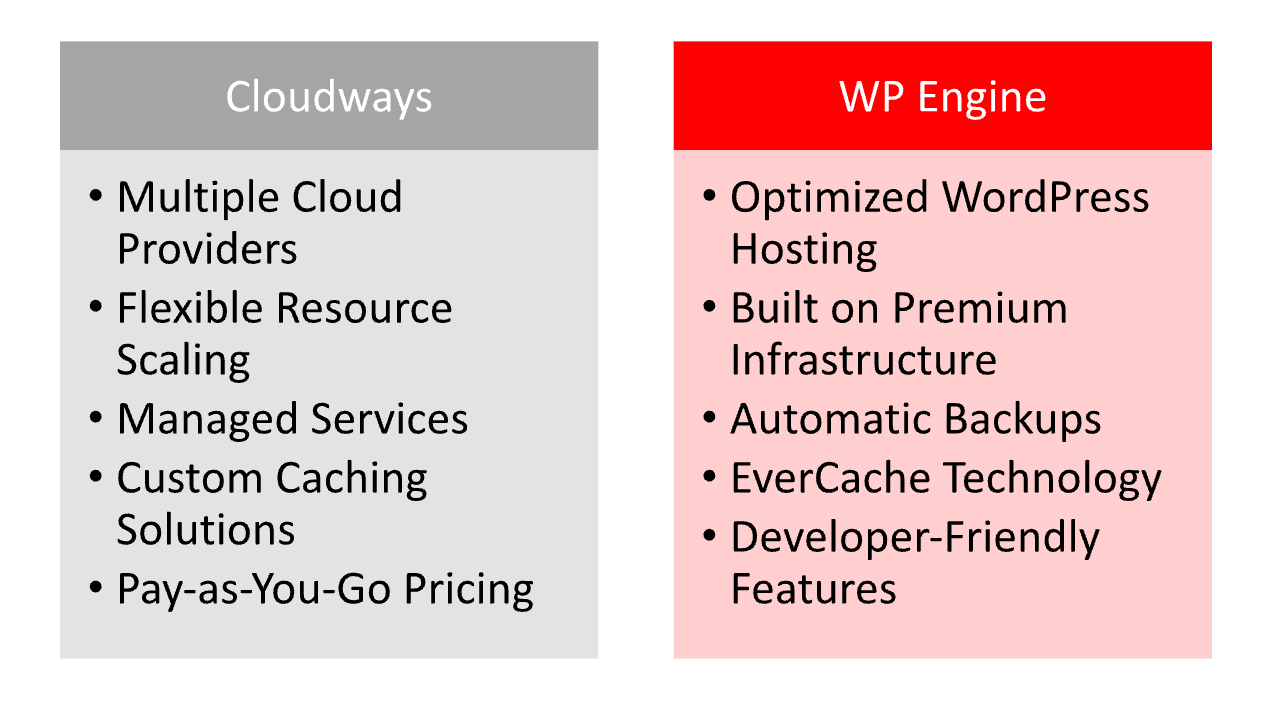
Cloudways and WP Engine are leading managed WordPress hosting providers with distinct features. Cloudways offers flexibility by allowing users to choose from top cloud providers like AWS and Google Cloud, making it ideal for developers and agencies needing customization. It provides managed services such as automated backups and security while retaining hands-on control.
WP Engine, however, is dedicated to managed WordPress hosting, focusing on simplicity, speed, and a streamlined experience. Built on Google Cloud and AWS, it handles the infrastructure entirely, providing premium WordPress features like custom caching and staging for an easy, out-of-the-box setup.
For pricing, Cloudways is more flexible with a “pay-as-you-go” model, while WP Engine’s higher price includes WordPress-focused tools and support, appealing to businesses needing simplicity and reliability. Cloudways suits developers, while WP Engine is ideal for those wanting a simplified WordPress-specific solution.
Overview
| Aspect | Cloudways | WP Engine |
|---|---|---|
| Target Audience | Developers needing flexibility and customization | Businesses wanting an easy, WordPress-specific solution |
| Hosting Providers | Multiple choices (AWS, Google Cloud, DigitalOcean, etc.) | Fixed on Google Cloud and AWS |
| Performance | Customizable caching and scalability options | Optimized with built-in CDN and performance monitoring |
| Uptime | High uptime with automated monitoring | Reliable uptime with proactive monitoring |
| Security | Firewalls, 2FA, bot protection | Malware scans and automatic updates |
| Customer Support | 24/7 support via chat and tickets | 24/7 WordPress-focused support via chat and phone |
| Get Started | Choose Cloudways | Choose WP Engine |
Performance
Cloudways offers performance flexibility by letting users choose from cloud providers like AWS and Google Cloud, optimizing for speed with SSD storage, caching through its Breeze plugin, and Cloudflare integration. Users can scale resources as needed, making it ideal for sites with varying traffic.
WP Engine provides optimized performance for WordPress, using Google Cloud and AWS infrastructure with EverCache and a built-in CDN for fast loading. It includes real-time monitoring and automatic updates, ensuring reliable speed and security, ideal for businesses seeking a streamlined, WordPress-specific platform.
Features
| Feature | Cloudways | WP Engine |
|---|---|---|
| Hosting Providers | Choice of AWS, Google Cloud, DigitalOcean, Vultr, Linode | Built on Google Cloud and AWS infrastructure; no direct provider selection |
| Performance | Custom caching with Breeze, Cloudflare integration, scalable resources | EverCache system, built-in CDN, real-time performance monitoring |
| Uptime | High uptime via chosen cloud provider, automated server monitoring and self-healing | Proactive uptime monitoring with SLA on premium plans |
| Security | Dedicated firewalls, bot protection, two-factor authentication | Daily malware scans, automatic WordPress updates, threat detection, DDoS protection |
| Backups | Automated backups with on-demand options | Daily automated backups with 1-click restore |
| Customer Support | 24/7 support via live chat and tickets; priority support on higher plans | 24/7 WordPress-focused support via chat and phone; premium support on higher plans |
| Get Started | Choose Cloudways | Choose WP Engine |
Uptime
Cloudways delivers strong uptime by partnering with major cloud providers like AWS, Google Cloud, and DigitalOcean, which ensures high reliability and server redundancy. Uptime largely depends on the chosen provider, but Cloudways supports automated server monitoring and self-healing to quickly resolve potential issues, contributing to consistent performance.
WP Engine is known for its reliable uptime, optimized specifically for WordPress on premium infrastructure through Google Cloud and AWS. Its EverCache system and proactive monitoring help prevent downtime, and WP Engine also offers a Service Level Agreement (SLA) on higher-tier plans, ensuring uptime reliability for business-critical websites.
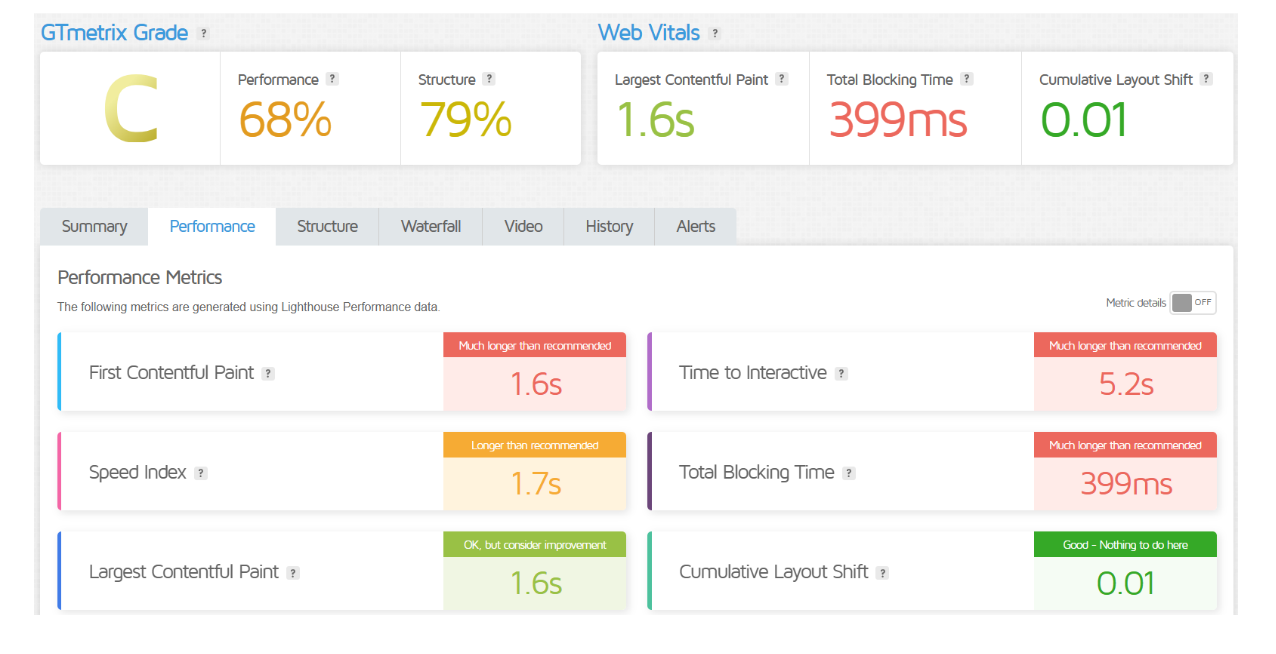
Performance of WP Engine
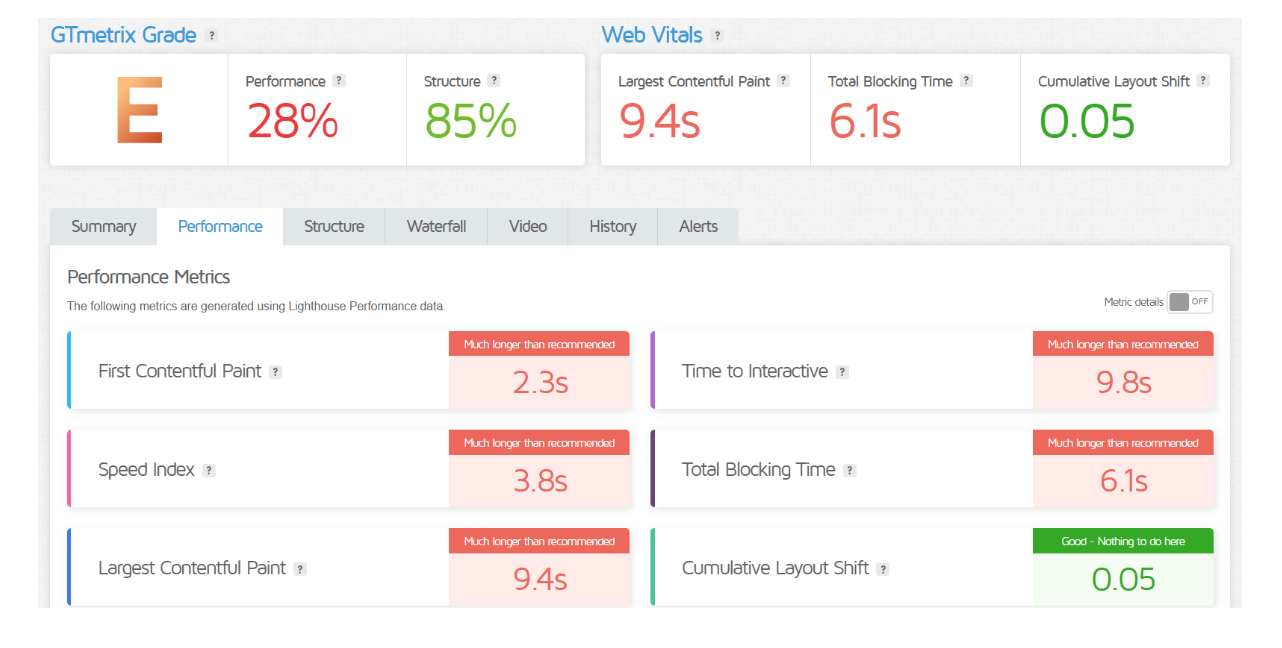
Performance of Cloudways
Customer Service
Cloudways provides 24/7 customer support via live chat and a ticketing system, with priority support available on higher-tier plans. While it offers solid assistance, the support focuses on managing cloud infrastructure rather than WordPress-specific help. Cloudways also has an active knowledge base and community to help users troubleshoot common issues.
WP Engine offers specialized, WordPress-focused 24/7 customer support through live chat and phone on most plans. Its support team is highly trained in WordPress, helping users with both technical and platform-specific issues. WP Engine also provides a robust knowledge base, developer resources, and dedicated support options for premium plans, making it a strong choice for WordPress-specific assistance.
Pricing Comparison
| Pricing Plan | Cloudways | WP Engine |
|---|---|---|
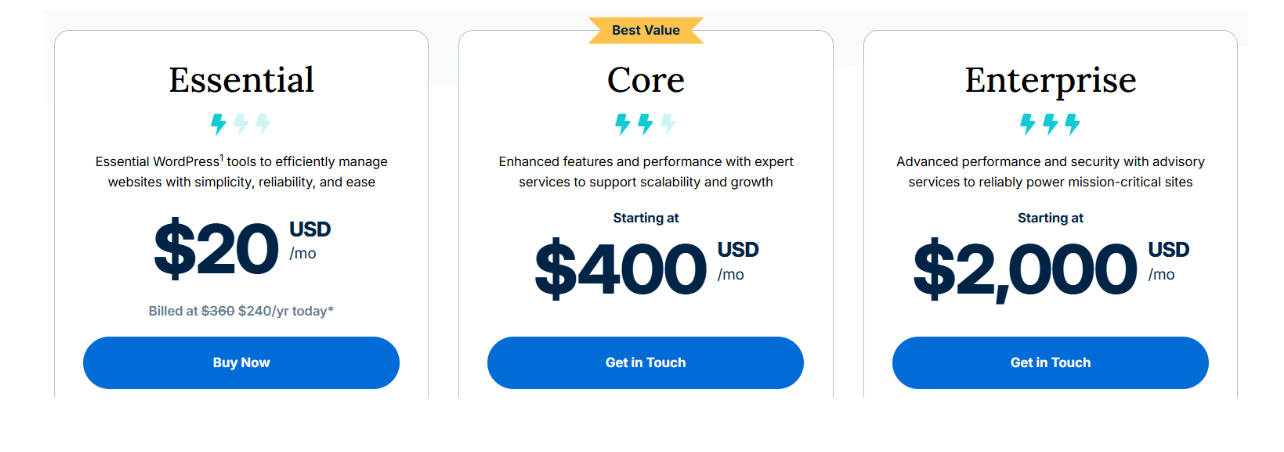
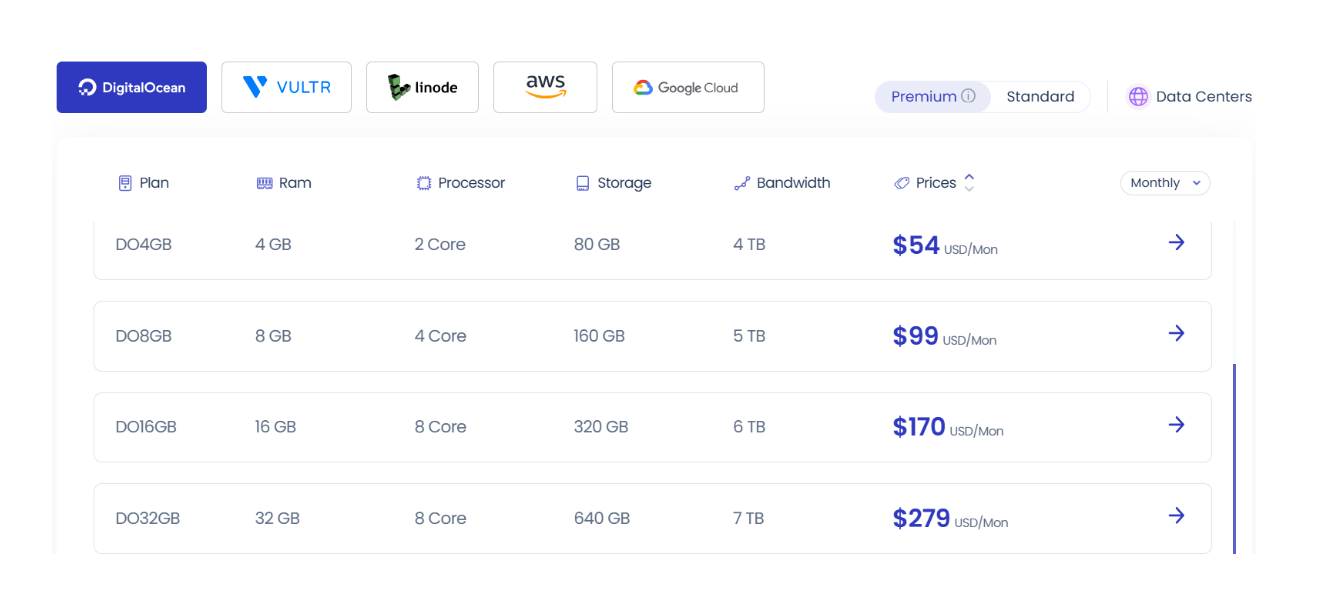
| Starting Price | From $12/month (for DigitalOcean) | From $20/month (for Startup plan) |
| Billing Options | Pay-as-you-go, monthly billing available | Monthly or annual billing options |
| Free Trial | 3-day free trial available | No free trial, but 60-day money-back guarantee |
| Additional Costs | Charges for bandwidth overages and add-ons | No hidden fees, but additional costs for advanced plans |
| Features Included | Managed hosting, automated backups, and security | Managed hosting, daily backups, and support |
| Higher Tier Pricing | Starts around $42/month (for more resources) | Plans range up to $241/month or more for advanced features |
| Get Started | Choose Cloudways | Choose WP Engine |
WP Engine
Cloudways
Hosting management
| Aspect | Cloudways | WP Engine |
|---|---|---|
| Management Interface | Custom dashboard for multiple cloud servers | WordPress-specific dashboard |
| Server Control | Users control server settings and PHP versions | Limited server control; focuses on WordPress |
| Scalability | Easily scalable resources | Fixed plans with upgrade options |
| Staging Environments | Provides staging for testing | Offers staging for testing and deployment |
| Backup Management | Automated backups with manual restore | Daily backups with one-click restore |
| Performance Optimization | Caching and Cloudflare for performance | Proprietary caching and CDN |
| Get Started | Choose Cloudways | Choose WP Engine |
Hosting Provided by Cloudways vs WP Engine
Which Platform Is Easier to Use? Cloudways vs WP Engine
Cloudways:
- Custom Dashboard: Offers a unique dashboard that provides access to various cloud server settings, which may require some technical knowledge.
- Hands-On Management: Users have to manage server resources, scaling, and configurations, which can be complex for beginners.
- Flexible Setup: The ability to choose from multiple cloud providers allows customization but adds a layer of complexity in setup.
- Limited WordPress Tools: While it offers caching and optimization tools, it lacks some WordPress-specific features that simplify management.
- Learning Curve: New users may face a steeper learning curve due to its flexibility and server management options.
WP Engine:
- WordPress-Focused Interface: Provides a user-friendly interface specifically designed for WordPress management, making it intuitive for users.
- Simplified Management: Offers streamlined tools for site management, including one-click staging and backups, which are easy to navigate.
- Less Technical Knowledge Required: Most server-related tasks are handled automatically, reducing the need for technical expertise.
- Proprietary Tools: Includes built-in performance and security features tailored for WordPress, enhancing usability.
- Comprehensive Support: Provides dedicated support for WordPress, making it easier for users to resolve issues quickly.
Advantage and Disadvantage: Cloudways vs WP Engine
Advantage
| Advantage | Cloudways | WP Engine |
|---|---|---|
| Flexibility | Choose from multiple cloud providers | Fixed infrastructure optimized for WordPress |
| Cost-Effective | Pay-as-you-go pricing for budget control | Comprehensive features included in fixed pricing |
| Customization | Extensive server control and options | User-friendly tools and built-in optimizations |
| Scalability | Easily scale resources as needed | Reliable performance with straightforward upgrades |
| Get Started | Choose Cloudways | Choose WP Engine |
Disadvantage
| Disadvantage | Cloudways | WP Engine |
|---|---|---|
| Complexity | Requires technical knowledge for server management | Limited control over server settings |
| Learning Curve | Steeper learning curve for new users | Not as flexible for advanced customization |
| Support Limitations | Support may lack WordPress-specific expertise | Higher pricing may not suit all budgets |
| Pricing Variability | Costs can fluctuate based on resource usage | Fixed pricing can be more expensive overall |
| Get Started | Choose Cloudways | Choose WP Engine |
What Our Customers Have To Say
Cloudways:
- Flexibility and Customization: Customers appreciate the ability to choose from multiple cloud providers and customize server settings to meet specific needs.
- Performance: Users often report high performance and speed, especially with the integration of Cloudflare and effective caching solutions.
- Support Experience: While many users find support responsive, some note that the technical nature of the platform can lead to longer resolution times for complex issues.
WP Engine:
- User-Friendly Experience: Customers frequently highlight the intuitive interface and ease of use, especially for WordPress management.
- Reliability and Uptime: Many users commend WP Engine for its reliable uptime and consistent performance, making it suitable for business-critical websites.
- Exceptional Customer Support: Users rave about the knowledgeable and prompt support team, specifically trained to handle WordPress-related queries and issues effectively.
Security:
| Security Feature | Cloudways | WP Engine |
|---|---|---|
| Firewall Protection | Dedicated firewalls to protect server instances | Built-in Web Application Firewall (WAF) |
| Two-Factor Authentication | Offers 2FA for added account security | 2FA available for user accounts |
| Regular Security Patching | Regular updates and security patches for the platform | Automatic WordPress core and plugin updates |
| Malware Scanning | Basic malware protection and monitoring | Daily malware scans and automated cleanup |
| DDoS Protection | Basic DDoS protection through cloud provider | Advanced DDoS protection included |
| Get Started | Choose Cloudways | Choose WP Engine |
Customer Support:
Cloudways:
- 24/7 Support: Provides around-the-clock support through live chat and a ticketing system.
- Priority Support: Offers priority support options for higher-tier plans to ensure faster response times.
- Knowledge Base: Features a comprehensive knowledge base and community forum for self-help resources.
- Technical Focus: Support is more focused on infrastructure and server management rather than WordPress-specific issues.
WP Engine:
- 24/7 WordPress-Focused Support: Offers 24/7 support via live chat and phone, specifically trained in WordPress management.
- Quick Response Times: Known for fast response times and efficient problem resolution, particularly for WordPress-related queries.
- Extensive Documentation: Provides detailed documentation and resources tailored to WordPress, enhancing user understanding.
- Onboarding Assistance: Offers onboarding support for new customers to help them get started smoothly with their WordPress sites.
Final Recommendations
| Recommendation | Cloudways | WP Engine |
|---|---|---|
| Best For Developers | Great for developers needing flexibility and control. | Less suitable for extensive customization. |
| Best For WordPress Users | Good for users comfortable with technical management. | Ideal for a streamlined WordPress experience. |
| Cost-Effective Options | Pay-as-you-go model for varying traffic needs. | More expensive, includes premium features. |
| Performance Optimization | Configurable performance settings and optimizations. | Built-in performance enhancements without setup. |
| Customer Support Focus | Good support, less WordPress specialization. | Strong WordPress-specific support available. |
| Get Started | Choose Cloudways | Choose WP Engine |
Frequently Asked Questions
Cloudways is a managed cloud hosting platform that allows users to host websites on multiple cloud providers like AWS, Google Cloud, and DigitalOcean.
WP Engine is a managed WordPress hosting provider optimized specifically for WordPress websites, offering high performance and specialized support.
WP Engine is generally easier to use for WordPress users due to its streamlined interface and WordPress-specific features, while Cloudways offers more flexibility but may require more technical knowledge.
Cloudways uses a pay-as-you-go pricing model based on resource usage, allowing users to scale resources as needed.
WP Engine has fixed pricing plans that include various features tailored for WordPress, typically at a higher cost compared to Cloudways.
Cloudways provides 24/7 support via live chat and a ticketing system, but support is more focused on server management than WordPress specifics.
WP Engine offers 24/7 WordPress-focused support via chat and phone, with quick response times for WordPress-related issues.
Table of Contents
Explore More




