

Comparexpert
Comparison Between Company


Cloudways vs WPX Hosting (2026): Which One Should You Choose?
When it comes to managed WordPress hosting, two popular names often come up — Cloudways and WPX Hosting.
Both offer high performance, strong security, and user-friendly features — but they are built for very different types of users.
In this detailed comparison, we’ll break down everything you need to know to choose the right hosting for your website.
Table of Contents
General Info of Cloudways vs WPX Hosting
Cloudways is a managed cloud hosting platform that offers flexibility by allowing users to choose from various cloud providers like AWS, Google Cloud, DigitalOcean, Vultr, and Linode. It provides features such as one-click installations, automatic backups, and easy scalability, making it suitable for developers and agencies looking for customizable hosting solutions. The pay-as-you-go pricing model allows for cost control, appealing to those with varying resource needs.
WPX Hosting is tailored for WordPress users, offering managed hosting services that emphasize speed and performance. It includes built-in caching and a CDN to boost site loading times. With 24/7 live chat and ticket support, WPX ensures quick assistance. Its plans come with a fixed number of websites and resources, simplifying the choice for WordPress site owners.
In summary, the choice between Cloudways and WPX Hosting depends on user needs: Cloudways is ideal for those seeking a customizable cloud hosting experience with multiple provider options, while WPX Hosting is perfect for WordPress users who prioritize speed, performance, and dedicated support.
Overview
| Feature | Cloudways | WPX Hosting |
|---|---|---|
| Target Audience | Developers, agencies, and businesses | WordPress site owners |
| Hosting Type | Managed cloud hosting | Managed WordPress hosting |
| Pricing Model | Pay-as-you-go | Fixed pricing based on the number of websites |
| Uptime Guarantee | 99.99% | 99.95% |
| Performance Optimization | Built-in caching, optimized stacks | Custom caching and global CDN |
| Support Channels | 24/7 live chat and ticketing | 24/7 live chat and ticket support |
| Knowledge Base | Comprehensive resources and community forums | Detailed knowledge base |
| Scalability | Flexible resource scaling based on demand | Fixed resources per plan |
| Backup and Security | Automatic backups and security features | Regular server maintenance and proactive monitoring |
| Additional Features | Supports multiple frameworks and applications | Focused on WordPress-specific features |
| Get Started | Choose Cloudways | Choose WPX Hosting |
Performance
Cloudways delivers impressive performance through its cloud infrastructure, allowing users to select high-performance providers like AWS, Google Cloud, and DigitalOcean. It features built-in caching, optimized stacks, and the ability to scale resources on demand, which contributes to fast loading times and improved website performance. Additionally, Cloudways offers automatic backups and security measures to ensure website reliability.
WPX Hosting prioritizes speed and performance for WordPress sites with features like custom-built caching and a global content delivery network (CDN). These optimizations help reduce loading times significantly, enhancing user experience. WPX also boasts a focus on server speed, with high-performance SSD storage and optimized server configurations, ensuring that WordPress sites run smoothly even during high traffic periods.
Features
| Cloudways | WPX Hosting |
| Managed cloud hosting with multiple provider options | Managed WordPress hosting tailored for WP users |
| Pay-as-you-go pricing model | Fixed pricing plans based on the number of sites |
| One-click application installations | Easy WordPress setup with one-click installations |
| Built-in caching and optimized stacks | Custom caching and a global CDN for enhanced speed |
| Automatic backups and server monitoring | Proactive server management and monitoring |
| Flexible scalability based on resource needs | High-performance SSD storage and optimized servers |
| Comprehensive knowledge base and community forums | Detailed knowledge base and 24/7 support |
| Supports multiple frameworks and applications | Focused support for WordPress-specific issues |
Uptime
Cloudways offers a strong uptime guarantee of 99.99%, which is backed by its use of reputable cloud providers known for their reliability. The platform utilizes server monitoring and automated backups to help ensure that websites remain online and accessible. Users can also implement additional features such as application-level monitoring for enhanced uptime management.
WPX Hosting guarantees an impressive 99.95% uptime, which is reinforced by its high-performance infrastructure and proactive server management. The service includes regular server monitoring and maintenance to detect and address potential issues quickly. WPX’s focus on optimized server configurations further supports consistent uptime, making it a reliable choice for WordPress site owners.
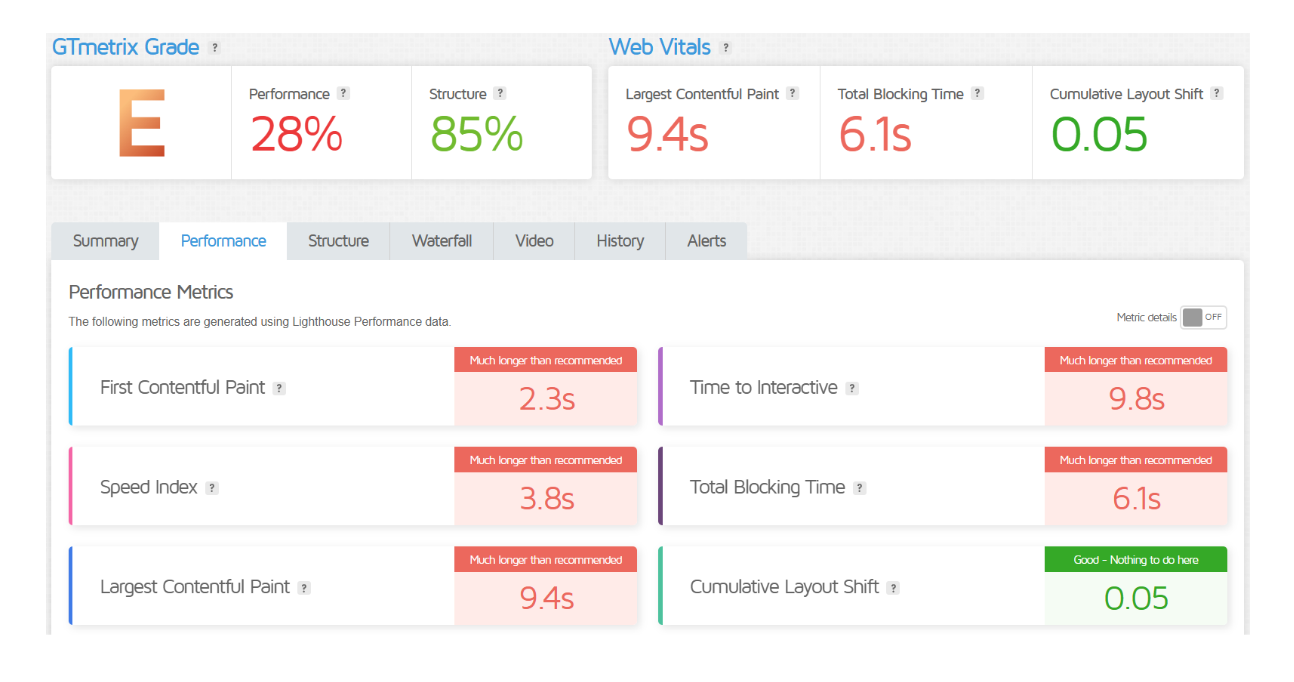
Performance of Cloudways
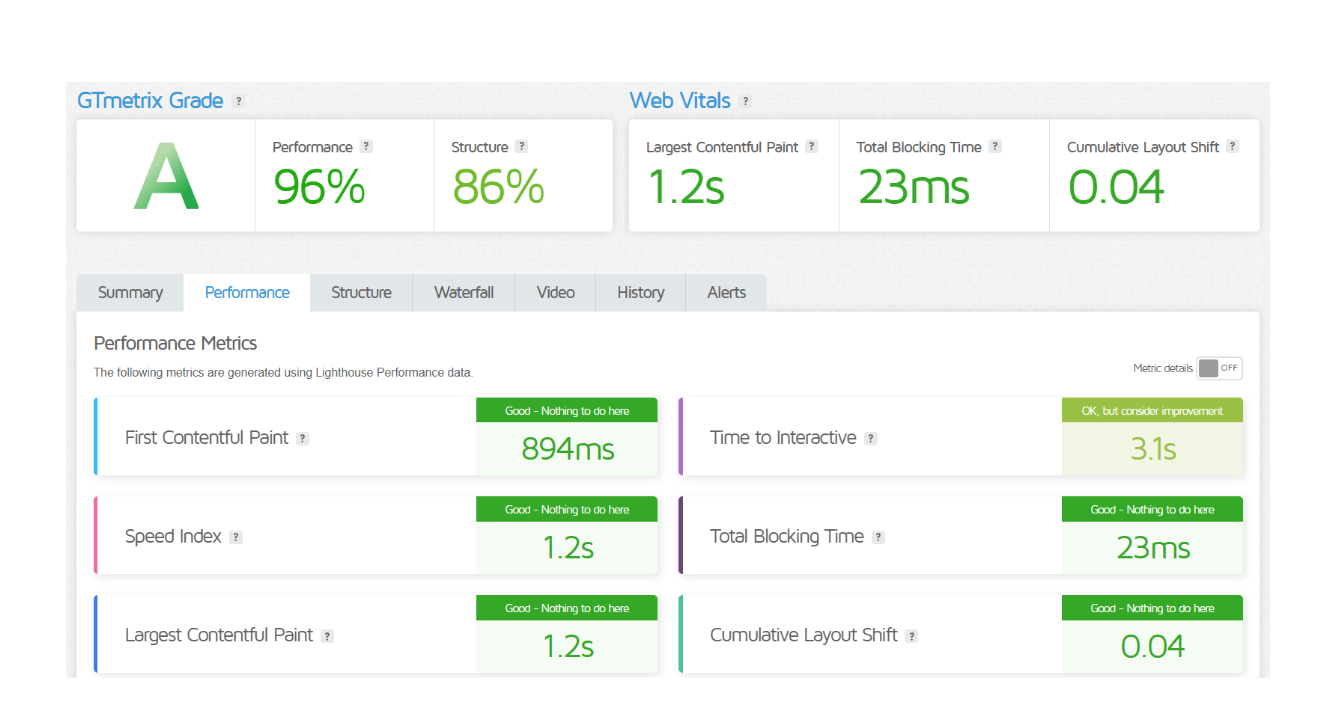
Performance of WPX Hosting
Customer Service
Cloudways provides customer support through multiple channels, including 24/7 live chat and a ticketing system. Their support team is composed of cloud hosting experts who can assist with technical issues and account management. The platform also offers a comprehensive knowledge base and community forums, allowing users to find solutions to common questions independently.
WPX Hosting is known for its exceptional customer service, offering 24/7 live chat support that connects users with knowledgeable representatives. They prioritize fast response times, often resolving queries within minutes. In addition to live chat, WPX provides a ticketing system and a detailed knowledge base for self-help, ensuring that users have access to resources and assistance whenever needed.
Overall, both Cloudways and WPX Hosting emphasize customer support, but WPX’s rapid response times and dedicated focus on WordPress users set it apart. Cloudways, while also providing solid support, is geared towards a broader audience, including developers and agencies looking for more technical assistance.
Pricing Comparison
| Aspect | Cloudways | WPX |
|---|---|---|
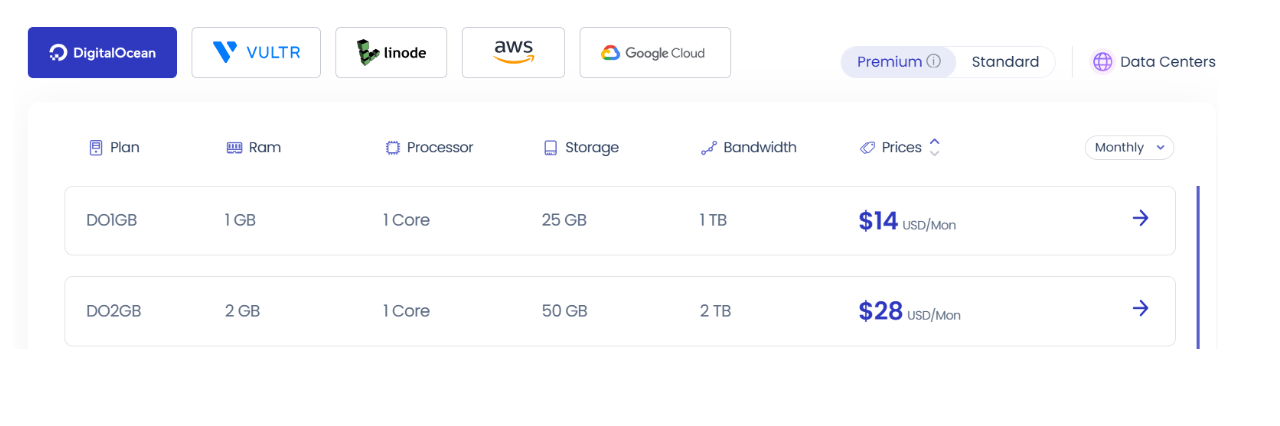
| Starting Price | ⭐ $12/month (DigitalOcean) | ⭐ $24.99/month (1 site) |
| Pricing Model | ⭐ Pay-as-you-go | ⭐ Fixed monthly pricing |
| Plan Inclusions | ⭐ 1 GB RAM, 1 CPU, 25 GB storage | ⭐ 10 GB storage, 100 GB bandwidth |
| Free Trial | ⭐ 3-day free trial | ⭐ 30-day money-back guarantee |
| Additional Costs | ⭐ Cost varies with resource scaling | ⭐ No hidden fees, all-inclusive pricing |
| Best For | ⭐ Flexibility and scalability | ⭐ Simplicity and managed hosting for WordPress |
| Get Started | Choose Cloudways | Choose WPX |
WPX Hosting

Cloudways
Hosting Management
| Feature | Cloudways | WPX Hosting |
|---|---|---|
| Control Panel | Custom Dashboard | Custom Dashboard |
| Managed Hosting | Yes | Yes |
| Automated Backups | Daily backups (on-demand) | Daily backups |
| Scaling Options | Easy scaling via resource allocation | Limited scaling options |
| Performance Optimization | Built-in caching and CDN options | Custom optimization, fast servers |
| Free Migration | Yes (via support) | Yes |
| Support Channels | 24/7 live chat, ticketing | 24/7 live chat |
| Security Features | Free SSL, application-level firewalls | Free SSL, DDoS protection |
| Email Hosting | Not included (add-on) | Yes (included) |
| Staging Environment | Yes | Yes |
| User-Friendly Interface | Moderate | High |
| Get Started | Choose Cloudways | Choose WPX Hosting |
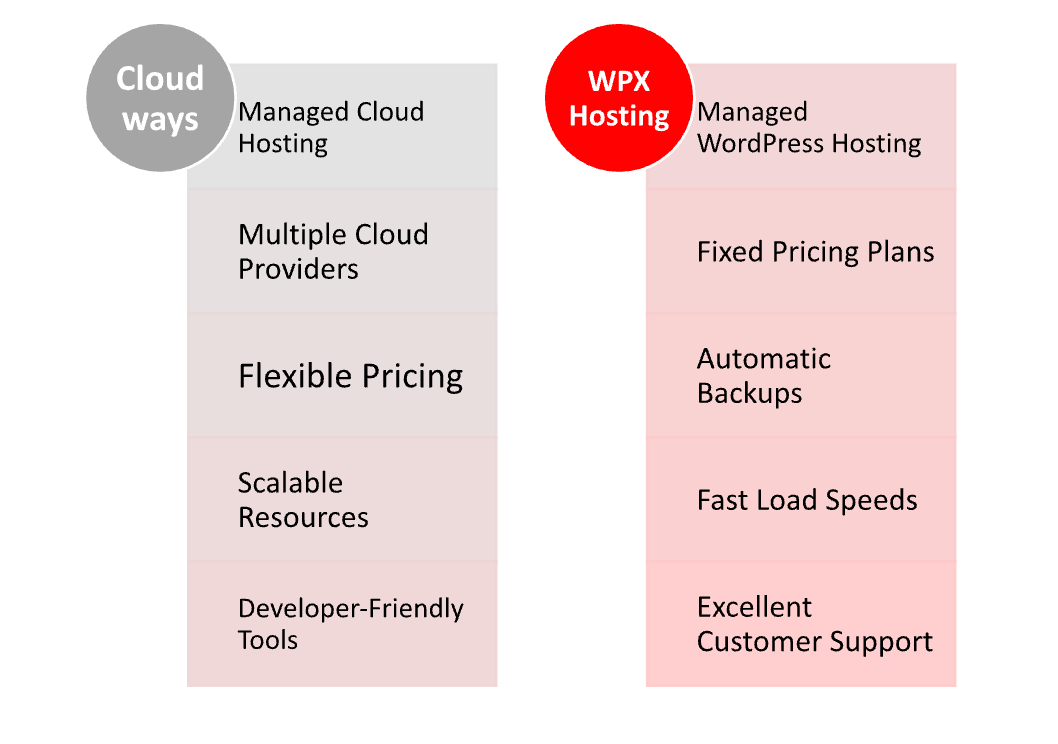
Hosting Provided
Ease of Use
Cloudways
- Custom Dashboard: Cloudways features a user-friendly, intuitive dashboard that provides easy access to all hosting management functions, though it may require some initial learning for complete newcomers.
- One-Click Installations: Users can easily deploy applications and services with one-click installations for popular platforms like WordPress, but setting up specific configurations can be slightly more complex.
- Flexible Scaling: Cloudways allows users to easily scale resources up or down based on traffic needs, which can be a bit complex for those unfamiliar with cloud hosting but offers great flexibility.
- On-Demand Backups: The ability to create backups on demand is user-friendly but may require a little guidance for those new to hosting.
- Support Resources: Cloudways offers extensive documentation and tutorials, which are helpful for users needing assistance, but the complexity of some features may still pose challenges for beginners.
- Managed Services: Although it is a managed hosting service, users still need to understand some technical aspects, making it less straightforward for complete novices.
WPX Hosting
- User-Friendly Dashboard: WPX Hosting provides a clean, straightforward dashboard designed for ease of use, making it simple for beginners to navigate and manage their websites.
- Simple Setup Process: The onboarding process is streamlined, allowing users to get their sites up and running quickly without a steep learning curve.
- Automatic Backups: WPX handles backups automatically, so users don’t need to manage this aspect, simplifying the overall experience.
- Fast Customer Support: With 24/7 live chat support, users can quickly get help for any issues they encounter, making it easier for less experienced users to resolve problems.
- No Technical Knowledge Required: WPX Hosting is designed to be user-friendly, so even those with minimal technical knowledge can manage their hosting without difficulty.
- Email Hosting Included: WPX includes email hosting as part of its service, allowing users to manage everything in one place without needing additional setups.
Advantage and Disadvantage
Advantage
| Cloudways | WPX Hosting |
| Flexible cloud hosting with multiple providers | Managed WordPress hosting for simplicity |
| Pay-as-you-go pricing model | Fixed pricing plans for predictable costs |
| Easy scaling of resources | Fast loading speeds and performance |
| Advanced developer features (SSH, staging) | Excellent customer support with fast response |
| Built-in caching and CDN options | Automatic backups included |
| Customizable environment for specific needs | User-friendly dashboard for easy management |
| Global data centers for better performance | Free site migration service |
Disadvantage
| Cloudways | WPX Hosting |
| Steeper learning curve for beginners | Limited scaling options at lower plans |
| Support response times can vary | Higher starting price compared to some hosts |
| Requires more technical knowledge for setup | Fewer cloud hosting options |
| No built-in email hosting | Some features may be limited for advanced users |
| Pay-as-you-go model can be confusing | Less control over server configurations |
What Our Customers Have To Say?
Cloudways
- Flexibility and Control: Customers appreciate the ability to choose from multiple cloud providers and easily scale resources based on their needs.
- Performance: Users often report positive experiences regarding site speed and uptime, particularly when using Cloudways’ built-in caching and CDN options.
- Technical Features: Many developers value the advanced features available, such as staging environments and SSH access, which cater to more technical users.
- Learning Curve: Some customers note a steeper learning curve due to the platform’s complexity, particularly for those new to cloud hosting.
- Support: Customer service feedback is mixed; while many appreciate the 24/7 support, some have experienced slower response times during peak hours.
WPX Hosting
- User-Friendly Experience: Customers frequently highlight the simplicity of the setup process and the ease of managing their hosting through the intuitive dashboard.
- Excellent Customer Support: WPX is often praised for its responsive and knowledgeable support team, providing quick assistance via live chat.
- Performance and Reliability: Users commonly report fast load times and high uptime, making WPX a popular choice for WordPress hosting.
- Automatic Backups: Customers appreciate the automatic backup feature, which offers peace of mind and simplifies site management.
- Value for Money: Many users feel that WPX provides good value for its pricing, particularly with the features included in its plans.
Security:
| Security Feature | Cloudways | WPX Hosting |
|---|---|---|
| Free SSL Certificate | Yes | Yes |
| DDoS Protection | Yes (via third-party integration) | Yes |
| Web Application Firewall (WAF) | Yes | Yes |
| Automatic Security Patching | Yes | Yes |
| Two-Factor Authentication (2FA) | Yes | Yes |
| Regular Malware Scans | Yes (manual setup required) | Daily malware scans |
| Backups and Restore Options | Daily backups (on-demand) | Automatic daily backups |
| User Access Control | Yes (role-based access) | Yes (with user permissions) |
| Application Isolation | Yes | Yes |
| Get Started | Choose Cloudways | Choose WPX Hosting |
Customer Support:
Cloudways
- 24/7 Support: Offers round-the-clock customer support through live chat and a ticketing system, ensuring help is available at any time.
- Knowledge Base: Provides a comprehensive knowledge base with tutorials and articles, which helps users find solutions independently.
- Support Response Times: Response times can vary; some users report delays during peak hours, which can be frustrating for urgent issues.
- Technical Support: Support is geared toward technical issues, making it suitable for developers, but may not always be as beginner-friendly.
- Community Forum: Users have access to a community forum where they can share experiences and solutions, adding an additional layer of support.
WPX Hosting
- 24/7 Live Chat Support: WPX is known for its responsive live chat support, which many users find quick and efficient for resolving issues.
- Phone Support: In addition to live chat, WPX offers phone support, providing an alternative for users who prefer direct communication.
- Fast Response Times: Customers frequently praise WPX for its fast response times, often receiving help within minutes.
- User-Friendly Assistance: Support representatives are noted for being friendly and helpful, making it easier for less experienced users to navigate issues.
- Comprehensive Documentation: WPX provides a good range of documentation and FAQs, allowing users to troubleshoot common problems on their own.
Final Recommendations
| Criteria | Cloudways | WPX Hosting |
|---|---|---|
| Best For | Developers and agencies needing flexibility | Beginners and users seeking simplicity |
| Ease of Use | Moderate learning curve | User-friendly interface |
| Support | 24/7 chat and ticketing, variable response times | 24/7 live chat and phone support, fast response |
| Performance | Excellent speed with caching options | High uptime and fast load times |
| Scalability | Highly scalable with pay-as-you-go model | Limited scaling options at lower plans |
| Security | Strong security features, requires manual setup for some | Automatic daily backups and malware scans |
| Pricing | Flexible pricing with multiple cloud options | Fixed pricing with good value for features |
| Ideal Use Cases | E-commerce, SaaS applications, custom projects | Blogs, small to medium-sized businesses |
| Get Started | Choose Cloudways | Choose WPX Hosting |
Frequently Asked Questions
Cloudways is a managed cloud hosting platform that allows users to deploy applications on multiple cloud providers, such as DigitalOcean, AWS, Google Cloud, and more, with a focus on flexibility and scalability.
WPX Hosting is a managed WordPress hosting provider known for its fast performance, user-friendly interface, and excellent customer support, specifically optimized for WordPress sites.
WPX Hosting is generally considered easier for beginners due to its user-friendly interface and responsive customer support, while Cloudways may have a steeper learning curve.
Yes, both Cloudways and WPX Hosting offer 24/7 customer support, but WPX is known for its faster response times and user-friendly assistance.
Cloudways offers a 3-day free trial, allowing users to test their services, while WPX Hosting does not provide a free trial.
Both Cloudways and WPX Hosting offer free SSL certificates, DDoS protection, web application firewalls, and automatic security patching. However, WPX includes daily malware scans as part of its service.
Yes, Cloudways allows users to host various applications, including WordPress, Magento, Laravel, and more, making it suitable for different types of websites.
Table of Contents
Explore More




