

Comparexpert
Comparison Between Company


Hostinger vs GoDaddy (2026): Which Hosting Provider Is Better?
Hostinger vs GoDaddy in 2026 comes down to value, speed, and usability. Hostinger is the better choice for most users thanks to its lower starting price, faster performance, modern hPanel dashboard, and stronger built-in features like free SSL, backups, and WordPress optimization. GoDaddy remains a solid option for users who prefer phone support and a more traditional hosting experience with cPanel. While both offer reliable uptime and beginner-friendly tools, Hostinger delivers better overall value for bloggers, small businesses, and WordPress users. If affordability and performance matter most, Hostinger wins. If phone-based support is your priority, GoDaddy is still worth considering.
Table of Contents
General Info of Hostinger vs GoDaddy
Hostinger is known for its affordable web hosting plans, offering a range of services including shared hosting, VPS hosting, and cloud hosting. It has a user-friendly interface and offers excellent customer support. Hostinger’s standout feature is its high-performance infrastructure with a focus on speed and uptime, making it a popular choice for budget-conscious users looking for reliable hosting.
GoDaddy, one of the largest web hosting providers globally, offers a comprehensive suite of services, including domain registration, website hosting, website builders, and online marketing tools. Known for its wide range of services, GoDaddy provides robust customer support, but its pricing can be higher compared to some competitors, especially for renewal rates. It is ideal for businesses looking for all-in-one solutions.
Both companies are competitive in terms of reliability, but Hostinger generally excels with more cost-effective pricing for basic hosting needs, while GoDaddy is more suitable for those seeking a larger variety of services, including professional email and marketing tools.
Overview
| Feature | Hostinger | GoDaddy |
|---|---|---|
| Pricing | Affordable, budget-friendly plans | Higher initial prices with higher renewal rates |
| Performance | Fast speeds, 99.9% uptime, LiteSpeed web servers | Reliable performance, but can be slower on shared hosting |
| Customer Support | 24/7 live chat support, helpful knowledge base | 24/7 phone and chat support, good but variable quality |
| Hosting Options | Shared, VPS, Cloud Hosting | Shared, VPS, WordPress, Business Hosting |
| User Interface | Simple, intuitive control panel | Easy-to-use control panel with additional tools |
| Security Features | Free SSL, daily backups, strong DDoS protection | Free SSL, daily backups, enhanced security options |
| Domain Services | Offers domain registration with hosting plans | Extensive domain registration and transfer services |
| Website Builder | Available with specific plans | Offers a website builder for users without coding experience |
| Additional Features | Free email, caching tools, e-commerce support | Email marketing, online store features, professional email services |
| Get Started | Choose Hostinger | Choose GoDaddy |
Performance
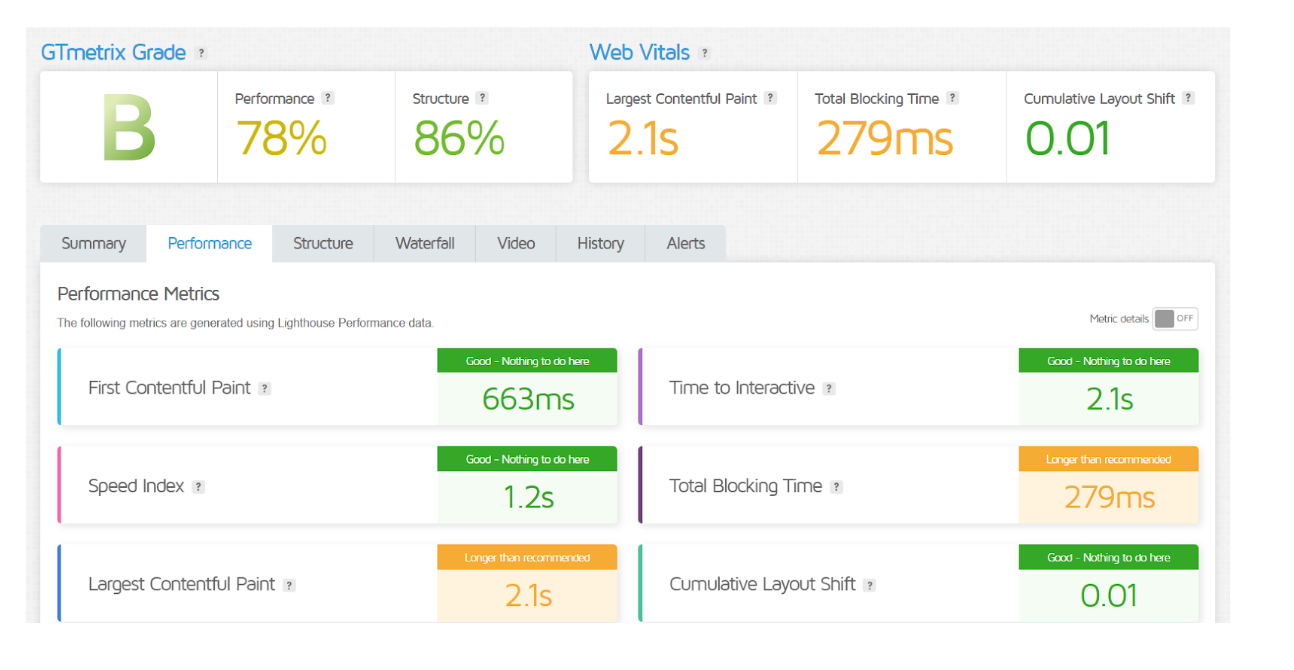
Hostinger offers strong performance, particularly for its price range. With a global network of data centers, Hostinger ensures fast loading times and high uptime rates, typically around 99.9%. Its use of LiteSpeed web servers and optimization features like caching further boosts site speed, making it ideal for small to medium-sized websites.
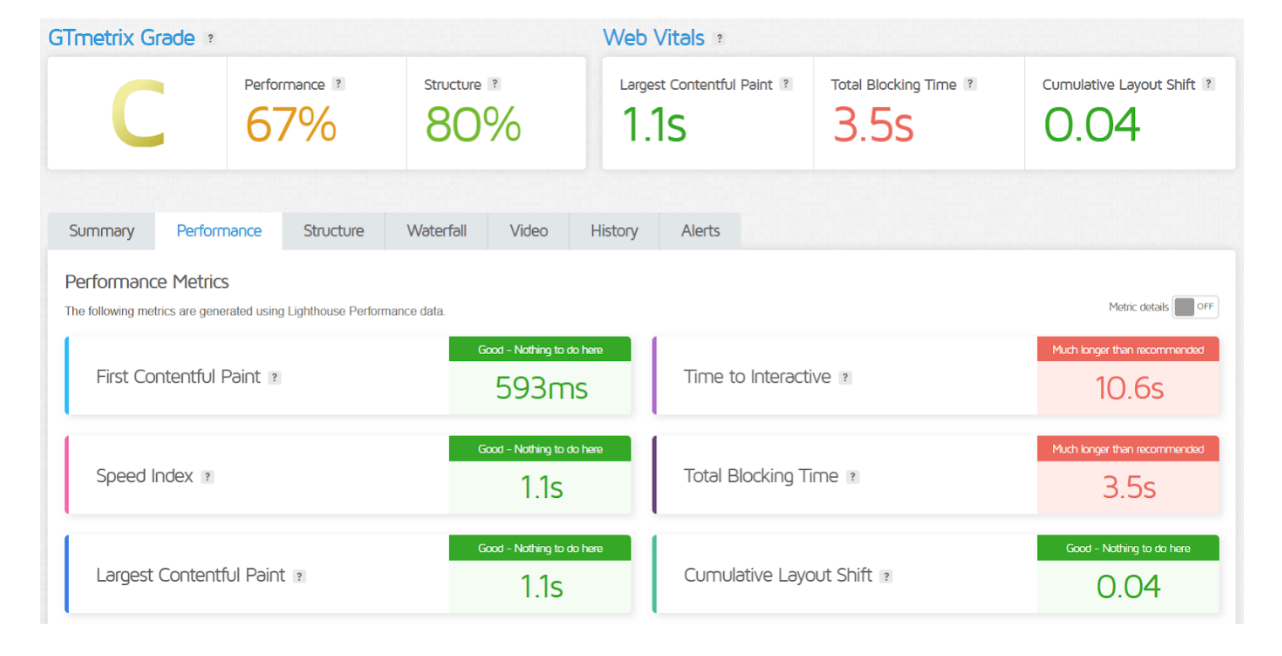
GoDaddy, while reliable, tends to be slightly slower compared to Hostinger in terms of raw performance. It offers solid uptime and speed but may not match Hostinger’s performance for more resource-intensive sites. GoDaddy’s performance is good for general business websites but might need more resources or upgrades for larger, high-traffic sites.
Features
| Hostinger | GoDaddy |
| Affordable pricing and budget-friendly plans | Wide range of services, including domain registration, email, and marketing tools |
| High-performance infrastructure with SSD storage | Solid hosting options, but with higher renewal rates |
| 24/7 live chat support | 24/7 support via phone, chat, and email |
| LiteSpeed web servers for fast loading times | Offers additional features like website builder and business apps |
| Multiple data centers for global reach | Extensive knowledge base and tutorials |
| Free daily backups with higher plans | Free domain with annual plans |
| User-friendly interface and control panel | Strong emphasis on small business tools |
Uptime
Hostinger guarantees a 99.9% uptime, and its performance consistently meets this standard. Users often report minimal downtime, thanks to its robust infrastructure, including SSD storage and multiple data centers worldwide, which help ensure high availability and reliability.
GoDaddy also promises a 99.9% uptime guarantee, which it generally meets. However, some users have reported occasional dips in performance, particularly during peak times or with shared hosting plans. Despite this, GoDaddy remains a reliable choice for most business websites.
GoDaddy Performance
Hostinger Performance
Customer Service
Hostinger is praised for its responsive customer support, offering 24/7 live chat assistance. The support team is knowledgeable and helpful, typically resolving issues quickly. Hostinger also provides a robust knowledge base and tutorials for self-service, making it easy for users to find solutions independently.
GoDaddy offers 24/7 support through phone, live chat, and email, with a strong reputation for customer service. While responses are generally quick, some users report that the quality of support can vary, with complex issues sometimes requiring more time to resolve. GoDaddy also has an extensive knowledge base for self-help.
Both companies provide reliable customer service, but Hostinger tends to receive higher marks for quick, efficient problem-solving, while GoDaddy may offer a wider range of support channels.
Pricing Comparison
| Feature | Hostinger | GoDaddy |
|---|---|---|
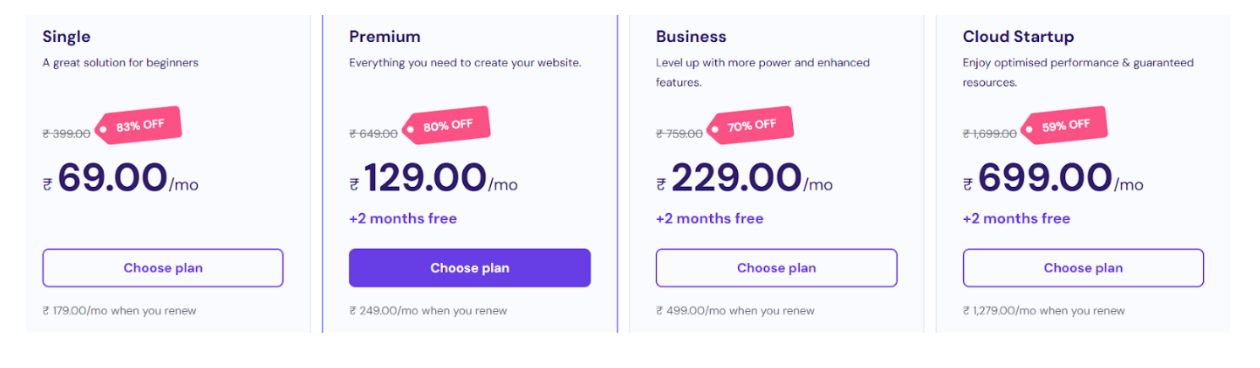
| Shared Hosting | Starts at $1.99/month ⭐⭐⭐⭐ | Starts at $5.99/month ⭐⭐⭐ |
| VPS Hosting | Starts at $3.99/month ⭐⭐⭐⭐⭐ | Starts at $19.99/month ⭐⭐⭐ |
| Cloud Hosting | Starts at $9.99/month ⭐⭐⭐⭐⭐ | Starts at $9.99/month ⭐⭐⭐⭐⭐ |
| WordPress Hosting | Starts at $1.99/month ⭐⭐⭐⭐ | Starts at $6.99/month ⭐⭐⭐ |
| Domain Registration | Starts at $0.99/year ⭐⭐⭐⭐⭐ | Starts at $11.99/year ⭐⭐⭐⭐ |
| Renewal Rates | Generally low, increases slightly after renewal | Renewal rates tend to be higher ⭐⭐⭐ |
| Get Started | Choose Hostinger | Choose GoDaddy |
Hostinger
GoDaddy
Hosting Management
| Feature | Hostinger | GoDaddy |
|---|---|---|
| Control Panel | Custom hPanel, user-friendly and intuitive | cPanel (for some plans), custom control panel |
| Ease of Use | Simple setup with easy navigation | Easy setup, but may have a steeper learning curve for beginners |
| Website Builder | Built-in website builder, drag-and-drop options | GoDaddy Website Builder, templates available |
| One-Click Installers | 1-click installers for WordPress and more | 1-click installs for WordPress, Drupal, etc. |
| Resource Management | Resource monitoring, scaling options available | Resource allocation tools, more limited scaling |
| Performance Optimization | LiteSpeed caching, SSD storage for speed | Performance management tools available, but not as optimized as Hostinger |
| Backup Options | Free daily backups with some plans | Paid backups or available on higher-tier plans |
| Security Features | Free SSL, DDoS protection, regular updates | Free SSL, additional security tools on higher plans |
| Customer Support Access | 24/7 live chat support, responsive assistance | 24/7 phone/chat support, some wait times for complex issues |
| Get Started | Choose Hostinger | Choose GoDaddy |
Ease of Use
Hostinger
- Intuitive Control Panel: Hostinger uses a custom hPanel that’s designed to be user-friendly and simple, even for beginners.
- Simple Setup: New users can easily set up hosting and websites through quick-start wizards.
- Website Builder: The drag-and-drop builder makes creating a website easy, with no coding knowledge required.
- One-Click Installers: Installs apps like WordPress or Joomla with just one click, simplifying website management.
- Streamlined Account Management: A clean interface for managing domains, hosting, and email accounts.
GoDaddy
- Familiar Control Panel: GoDaddy primarily uses cPanel for its shared hosting plans, which may require a learning curve for new users.
- Easy Setup Process: Setup is quick and easy, though beginners may need guidance for more advanced features.
- GoDaddy Website Builder: A user-friendly builder with templates, ideal for users without coding skills.
- Comprehensive Dashboard: Centralized dashboard for managing domains, hosting, and email, but can feel cluttered for some users.
- Guided Assistance: Offers tutorials and support for users to easily navigate through more complex tasks.
Advantage and Disadvantage:
Advantage
| Hostinger | GoDaddy |
| Affordable pricing with great value for money | Wide range of services (domains, hosting, marketing) |
| High-performance infrastructure and fast speeds | Reliable hosting with solid uptime |
| User-friendly custom control panel (hPanel) | Strong presence in domain registration and transfer |
| 24/7 responsive customer support | Extensive knowledge base and self-help options |
| Free daily backups with higher-tier plans | All-in-one platform for businesses and websites |
| Multiple data centers for global reach | Easy-to-use website builder with templates |
Disadvantages
| Hostinger | GoDaddy |
| Higher renewal rates after the first term | Higher initial prices and renewal rates |
| Limited advanced features on lower-tier plans | Customer support can be slow for complex issues |
| Limited data center locations in certain regions | The control panel can be less intuitive for beginners |
| No phone support for lower-tier plans | Limited customization options on website builder |
| Some features like backups are limited to higher plans | Upselling of additional services can be overwhelming |
What Our Customers Have To Say?
Hostinger
- Affordable Pricing: Customers appreciate the low-cost hosting plans, especially for beginners and small businesses.
- Excellent Performance: Many users praise Hostinger for fast loading speeds and reliable uptime.
- User-Friendly Interface: The custom hPanel is frequently mentioned for being easy to navigate and setup.
- Responsive Customer Support: Positive feedback for the 24/7 live chat support, which is often considered quick and helpful.
- Value for Money: Customers often highlight that they get a lot of features and performance for the price.
GoDaddy
- All-in-One Services: Customers like the wide range of services offered, such as domains, hosting, and website builders.
- Reliable Hosting: Many users report good uptime and decent performance, especially for small businesses.
- Easy Website Building: Users appreciate GoDaddy’s website builder, which is easy for non-technical users to design a site.
- Helpful Support: While generally positive, some users mention that support can sometimes be slow for complex issues.
- Renewal Rates: Some customers express dissatisfaction with high renewal rates after the initial discount period.
Security:
| Feature | Hostinger | GoDaddy |
|---|---|---|
| SSL Certificate | Free SSL on most plans | Free SSL with most plans |
| DDoS Protection | Strong DDoS protection included in all plans | Enhanced DDoS protection available on higher-tier plans |
| Firewalls | Built-in firewall protection | Advanced firewall protection on premium plans |
| Malware Scanning | Daily malware scans included | Malware scanning on higher-tier plans |
| Backups | Free daily backups on higher-tier plans | Backup options available, but not free on all plans |
| Two-Factor Authentication | Available for account login | Two-factor authentication available |
| Security Updates | Regular software and security updates | Automatic security updates on most plans |
| Website Protection | ModSecurity and BitNinja for security | Web application firewall (WAF) on advanced plans |
| Custom Security Tools | Limited on lower-tier plans | More customizable security features on higher plans |
| Get Started | Choose Hostinger | Choose GoDaddy |
Customer Support:
Hostinger
- 24/7 Live Chat: Hostinger offers around-the-clock support through live chat, which is quick and helpful for most inquiries.
- Knowledge Base: A well-organized knowledge base with tutorials, FAQs, and guides to help users resolve issues independently.
- Ticketing System: For more complex issues, Hostinger uses a ticketing system, and responses are typically fast.
- Multilingual Support: Provides support in multiple languages, making it accessible for a global audience.
- User Feedback: Generally praised for being responsive and resolving issues quickly, with many users noting helpful and friendly agents.
GoDaddy
- 24/7 Phone Support: GoDaddy is known for offering 24/7 phone support, which many users find convenient for resolving issues in real-time.
- Live Chat: Also offers live chat support, although response times may vary depending on volume and complexity.
- Email Support: Provides email support for non-urgent issues, though response time can be slower.
- Extensive Knowledge Base: GoDaddy offers an extensive library of articles and tutorials for self-service troubleshooting.
- Mixed Customer Reviews: While many customers appreciate the support, some report long wait times for phone or chat support, especially for more complicated issues.
Final Recommendations
| Criteria | Hostinger | GoDaddy |
|---|---|---|
| Best for | Budget users, beginners, small businesses | Businesses needing all-in-one services |
| Pricing | More affordable, especially for basic plans | Higher initial and renewal prices |
| Performance | Fast speeds, high uptime | Reliable, but slower on shared hosting |
| Customer Support | Quick, 24/7 live chat | 24/7 phone/chat, but longer wait times |
| Ease of Use | User-friendly, intuitive tools | Easy, but cPanel may require more learning |
| Security | Strong features, free SSL, DDoS protection | Good security, advanced options on higher plans |
| Hosting Features | Wide range with performance boosts | Comprehensive, with extra business tools |
| Website Building | Easy drag-and-drop builder | Website builder with templates |
| Recommendation | Best for affordable, reliable hosting | Best for those needing a full service package |
| Get Started | Choose Hostinger | Choose GoDaddy |
Frequently Asked Questions
- Hostinger: Shared hosting plans are ideal for beginners due to their affordability and ease of use.
- GoDaddy: The basic shared hosting plan is good for beginners, with an easy setup process.
Some of Hostinger's premium hosting plans, including the yearly WordPress hosting plan, come with a free domain.
GoDaddy’s customer support is generally reliable, offering 24/7 phone and chat support. However, wait times may vary for complex issues.
Hostinger offers free SSL certificates, daily backups, DDoS protection, and regular security updates to safeguard your site.
Yes, Hostinger provides free website migration for WordPress sites with its premium plans.
Yes, GoDaddy provides VPS hosting with different plans depending on the resources and scalability you need.
Hostinger’s easy setup process allows users to have their website up and running in as little as 30 minutes, especially with the website builder.
Table of Contents
Explore More




