

Comparexpert
Comparison Between Company


SiteGround vs Wix: Which is the Best Hosting Platform for Your Website?
Choosing the right web hosting platform is crucial for your website’s performance, speed, and overall user experience. Two popular options are SiteGround and Wix, but they cater to different needs. In this guide, we’ll break down the differences between SiteGround and Wix, comparing them on key features, pricing, ease of use, and more to help you make an informed decision.
Table of Contents
General Info of SiteGround vs Wix
SiteGround is a versatile hosting provider offering shared, cloud, and dedicated hosting with a focus on speed and reliability. It provides excellent support, SSD storage, strong security features, and an intuitive Site Tools interface for managing websites.
Wix is a website builder that simplifies creating and managing websites with drag-and-drop functionality. It offers customizable templates and built-in tools for e-commerce, blogs, and portfolios, making it ideal for users without technical expertise.
SiteGround offers more flexibility with various hosting plans and CMS support, while Wix provides an all-in-one solution for website building and hosting, focusing on ease of use for beginners.
Overview
| Aspect | SiteGround | Wix |
|---|---|---|
| Type | Hosting provider (Shared, Cloud, Dedicated) | Website builder and hosting platform |
| Audience | Users needing flexible hosting options | Beginners and small businesses |
| Ease of Use | User-friendly tools, some technical knowledge | Drag-and-drop builder, no coding required |
| Performance | SSD, Cloudflare CDN, fast load times | Built-in performance optimizations and CDN |
| Support | 24/7 support via chat, phone, tickets | 24/7 chat support, limited phone support |
| Customization | Supports various CMS platforms (WordPress) | Customizable templates, built-in e-commerce tools |
| Best For | Scalable hosting solutions | Quick, easy website creation |
| Get Started | Choose SiteGround | Choose Wix |
Performance
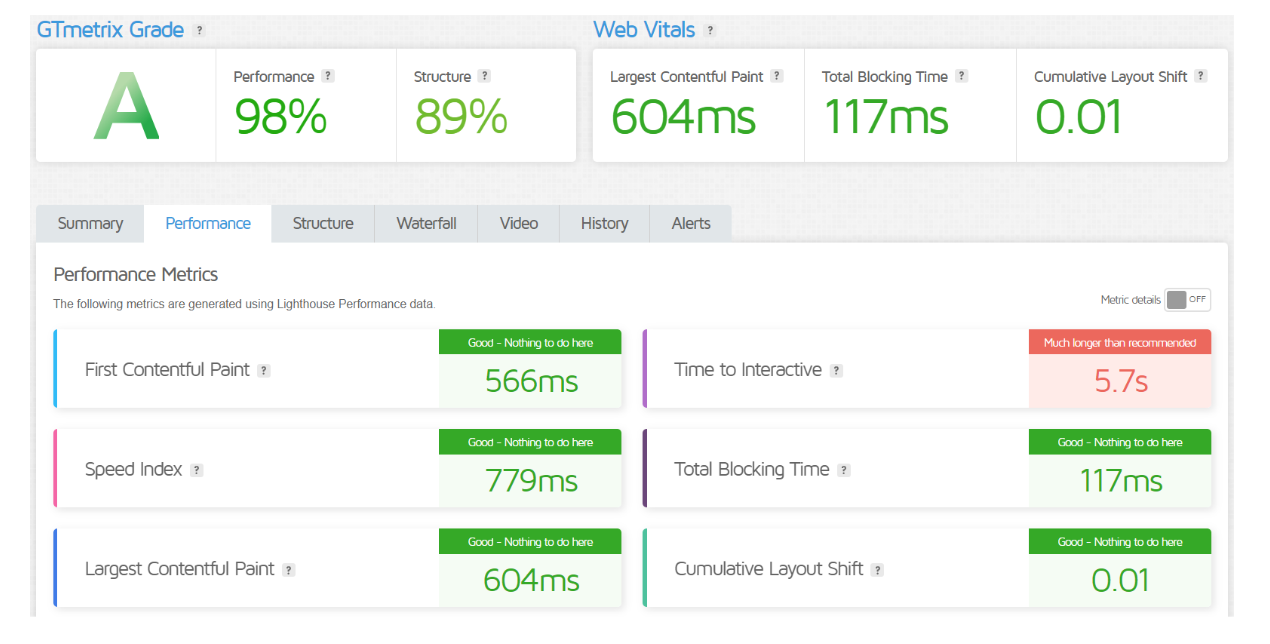
SiteGround offers strong performance with fast loading speeds, thanks to its SSD storage, built-in caching, and Cloudflare CDN integration. It also provides excellent uptime with a guarantee of 99.99%, ensuring reliable website availability. The platform’s performance is highly suitable for websites of all sizes, from small personal blogs to large business sites, due to its scalable hosting options and robust infrastructure.
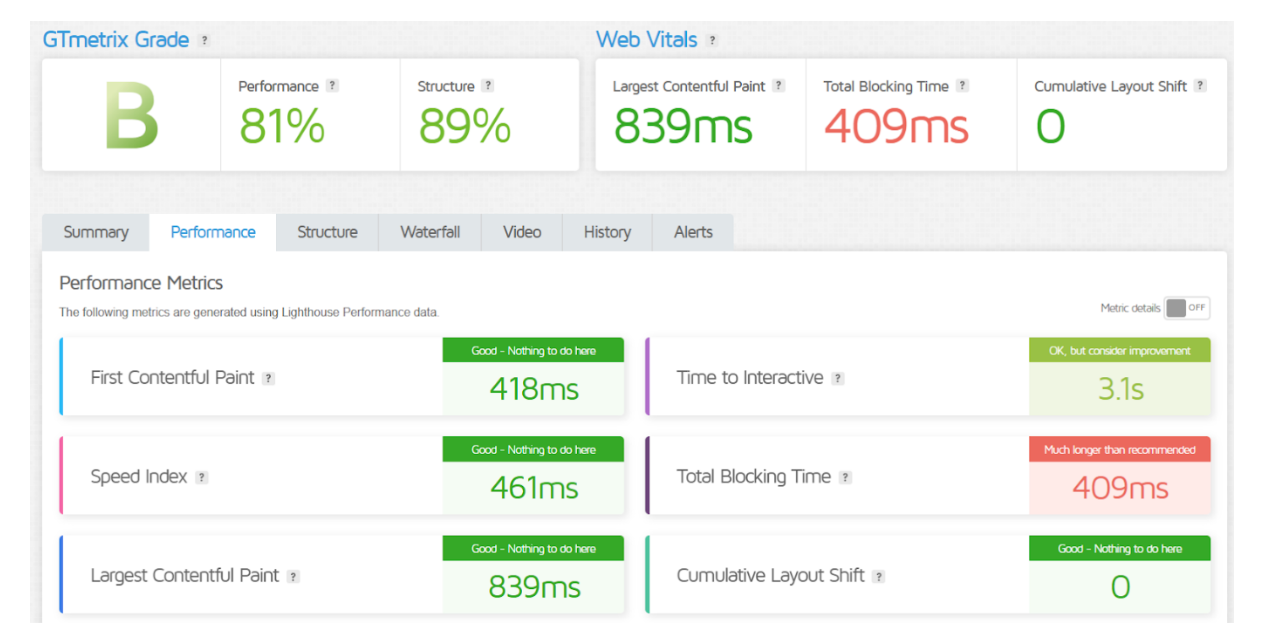
Wix, while offering good performance for a website builder, is not as customizable or scalable as SiteGround. Wix sites are generally fast for basic use, but as traffic grows or if your site requires high performance, it may not be as efficient as SiteGround’s more flexible hosting options. Wix does include built-in performance optimizations, such as fast hosting and CDN, but it may not handle high-traffic sites as effectively as SiteGround.
Features
| Feature Comparison | SiteGround | Wix |
|---|---|---|
| Hosting Type | Shared, Cloud, Dedicated Hosting | All-in-one website builder and hosting |
| Ease of Use | Intuitive Site Tools | Drag-and-drop website builder |
| Performance | SSD storage, Cloudflare CDN | Built-in performance optimizations, CDN |
| Customer Support | 24/7 support via chat, phone, and tickets | 24/7 chat support, limited phone support |
| SSL Certificates | Free SSL with all plans | Free SSL with all plans |
| E-commerce | WooCommerce and other integrations | Built-in e-commerce features |
| Get Started | Choose SiteGround | Choose Wix |
Uptime
SiteGround guarantees 99.99% uptime, ensuring reliable website availability with proactive monitoring and quick issue resolution. It uses a robust infrastructure to minimize downtime and maintain consistent performance.
Wix also provides solid uptime but doesn’t offer a specific guarantee like SiteGround. While generally reliable, it may not match the same level of performance consistency, especially for high-traffic sites.
Performance of SiteGround
Performance of Wix
Customer Service
SiteGround offers 24/7 customer support through live chat, phone, and tickets. The support team is known for its expertise in handling technical issues and providing detailed solutions. Additionally, SiteGround has a comprehensive knowledge base and tutorials to assist users.
Wix also provides 24/7 support via chat and email, but live phone support is limited. While the support team is helpful, some users report longer response times for complex issues. Wix also offers a knowledge base and community forum for self-help.
Pricing Comparison
| Plan | SiteGround | Wix |
|---|---|---|
| Basic Plan | Starts at $2.99/month (shared hosting) | Free plan (with Wix branding) |
| Standard Plan | Starts at $5.99/month (shared hosting) | Starts at $14/month (Combo plan) |
| E-commerce Plan | Starts at $7.99/month (WooCommerce hosting) | Starts at $23/month (Business Basic plan) |
| Renewal Rate | Renewal prices higher than initial plans | Same pricing after renewal |
| Free Domain | Free for the first year (on certain plans) | Free for the first year (on premium plans) |
| Money-back Guarantee | 30-day money-back guarantee | 14-day money-back guarantee |
| Get Started | Choose SiteGround | Choose Wix |
Hosting Management
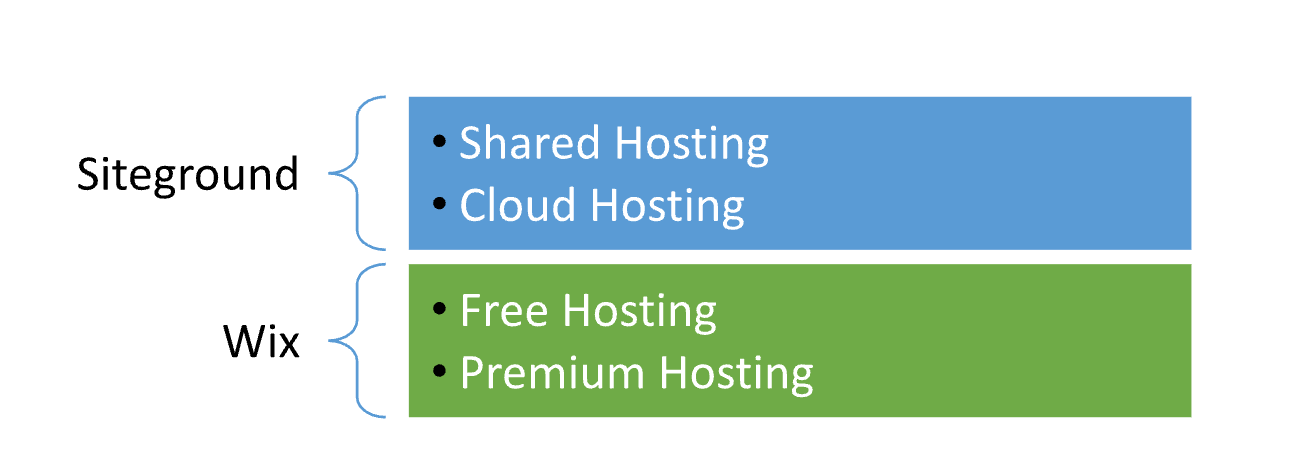
SiteGround offers a more traditional approach to hosting management, providing various hosting plans like shared, cloud, and dedicated hosting. Users can manage their websites through the Site Tools interface, which allows them to install applications like WordPress, manage databases, and configure email accounts. Advanced users can also access more detailed server configurations, making SiteGround suitable for those with more technical expertise or larger-scale websites.
Wix, on the other hand, provides a more streamlined and simplified hosting management experience. As an all-in-one platform, Wix handles both website building and hosting in one place. Users can easily manage their websites through the Wix dashboard, which includes tools for design, content, and e-commerce. While Wix offers less technical control compared to SiteGround, its intuitive drag-and-drop interface makes it ideal for users who prefer ease of use and do not require advanced configuration options.
Hosting Provided
Ease of Use
SiteGround: Ease of Use
- Site Tools: Intuitive dashboard for managing websites, requires some technical knowledge.
- One-click Install: Easy setup for WordPress and apps.
- Advanced Control: More customization for experienced users.
Wix: Ease of Use
- Drag-and-Drop: Simple editor, no coding needed.
- All-in-One: Combines building and hosting in one platform.
- Templates: Customizable templates for quick website creation.
Advantage and Disadvantage: SiteGround vs Wix
Advantage
| Advantage | SiteGround | Wix |
|---|---|---|
| Hosting Options | Offers shared, cloud, and dedicated hosting | All-in-one website building and hosting platform |
| Performance | Fast load times with SSD, Cloudflare CDN, and 99.99% uptime | Built-in performance optimizations and CDN |
| Support | 24/7 expert support via chat, phone, and tickets | 24/7 support via chat, limited phone support |
| Flexibility | Supports various CMSs (WordPress, Joomla, etc.) | Easy drag-and-drop website creation |
| Scalability | Highly scalable for growing websites | Limited scalability for large, high-traffic sites |
| Get Started | Choose SiteGround | Choose Wix |
Disadvantage
| Disadvantage | SiteGround | Wix |
|---|---|---|
| Pricing | Higher renewal rates for some plans | Premium plans are more expensive than other builders |
| Technical Knowledge | Requires some technical expertise for advanced settings | Limited customization for advanced users |
| Limited Website Builder | Does not offer a drag-and-drop builder | Less flexibility in features and design options |
| Customization | Limited theme/template options for non-CMS sites | Restricted customization once the site is launched |
| Free Plan | No free plan available | Free plan includes Wix branding and limited features |
| Get Started | Choose SiteGround | Choose Wix |
What Our Customers Have To Say
SiteGround: What Our Customers Have to Say
- Support: Praise for responsive, knowledgeable 24/7 support.
- Performance: Users value fast load times and reliable uptime.
- User-Friendly: Easy-to-use Site Tools with options for advanced users.
Wix: What Our Customers Have to Say
- Ease of Use: Simple drag-and-drop builder for quick site creation.
- Design Options: Wide variety of customizable templates.
- Limited Flexibility: Some users find customization options restricted.
Security:
| Security Feature | SiteGround | Wix |
|---|---|---|
| SSL Certificates | Free SSL with all plans | Free SSL with all plans |
| Backups | Daily backups included | Automatic backups (for premium plans) |
| Firewall Protection | AI-based security system and custom firewall | Built-in security measures |
| Malware Protection | Daily scans and proactive malware removal | Malware removal on premium plans |
| Two-Factor Authentication | Available for accounts and cPanel access | Two-factor authentication for account access |
| Get Started | Choose SiteGround | Choose Wix |
Customer Support:
SiteGround: Customer Support
- 24/7 Support: Available via chat, phone, and tickets.
- Expert Help: Quick, knowledgeable responses for technical issues.
- Resources: Comprehensive knowledge base and tutorials.
Wix: Customer Support
- 24/7 Chat: Live chat support, limited phone support.
- Help Center: Detailed articles and video tutorials.
- Community Forum: User-driven support and solutions.
Final Recommendations
| Aspect | SiteGround | Wix |
|---|---|---|
| Best for | Users needing flexible hosting options and control | Beginners or small businesses wanting easy site creation |
| Performance | Ideal for high performance and reliability | Suitable for basic websites and small traffic |
| Customization | More control with advanced settings and CMS support | Limited customization, but easy to use for design |
| Scalability | Excellent for growing websites and businesses | Limited scalability for large or high-traffic sites |
| Ease of Use | Requires some technical knowledge for full control | Very easy to use with drag-and-drop functionality |
| Get Started | Choose SiteGround | Choose Wix |
Frequently Asked Questions
Wix is better for beginners as it offers a drag-and-drop builder, making it easy to create websites without any technical skills.
Yes, SiteGround supports WordPress, Joomla, and other CMS platforms, providing tools for managing websites through its Site Tools interface.
Yes, SiteGround offers WooCommerce hosting and supports various e-commerce platforms, allowing users to create online stores.
Yes, Wix offers a free plan, but it includes Wix branding and limited features. Premium plans are required for full customization.
SiteGround can be more expensive, especially upon renewal. Wix offers more affordable entry-level plans, but higher-tier plans can get costly.
Yes, Wix provides free SSL certificates with all premium plans, ensuring secure connections for your site.
SiteGround generally has more robust customer support, offering 24/7 live chat, phone, and ticket support, with highly rated assistance for technical issues.
Table of Contents
Explore More




