
Comparexpert
Comparison Between Company


Ayoa Guide: Best Features for Mind Mapping and Project Management
Discover the power of Ayoa, an all-in-one productivity tool that combines mind mapping, project management, and AI-driven features. This guide explores how Ayoa helps you brainstorm ideas, organize tasks, and collaborate efficiently, making it perfect for individuals and teams looking to boost creativity and productivity.
Table of Contents
What is Ayoa?
Overview of Ayoa Software
If you’ve ever felt overwhelmed juggling ideas, deadlines, and team collaboration, then Ayoa might feel like a breath of fresh air. Ayoa is an AI-powered productivity tool that combines mind mapping, task management, and collaborative whiteboards into a single workspace. Instead of switching between multiple apps for brainstorming, planning, and execution, Ayoa puts everything under one digital roof.
Think of it like this: imagine your brain had a dashboard where ideas flow freely, tasks organize themselves, and your team works alongside you in real time. That’s exactly what Ayoa aims to achieve. It’s designed not just for professionals but also for students, creatives, and even neurodivergent users who benefit from visual thinking tools.
What makes Ayoa stand out is its visual-first approach. Instead of boring spreadsheets or rigid task lists, it uses colorful, flexible layouts that mimic how your brain naturally organizes thoughts. Because of this, even for novices, it is very intuitive. And because it integrates AI, it doesn’t just store your ideas—it actively helps generate and refine them.
In a world where productivity tools often feel complex and fragmented, Ayoa simplifies everything into one cohesive experience. It’s not just a tool—it’s a system designed to help you think, plan, and execute better.
Why Ayoa is Trending in 2026
So why is everyone suddenly talking about Ayoa in 2026? The answer lies in how work itself has evolved. Remote teams, hybrid workflows, and AI-driven productivity are no longer optional—they’re the norm. Ayoa taps directly into these trends by offering a platform that supports real-time collaboration, visual planning, and intelligent automation.
One major reason behind its popularity is its neuro-inclusive design, which makes it accessible to people with ADHD, dyslexia, and other cognitive differences. This isn’t just a feature—it’s a philosophy that sets Ayoa apart from traditional tools. By allowing users to customize layouts, colors, and workflows, it adapts to different thinking styles rather than forcing users into a rigid system.
Another key factor is the rise of AI-assisted workflows. Ayoa’s built-in AI helps users overcome “blank page syndrome” by generating ideas, structuring mind maps, and even breaking down complex projects into manageable tasks. This dramatically reduces the time spent on planning and increases focus on execution.
Add to that its ability to combine mind mapping with project management, and you get a tool that bridges the gap between creativity and productivity. While most tools focus on one or the other, Ayoa does both—and that’s exactly why it’s gaining traction worldwide.
Core Features of Ayoa
Mind Mapping Capabilities
Radial Maps and Organic Mind Maps
At the heart of Ayoa lies its powerful mind mapping engine. Unlike traditional note-taking tools, Ayoa uses radial and organic mind maps that visually represent ideas as interconnected branches. This isn’t just visually appealing—it mirrors how the human brain actually processes information.
Radial maps, in particular, allow you to prioritize ideas by adjusting the size of segments, almost like creating a pie chart of your thoughts. This makes it incredibly easy to identify what matters most at a glance. Imagine planning a project and instantly seeing which tasks deserve more attention—that’s the power of visual thinking.
Organic mind maps, on the other hand, give you complete creative freedom. You can draw, connect, and rearrange ideas without any rigid structure. It feels less like working in software and more like brainstorming on a whiteboard. This flexibility is especially useful for creative professionals, students, and anyone who thrives on free-flowing ideas.
The real magic happens when these mind maps evolve into actionable plans. Instead of staying as static diagrams, they can be converted into tasks, making the transition from idea to execution seamless. That’s where Ayoa truly shines.
AI-Powered Idea Generation
Have you ever waited for inspiration to strike while staring at a blank screen? Ayoa’s AI assistant eliminates that struggle by acting as your brainstorming partner. It can generate ideas, suggest connections, and even build entire mind maps based on a simple prompt.
This feature is a game-changer for writers, marketers, and project managers who need to come up with ideas quickly. Instead of spending hours brainstorming, you can kickstart the process in seconds. It’s like having a creative assistant who never runs out of energy.
What’s even more impressive is how the AI integrates with the rest of the platform. It doesn’t just generate ideas—it helps structure them, turning abstract thoughts into organized plans. This makes Ayoa not just a tool for thinking, but a tool for thinking smarter.
In a fast-paced world where time is money, having AI that enhances your creativity can make all the difference.
Project Management Tools
Task Boards and Workflow Views
Ayoa doesn’t stop at brainstorming—it takes your ideas and turns them into actionable tasks. Its task boards, inspired by Kanban systems, allow you to organize work into stages like “To Do,” “In Progress,” and “Completed.”
What makes these boards unique is their visual flexibility. You can choose different views such as canvas, workflow, or urgency-based layouts depending on how you prefer to work. This means you’re not forced into a single system—you can adapt the tool to your workflow.
Each task can include detailed information like due dates, attachments, checklists, and assigned team members. This guarantees that nothing gets overlooked. It’s like having a digital project manager that keeps everything organized for you.
And because everything is connected to your mind maps, you can always trace tasks back to the original idea. This creates a seamless workflow from brainstorming to execution.
Gantt Timeline View
For more complex projects, Ayoa offers a Gantt timeline view, which allows you to visualize tasks over time. This is especially useful for projects with multiple dependencies and deadlines.
With this feature, you can set start and end dates, add milestones, and track progress in a clear timeline. It’s like having a bird’s-eye view of your entire project. Instead of guessing how tasks overlap, you can see everything laid out visually.
This makes planning more accurate and reduces the risk of delays. You can quickly identify bottlenecks and adjust your schedule accordingly. For project managers, this level of control is invaluable.
In essence, the Gantt view transforms Ayoa from a simple productivity tool into a full-fledged project management solution.
Collaboration Features
Real-Time Team Collaboration
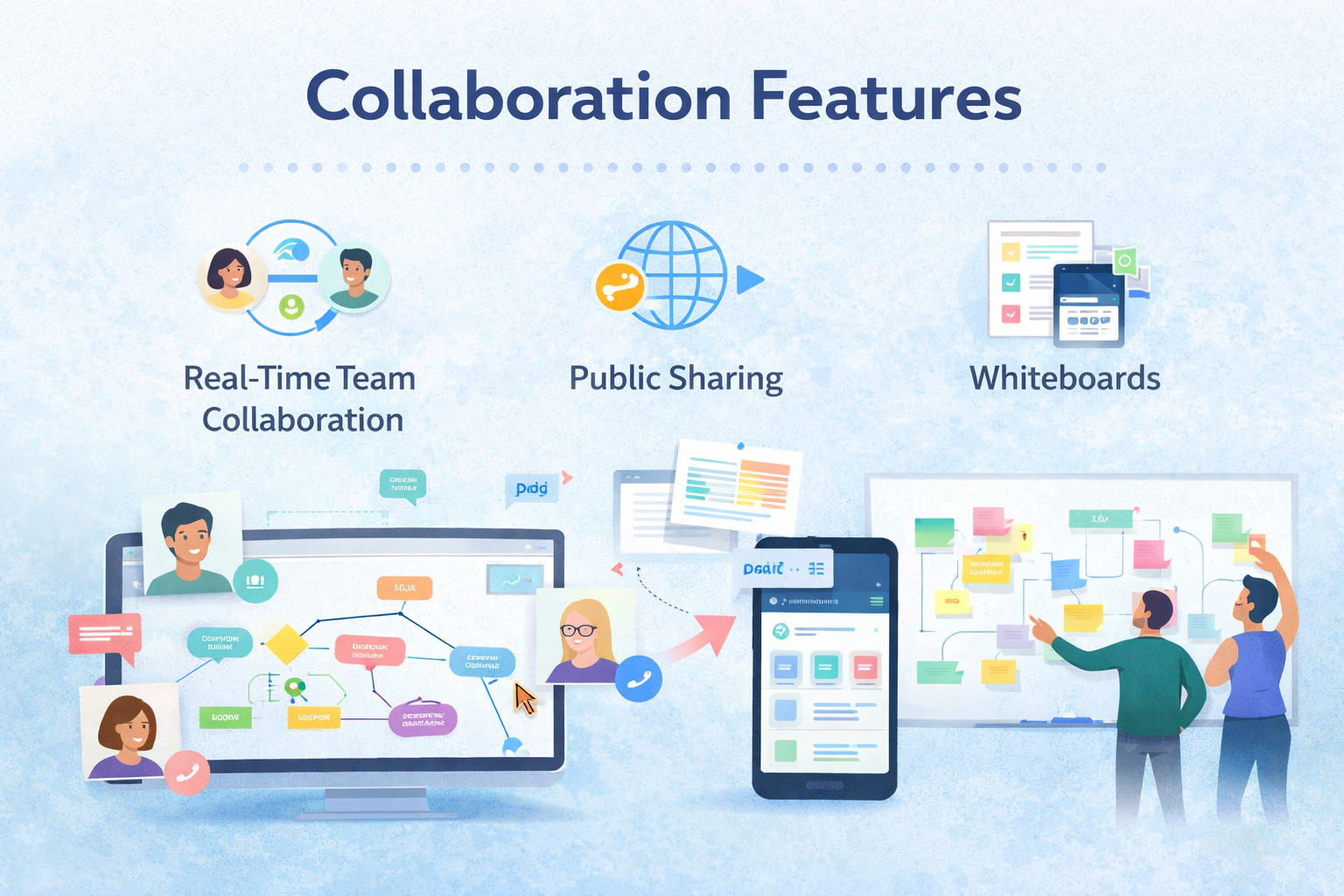
Collaboration is where Ayoa truly shines. Teams can work together in real time, editing mind maps, updating tasks, and sharing ideas simultaneously.
This eliminates the need for endless email threads and meetings. Instead, everyone stays on the same page, literally. You can see changes as they happen, making communication faster and more efficient.
It’s like working in the same room, even if your team is spread across different countries.
Public Sharing and Whiteboards
Ayoa also offers public mind map sharing, allowing you to share your ideas with anyone via a simple link. This is perfect for presentations, workshops, or collaborative sessions.
The online whiteboard feature takes things a step further by providing a blank canvas for brainstorming. You can add notes, images, and diagrams, making it ideal for creative projects and team discussions.
These features make Ayoa not just a productivity tool, but a collaboration hub.
Productivity Enhancements
Planner and Calendar Integration
Ayoa’s planner helps you prioritize tasks using categories like “Now,” “Next,” and “Soon.” This simple system makes it easy to focus on what matters most without feeling overwhelmed.
Combined with its calendar view, you can see all your tasks and deadlines in one place. This ensures better time management and reduces stress.
Focus and Progress Tracking
Tracking progress is crucial for staying motivated. Ayoa allows you to update task progress percentages and monitor overall project status.
This gives you a clear sense of achievement and helps teams stay aligned.
Ayoa vs Other Tools
Comparison Table
Feature | Ayoa | Traditional Tools |
Mind Mapping | Advanced + AI | Limited |
Task Management | Visual + Flexible | List-based |
Collaboration | Real-time | Limited |
AI Integration | Yes | Rare |
Interface | Visual | Text-heavy |
How Ayoa Improves Creative Thinking
Creativity is often messy, unpredictable, and difficult to organize—but that’s exactly where Ayoa shines. Unlike traditional tools that force you into rigid structures, Ayoa embraces the chaos of creativity and turns it into something meaningful. When you start a mind map in Ayoa, you’re not just jotting down ideas—you’re visually exploring connections between them. This approach mirrors how your brain naturally works, making it easier to think outside the box.
What makes Ayoa even more powerful is its AI-driven brainstorming support. Imagine you’re stuck on a topic or struggling to generate ideas—Ayoa’s AI can instantly suggest concepts, expand branches, and even help structure your thoughts. It’s similar to having a creative spouse who is always coming up with new ideas. This is especially useful for bloggers, marketers, and students who constantly need fresh content or innovative solutions.
Another underrated benefit is how Ayoa reduces mental clutter. Instead of juggling multiple ideas in your head, you can visually map everything out. This not only improves clarity but also boosts confidence in your ideas. Over time, you’ll notice that your thinking becomes more structured, yet still flexible enough to adapt and evolve.
Using Ayoa for Content Planning and Blogging
If you’re a blogger or content creator, Ayoa can completely transform your workflow. Instead of jumping straight into writing, you can start with a mind map to outline your blog post. Begin with your main topic in the center, then create branches for headings, subtopics, keywords, and ideas. This helps you see the entire structure of your content before writing a single word.
For example, if you’re writing about “Ayoa Guide,” you can create branches for features, benefits, comparisons, and FAQs. This ensures your article is well-organized and covers all important points. Once your mind map is ready, you can easily convert each branch into tasks or sections, making the writing process smoother and faster.
Ayoa also helps with SEO planning. You can add keywords, internal links, and content ideas directly into your map, ensuring your article is optimized from the start. Instead of editing SEO later, you build it into your workflow. This saves time and improves content quality.
Another advantage is collaboration. If you’re working with a team, everyone can contribute ideas in real time. This makes brainstorming sessions more productive and ensures that no idea gets lost. For content teams, this is a game-changer.
Best Ayoa Workflow for Project Management
Managing projects can quickly become overwhelming, especially when multiple tasks, deadlines, and team members are involved. Ayoa simplifies this process by combining visual planning with structured task management. The best way to use Ayoa for projects is to start with a mind map and then convert it into actionable tasks.
First, outline your project using a mind map. Break it down into phases, milestones, and tasks. This gives you a clear overview of the entire project. Next, switch to task boards or workflow view to organize these tasks into stages like “To Do,” “In Progress,” and “Completed.” This visual progression helps you track work effortlessly.
One of the most powerful features is the ability to assign tasks, set deadlines, and track progress—all within the same platform. This keeps everything concentrated and does away with the need for multiple tools. You can also use the timeline view to plan long-term projects and ensure everything stays on schedule.
Here, control and clarity are the main advantages. You always know what needs to be done, who is responsible, and how the project is progressing. This reduces stress and increases productivity, especially for teams working remotely.
Tips to Maximize Productivity with Ayoa
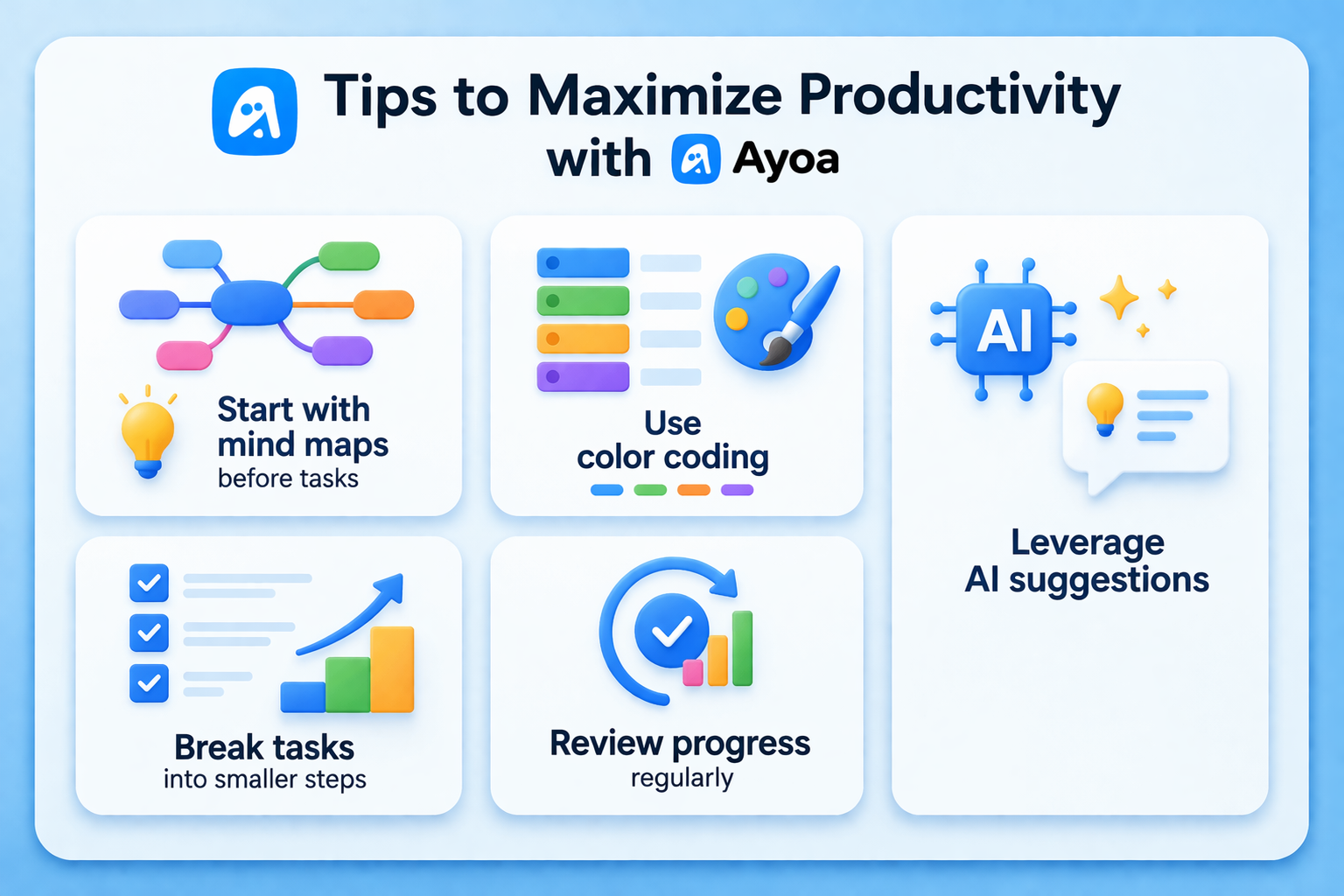
Using Ayoa effectively isn’t just about knowing its features—it’s about using them strategically. Here are some practical tips to get the most out of it:
- Start with mind maps before tasks – Always brainstorm first, then convert ideas into actions.
- Use color coding – Assign colors to different categories or priorities for better visual clarity.
- Leverage AI suggestions – Don’t hesitate to use AI when you’re stuck or need inspiration.
- Break tasks into smaller steps – This makes projects less overwhelming and easier to manage.
- Review progress regularly – Use Ayoa’s tracking features to stay on top of your goals.
By following these simple strategies, you can turn Ayoa into a powerful productivity system rather than just another tool.
Real-Life Use Cases of Ayoa
Ayoa isn’t limited to one type of user—it’s incredibly versatile. For students, it’s perfect for organizing study notes, planning assignments, and preparing for exams. The visual format makes it easier to understand complex topics and retain information.
For businesses, Ayoa acts as a central hub for project management and collaboration. Teams can brainstorm ideas, assign tasks, and track progress without switching between tools. This improves efficiency and reduces communication gaps.
Freelancers and creatives can use Ayoa to manage multiple projects, track deadlines, and generate ideas. Whether you’re writing articles, designing graphics, or planning campaigns, Ayoa helps you stay organized and creative at the same time.
Even personal users can benefit from Ayoa by using it for goal setting, habit tracking, and daily planning. It’s not just a work tool—it’s a life management tool.
Benefits of Using Ayoa
Ayoa offers a unique combination of creativity and productivity. It simplifies complex workflows, enhances collaboration, and boosts efficiency.
Also Read
Top Reasons to Choose Coverwise.co.uk for Your Next Trip
Hapbee Review: Can This Wellness Technology Improve Your Mood?
BeLight Software Review: Creative Tools for Designers and Developers
Notion Review: The Ultimate Productivity and Workspace Tool
How ElevenLabs Is Transforming AI Voice Technology
Limitations of Ayoa
While powerful, some advanced features are locked behind premium plans, and beginners may need time to explore all functionalities.
Pricing and Plans Overview
Ayoa offers a free version along with premium plans that unlock advanced features.
Who Should Use Ayoa?
Ayoa is ideal for students, professionals, teams, and creatives who want a visual and flexible productivity tool.
Conclusion
Ayoa isn’t just another productivity app—it’s a complete ecosystem for thinking, planning, and executing ideas. By combining mind mapping, project management, and AI, it bridges the gap between creativity and action. Whether you’re managing a team or organizing personal goals, Ayoa provides the tools you need to succeed.
Frequently Asked Questions
Yes, Ayoa offers a free plan with basic features.
Yes, it combines mind mapping and project management effectively.
Yes, it offers real-time collaboration features.
Absolutely, especially for brainstorming and study planning.
Yes, it includes AI for idea generation and task planning.
Table of Contents
Related Post

Helcim (US) Explained: Modern Payment Solutions for Growing Businesses
admin
March 29, 2026
Read More »