

Comparexpert
Comparison Between Company


Hostinger vs Bluehost (2026): Which Hosting is Better for You?
Compare Hostinger and Bluehost in this 2026 hosting comparison to find the best option for your website. This guide covers pricing, performance, speed, features, security, and ease of use, helping beginners and professionals make an informed decision. Hostinger stands out for its affordable plans and fast loading speeds, while Bluehost offers strong WordPress integration and reliable customer support. Whether you are starting a blog, business site, or online store, this comparison highlights the pros and cons of each provider so you can choose the hosting service that fits your needs and budget perfectly.
Table of Contents
General Info of Hostinger vs Bluehost
Hostinger and Bluehost are popular web hosting providers, each catering to different needs. Hostinger is known for its budget-friendly plans and beginner-friendly features, making it a great choice for small websites and those starting out. It offers a fast, user-friendly interface and reliable performance at affordable prices. Hostinger’s data centers are spread across multiple continents, ensuring good global reach.
Bluehost, endorsed by WordPress.org, is a versatile hosting solution with a focus on WordPress optimization. It offers a wide range of plans, including shared, VPS, and dedicated hosting, appealing to businesses and larger websites. Bluehost is recognized for its robust support and extensive resources for growing websites.
While Hostinger prioritizes affordability and simplicity, Bluehost emphasizes scalability and feature-rich options. Your choice depends on your budget, website complexity, and long-term goals.
Overview
| Aspect | Hostinger | Bluehost |
|---|---|---|
| Pricing | Affordable, beginner-friendly plans | Moderately priced, scalable options |
| Performance | Fast with LiteSpeed servers | Reliable for higher traffic sites |
| Uptime | 99.9% uptime guarantee | 99.9% uptime guarantee |
| Control Panel | Custom hPanel | Standard cPanel |
| WordPress Support | Managed hosting, LiteSpeed optimization | Endorsed by WordPress.org |
| Backups | Weekly backups | Daily backups on higher-tier plans |
| Support | 24/7 live chat, no phone support | 24/7 support via chat, email, and phone |
| Freebies | SSL, domain (select plans), CDN | SSL, domain (1 year), CDN, ad credits |
| Best For | Budget-conscious beginners | WordPress users and growing sites |
| Get Started | Choose Hostinger | Choose Bluehost |
Performance
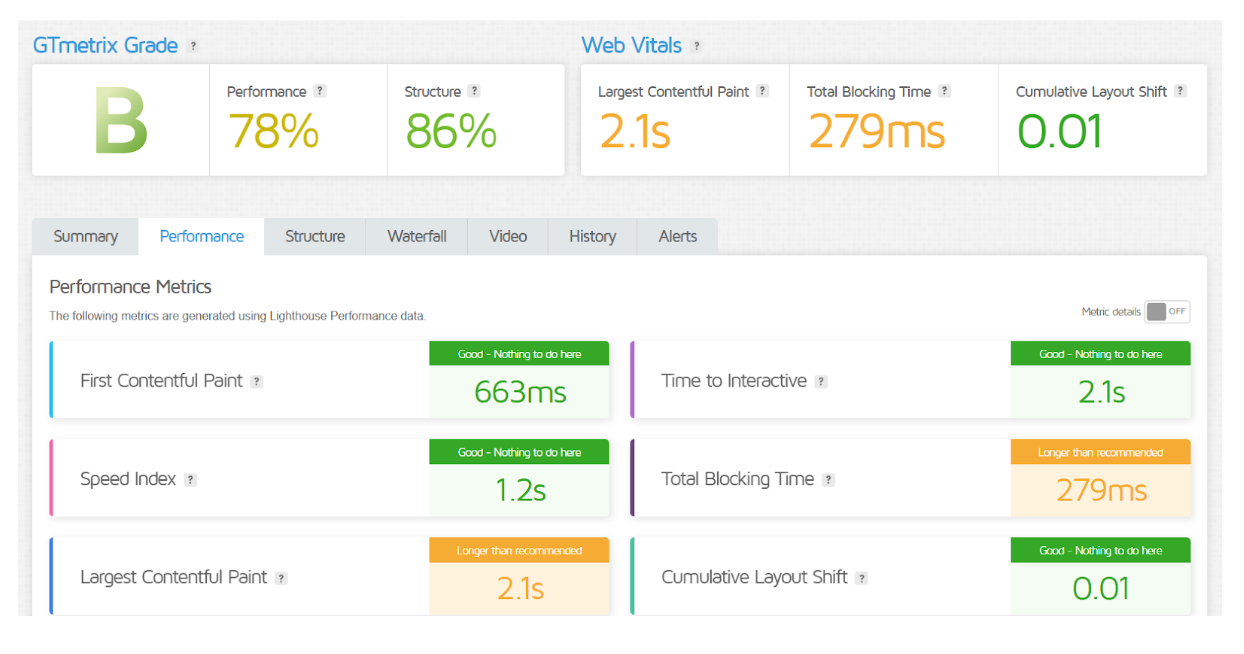
Hostinger delivers excellent performance for its price range, with fast loading speeds and a 99.9% uptime guarantee. Its use of LiteSpeed servers, SSD storage, and a built-in caching solution ensures quick response times, especially for smaller websites. It also offers data centers in multiple regions, allowing users to optimize performance for their target audience.
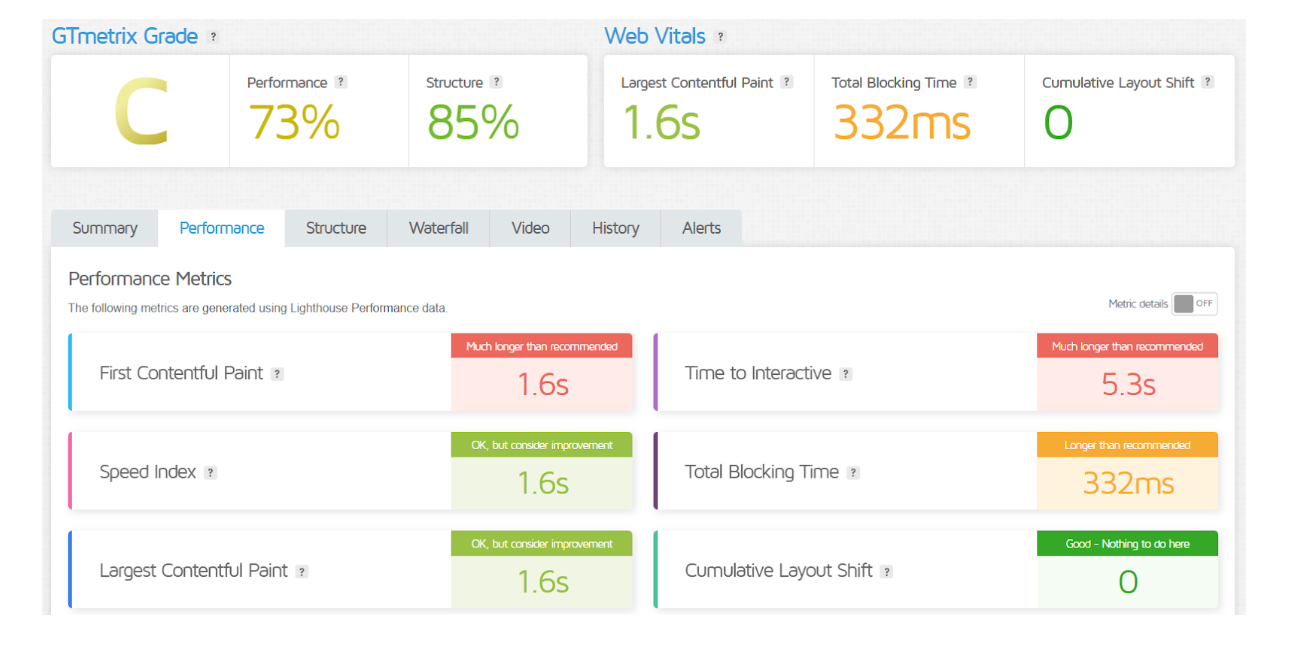
Bluehost provides reliable performance with robust infrastructure and consistent uptime. While it may not match Hostinger’s speed for smaller sites, its servers are well-suited for handling higher traffic volumes. Bluehost also includes advanced performance tools like CDN integration and server-side caching, which are particularly effective for WordPress websites.
Features
| Hostinger | Bluehost |
| Budget-friendly plans | Wide hosting options |
| LiteSpeed servers for speed | Optimized for WordPress |
| Global data center network | Free domain for the first year |
| Custom hPanel control panel | cPanel interface |
| Free SSL and weekly backups | Free SSL and CDN included |
| Managed WordPress hosting | WordPress staging tools |
| 100+ apps via auto-installer | 1-click WordPress setup |
| Cloudflare CDN integration | Marketing credits for ads |
| 99.9% uptime guarantee | 24/7 support with phone option |
Uptime
Hostinger offers a 99.9% uptime guarantee, and its performance generally aligns with this commitment, ensuring stable website availability. It uses modern infrastructure and global data centers to maintain consistent uptime, making it reliable for small to medium websites.
Bluehost also provides a 99.9% uptime guarantee, supported by its robust infrastructure and server redundancy. While its uptime performance is reliable, occasional minor dips in uptime have been reported during peak traffic, making it slightly less consistent for larger or highly dynamic sites.
Hostinger Performance
BlueHost Performance
Customer Service
Mostly via email and live chat, Hostinger provides round-the-clock customer service. While there’s no phone support, their agents are responsive and knowledgeable, often resolving issues quickly. Additionally, Hostinger provides a well-organized knowledge base with tutorials and FAQs for self-help.
Bluehost also provides 24/7 customer support via live chat, phone, and email, catering to a wider range of preferences. Its support team is generally helpful, especially for WordPress-related issues, thanks to Bluehost’s close partnership with WordPress.org. However, response times can sometimes vary during peak periods.
Both providers prioritize customer support but differ in their approach. Hostinger excels in live chat efficiency, while Bluehost offers more support channels, which may appeal to users seeking flexibility.
Pricing Comparison
| Plan | Hostinger | Bluehost |
|---|---|---|
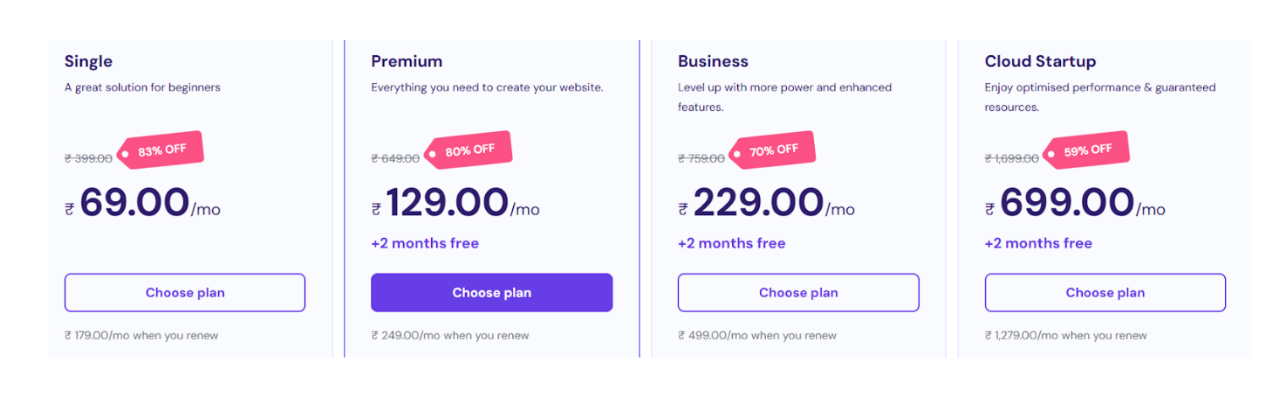
| Basic Plan | ★★★★☆ ($1.99/month) | ★★★☆☆ ($2.95/month) |
| Premium Plan | ★★★★★ ($2.99/month) | ★★★★☆ ($5.45/month) |
| Business Plan | ★★★★★ ($3.99/month) | ★★★☆☆ ($5.45/month) |
| VPS Hosting (1GB RAM) | ★★★★☆ ($3.99/month) | ★★★★☆ ($19.99/month) |
| Managed WordPress | ★★★★☆ ($3.99/month) | ★★★★★ ($9.95/month) |
| Dedicated Hosting | ★★★★☆ ($79.99/month) | ★★★★☆ ($79.99/month) |
| Get Started | Choose Hostinger | Choose Bluehost |
Hostinger
Bluehost
Hosting Management
| Feature | Hostinger | Bluehost |
|---|---|---|
| Control Panel | Custom hPanel | cPanel |
| Ease of Use | User-friendly, streamlined interface | Easy to navigate, popular for beginners |
| Managed Hosting | Yes (for WordPress and VPS) | Yes (for WordPress, WooCommerce) |
| Website Builder | Built-in website builder (Zyro) | Integrated with WordPress, Elementor |
| One-Click Installer | 100+ apps via auto-installer | 1-click WordPress install |
| Automatic Backups | Weekly backups | Daily backups (higher plans) |
| Security Features | Free SSL, Cloudflare, advanced firewall | Free SSL, SiteLock (paid plans), CDN |
| Email Management | Professional email available (paid) | Email accounts included (depending on plan) |
| Customer Support | 24/7 live chat (no phone support) | 24/7 support via chat, phone, and email |
| Get Started | Choose Hostinger | Choose Bluehost |
Ease of Use
Hostinger:
- Custom hPanel: A simple and intuitive control panel designed for beginners. It’s streamlined, reducing the learning curve for new users.
- Website Builder (Zyro): Hostinger includes a drag-and-drop website builder that allows users to create websites without any coding experience.
- One-Click Installer: Easy installation of over 100 apps and CMS options, making site management simple.
- Optimized for Beginners: Hostinger’s design focuses on simplicity, with clear navigation and accessible features.
Bluehost:
- cPanel Interface: The standard cPanel is widely known and user-friendly, though it can be a bit overwhelming for absolute beginners.
- WordPress Integration: Bluehost is optimized for WordPress, providing easy setup and management tools like staging environments and a 1-click installer.
- Guided Setup: Provides step-by-step instructions to get started, especially for WordPress users, easing the setup process.
- Clear Documentation: Extensive knowledge base and tutorials, helping users navigate through common issues quickly.
Advantage and Disadvantage:
Advantage
| Hostinger | Bluehost |
| Affordable pricing for all plans | Free domain for the first year |
| Fast performance with LiteSpeed servers | Excellent WordPress integration and optimization |
| User-friendly custom hPanel | 24/7 customer service by phone, email, and chat |
| Free SSL certificates on all plans | Free CDN and marketing credits |
| Global data centers for optimized speed | Reliable uptime and stability |
| Weekly backups included in all plans | Staging environments for WordPress users |
| 30-day money-back guarantee | Strong support for e-commerce and larger sites |
| 100+ apps via auto-installer | Extensive knowledge base and tutorials |
| Cloudflare integration for added speed | Easy-to-use cPanel interface |
Disadvantage:
| Hostinger | Bluehost |
| Limited phone support | Higher renewal rates after the first term |
| Upselling of additional services | Slower performance on lower-tier plans |
| No free domain on basic plans | Customer support response time can vary |
| Limited scalability on lower plans | Occasional uptime dips during peak traffic |
| Limited advanced customization options | Complicated features for beginners on cPanel |
What Our Customers Have To Say?
Hostinger:
Positive Feedback:
- Affordable Pricing: Many customers appreciate Hostinger’s budget-friendly plans, especially for small businesses and personal websites.
- Fast Performance: Users report quick loading speeds and reliable uptime, especially with LiteSpeed servers.
- User-Friendly Interface: Customers find the custom hPanel and website builder intuitive, making it easy to manage their sites.
- Great Customer Support: Live chat support is generally praised for its fast responses and helpfulness.
Negative Feedback:
- Limited Phone Support: Some users express frustration with the absence of phone support, relying solely on live chat and email.
- Upselling: A few customers mention that Hostinger frequently promotes upsell offers, which can feel intrusive.
Bluehost:
Positive Feedback:
- WordPress Optimization: Customers often highlight Bluehost’s excellent performance for WordPress websites, with tools like staging environments and 1-click installs.
- Comprehensive Support: Bluehost’s 24/7 support via chat, email, and phone is well-reviewed, particularly for new users.
- Reliable Uptime: Many users report consistent uptime and stability, particularly for larger websites or e-commerce stores.
- Freebies: The inclusion of a free domain for the first year and SSL certificate is a favorite feature among users.
Negative Feedback:
- Higher Renewal Prices: Some users complain about significant price increases upon renewal after the first term.
- Performance on Lower Tiers: A few customers mention that Bluehost’s basic plans can be slower or less reliable under high traffic compared to other providers.
Security:
| Feature | Hostinger | Bluehost |
|---|---|---|
| SSL Certificate | Free SSL included | Free SSL included |
| Firewall Protection | Advanced security with custom firewall | SiteLock (paid plans) for extra protection |
| DDoS Protection | Included with hosting plans | Basic DDoS protection |
| Backup Frequency | Weekly backups | Daily backups (higher plans) |
| Malware Scanning | Free malware scanner on paid plans | Malware protection (paid plans) |
| 2FA (Two-Factor Authentication) | Available for account security | Available for account security |
| Automatic Updates | Regular updates for software security | Regular updates for WordPress |
| Spam Protection | Email spam filtering available | Spam filtering available for emails |
| Data Encryption | SSL encryption for all data | SSL encryption for all data |
| Get Started | Choose Hostinger | Choose Bluehost |
Customer Support:
Hostinger:
- 24/7 Live Chat: Hostinger offers around-the-clock live chat support, which is responsive and helpful for troubleshooting issues.
- Email Support: Email support is available for more detailed inquiries or complex issues, though response times can vary.
- No Phone Support: Unlike some competitors, Hostinger doesn’t offer phone support, which may be a drawback for users who prefer direct communication.
- Knowledge Base: Hostinger provides a comprehensive library of tutorials, guides, and FAQs to help users resolve common issues independently.
- User Feedback: Generally praised for its quick response times and professional agents, though some users wish for more in-depth support options.
Bluehost:
- 24/7 Support Channels: Bluehost provides 24/7 support via live chat, email, and phone, offering more flexibility in how users can reach out for help.
- Phone Support: Many users appreciate the ability to speak with a representative over the phone, especially for complex or urgent issues.
- WordPress Expertise: As a WordPress.org-recommended host, Bluehost’s support team has specialized knowledge to assist with WordPress-related problems.
- Knowledge Base: Extensive resources, including tutorials, video guides, and FAQs, are available for self-help.
- User Feedback: Often praised for its helpfulness, especially with WordPress, but response times may be slower during peak periods. Some users report inconsistent experiences with support quality.
Final Recommendations
| Criteria | Hostinger | Bluehost |
|---|---|---|
| Best For | Budget-conscious users, beginners | WordPress users, small to medium businesses |
| Pricing | Affordable, great for smaller websites | Moderately priced, offers scalability |
| Performance | Fast, reliable for small to medium sites | Reliable, good for higher traffic sites |
| Ease of Use | Very user-friendly, streamlined | Easy to use, especially for WordPress |
| Customer Support | 24/7 live chat, no phone support | 24/7 support via chat, phone, and email |
| Security | Free SSL, Cloudflare, advanced firewall | Free SSL, SiteLock (paid plans), CDN |
| Hosting Options | Shared, VPS, Cloud, WordPress Hosting | Shared, VPS, Dedicated, WordPress Hosting |
| Scalability | Limited on lower plans | Good scalability for growing websites |
| Free Features | Free SSL, domain (select plans), CDN | Free SSL, domain (1 year), CDN, ad credits |
| Renewal Pricing | Transparent, generally affordable | Higher renewal pricing after first term |
| Get Started | Choose Hostinger | Choose Bluehost |
Frequently Asked Questions
Yes, Hostinger generally offers more affordable pricing plans, especially for beginners and small websites. Bluehost’s prices are slightly higher but offer more scalability and features for growing websites.
Yes, Bluehost offers a free domain for the first year with their hosting plans, making it easier for new users to get started.
Hostinger provides 24/7 live chat support and email support. They don't, however, provide phone assistance.
Yes, Bluehost is highly recommended by WordPress.org and offers excellent performance, tools, and support for WordPress websites.
Yes, Hostinger allows you to upgrade your hosting plan easily, whether you’re moving from shared hosting to VPS or cloud hosting
Yes, Bluehost offers phone support in addition to live chat and email, which is a plus for users who prefer direct communication.
Yes, Hostinger includes weekly backups for free with all hosting plans. However, daily backups are available only with higher-tier plans.
Table of Contents
Explore More




