

Comparexpert
Comparison Between Company


InterServer vs SiteGround: Which Hosting Provider Should You Choose?
Choosing the right web hosting provider is crucial for your website’s performance, reliability, and growth. Two popular options in the hosting market are InterServer and SiteGround. Both offer unique features, pricing models, and performance benefits, but which one is better for your needs? In this comprehensive comparison, we break down everything you need to know.
Table of Contents
General Info of InterServer vs SiteGround
InterServer is known for its affordability and flexibility, offering a wide range of hosting solutions, including shared, VPS, and dedicated hosting. It stands out for its commitment to providing low-cost hosting with no price hikes upon renewal. InterServer also boasts a solid uptime record and offers unlimited storage and bandwidth, making it a good choice for budget-conscious users who need reliable performance.
SiteGround, on the other hand, is a premium hosting provider with a reputation for exceptional customer support and high-performance hosting. SiteGround excels in its managed WordPress hosting, optimized for speed and security. Its plans include automatic updates, daily backups, and free CDN, making it a strong option for users who want a hassle-free experience and premium services.
When comparing the two, InterServer offers better value for those looking for cost-effective options with basic to moderate performance needs, while SiteGround appeals to those willing to pay a bit more for premium features, fast performance, and top-tier customer support.
Overview
| Feature | InterServer | SiteGround |
|---|---|---|
| Pricing | Affordable, no renewal price hikes | Premium pricing with higher costs for advanced features |
| Uptime Guarantee | 99.9% uptime | 99.99% uptime, excellent reliability |
| Performance | Solid performance, good for basic to moderate needs | High-speed performance with advanced optimizations |
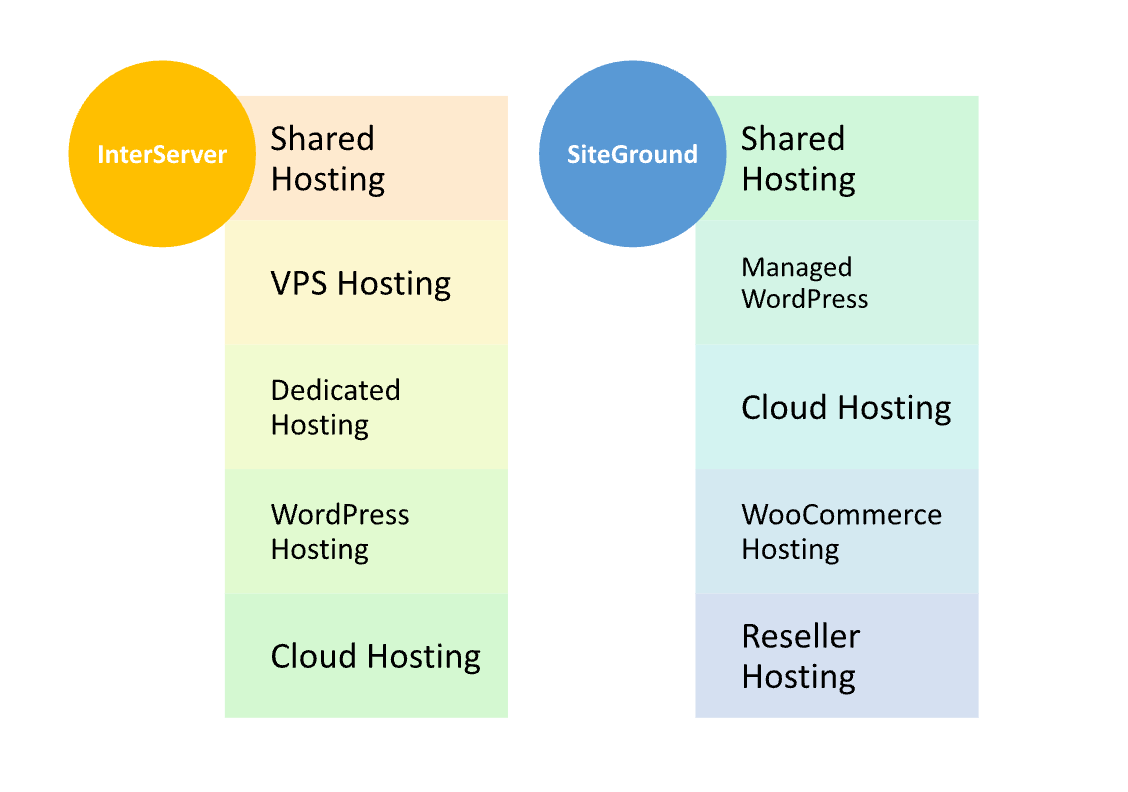
| Hosting Types | Shared, VPS, Dedicated hosting | Managed WordPress, Shared, Cloud hosting |
| Storage & Bandwidth | Unlimited storage and bandwidth (most plans) | SSD storage, Cloudflare CDN, caching technology |
| Customer Support | 24/7 chat, email, phone support (sometimes slower) | 24/7 expert support via chat, phone, and tickets |
| Control Panel | cPanel | Custom Site Tools panel |
| Free Features | Free website migration | Free daily backups, free CDN, automatic updates |
| Data Centers | US-based, global data centers | Global data centers (US, Europe, Asia) |
| Money-Back Guarantee | No free trial, but low-cost with a 30-day refund option | 30-day money-back guarantee |
| Get Started | Choose InterServer | Choose SiteGround |
Performance
InterServer offers solid performance with a 99.9% uptime guarantee, which is reliable for most users. Its servers are equipped with fast SSD storage, and it uses a range of optimization techniques, but its overall speed can vary depending on the specific hosting plan and server load. While performance is generally good, it may not be as fast as premium competitors for high-traffic websites.
SiteGround excels in performance, with a focus on speed and optimization. It uses SSD storage, Cloudflare CDN integration, and caching technology to ensure fast load times. SiteGround also offers advanced features like automatic scaling and server-level optimizations, making it ideal for high-traffic websites. Its performance is often considered top-tier in the industry, especially for WordPress hosting.
Features
| InterServer | SiteGround |
| Affordable pricing with no renewal hikes | Premium pricing with advanced features |
| 99.9% uptime guarantee | 99.99% uptime, proactive monitoring |
| Offers shared, VPS, and dedicated hosting | Managed WordPress, shared, cloud hosting |
| Unlimited storage and bandwidth for most plans | SSD storage, Cloudflare CDN, caching technology |
| Free website migration | Free daily backups, automatic updates |
| Basic customer support via chat, email, phone | 24/7 expert customer support via chat, phone, ticket |
| cPanel access for control | Easy-to-use custom control panel (Site Tools) |
| Data centers in the US and globally | Data centers in North America, Europe, Asia |
| Limited advanced features on lower-tier plans | Advanced features like staging, enhanced security |
| Monthly billing option available | 30-day money-back guarantee |
Uptime
InterServer guarantees 99.9% uptime, which is generally reliable, but actual performance can sometimes fluctuate based on server load and the specific hosting plan. While it meets industry standards, occasional downtime or slow response times can occur, especially with shared hosting plans.
SiteGround is renowned for its exceptional uptime, often exceeding 99.99%. The company uses advanced monitoring and proactive server management to ensure minimal downtime. It also offers features like automatic failover and an extensive global data center network to maintain consistent availability, making it a top choice for users who require highly reliable uptime.
Pricing Comparison
| Feature | InterServer | SiteGround |
|---|---|---|
| Pricing | ★★★★☆ (Affordable, low-cost plans with no price hikes upon renewal) | ★★★☆☆ (Higher pricing, especially for premium features) |
| Shared Hosting | Starting at $2.99/month | Starting at $3.99/month |
| VPS Hosting | Starting at $6/month | Starting at $3.99/month |
| Dedicated Hosting | Starting at $50/month | N/A (No dedicated plans, focuses on managed hosting) |
| Renewal Rates | No price hikes upon renewal | Higher renewal prices (especially for shared hosting) |
| Money-Back Guarantee | 30-day money-back guarantee | 30-day money-back guarantee |
| Get Started | Choose InterServer | Choose SiteGround |
Hosting management: InterServer vs SiteGround
Customer Service
InterServer offers 24/7 customer support through live chat, email, and phone. The support team is generally responsive and knowledgeable, but some users have reported longer wait times during peak hours. While they provide a solid level of assistance, the overall experience can be less polished compared to higher-end providers.
SiteGround is highly regarded for its exceptional customer support. The company provides 24/7 live chat, phone, and ticketing support, with a strong reputation for quick responses and effective solutions. SiteGround’s support staff is well-trained, especially in handling technical issues and hosting-specific questions, making it a standout in customer service within the hosting industry.
Overall, SiteGround is considered superior in terms of customer service due to its quick response times, expert staff, and overall commitment to providing a premium support experience, while InterServer offers decent service but may not deliver the same level of efficiency and expertise.
Hosting Management
| Feature | InterServer | SiteGround |
|---|---|---|
| Control Panel | cPanel, user-friendly but basic | Custom “Site Tools” panel, modern and intuitive |
| Website Migration | Free website migration | Free website migration, handled by support team |
| Automatic Backups | Backups available for extra cost | Free daily backups, automatic backup system |
| Security Features | Free SSL, malware protection, firewall | Free SSL, enhanced security features, WAF, AI-based bot protection |
| Performance Optimization | Basic caching and SSD storage | Advanced caching, Cloudflare CDN, SSD storage |
| Updates | Manual updates for software | Automatic updates for WordPress, security patches |
| Server Management | User-controlled, basic server management options | Proactive server management, automatic scaling |
| Support for Scaling | Available with VPS and Dedicated hosting | Auto-scaling for higher traffic, cloud hosting |
| Get Started | Choose InterServer | Choose SiteGround |
Ease of Use
InterServer:
- cPanel Interface: InterServer uses the familiar cPanel interface, which is user-friendly but may feel basic for those used to more advanced custom panels.
- Set-Up Process: Easy sign-up and setup for shared hosting, but VPS and dedicated hosting require more technical knowledge.
- Migration: Free website migration is available but requires manual initiation, which may require some technical steps.
- Customization: Customizations are possible but can be limited depending on the plan; more flexibility is available for VPS and dedicated hosting.
SiteGround:
- Custom Control Panel (Site Tools): SiteGround uses its own custom control panel, “Site Tools,” which is intuitive and designed for ease of use, with a clean layout.
- Managed Hosting: For WordPress and other managed services, everything from updates to backups is automated, simplifying the user experience.
- One-Click Installations: SiteGround offers one-click installers for popular apps like WordPress, making setup easier for beginners.
- Free Migration: The free migration service is handled by SiteGround’s support team, so users don’t have to manage the transfer themselves.
- Support for Beginners: SiteGround’s extensive knowledge base and 24/7 customer support make it easy for users to get help quickly.
Advantage and Disadvantage:
Advantage
| InterServer | SiteGround |
| Affordable pricing with no renewal hikes | Premium customer support, highly rated by users |
| Offers a wide range of hosting options (shared, VPS, dedicated) | Excellent performance and fast website speeds |
| Unlimited storage and bandwidth (for most plans) | User-friendly custom control panel (Site Tools) |
| Solid uptime guarantee (99.9%) | Automatic updates and daily backups |
| Flexibility with server management options | Optimized for WordPress hosting and other CMSs |
| Free website migration | Free CDN and advanced caching technologies |
| No extra charges for most basic features | Excellent scalability with cloud hosting options |
| Monthly billing option available | High level of security with AI-based bot protection |
Disadvantage:
| InterServer | SiteGround |
| Customer support can be slow during peak times | Higher renewal rates, especially for shared hosting |
| Limited advanced features on lower-tier plans | More expensive compared to competitors |
| No automatic backups on basic plans | No dedicated hosting plans available |
| Performance may vary with shared hosting | Limited scalability options in lower-tier plans |
| Less polished user interface for some services | Custom control panel may be a learning curve for some users |
| Additional charges for certain features (e.g., backups) | Can be overkill for small websites due to premium features |
What Our Customers Have To Say?
InterServer:
- Affordable Pricing: Many customers appreciate the low, transparent pricing structure, especially with no price hikes upon renewal.
- Good Performance for Budget Plans: Users often report decent performance for shared hosting and the flexibility of VPS and dedicated hosting for more control.
- Reliable Support: Support is generally responsive, though some reviews mention occasional delays during peak times.
- Easy Migration: Customers are satisfied with the free website migration service, although some may find it slightly manual.
- Occasional Slow Speeds: Some users have noted slower performance during peak times or with shared hosting plans.
SiteGround:
- Excellent Customer Support: SiteGround is frequently praised for its fast and knowledgeable customer support, with 24/7 availability and quick resolutions.
- Top-Tier Performance: Customers report fast website speeds, especially for WordPress hosting, and appreciate the performance optimizations like Cloudflare CDN.
- User-Friendly Interface: Many users appreciate the intuitive Site Tools control panel, which simplifies hosting management.
- Reliability and Uptime: Reviews highlight the company’s excellent uptime and minimal downtime, contributing to a hassle-free experience.
- Higher Cost for Premium Features: Some customers feel that SiteGround’s pricing is on the higher end, especially for renewals, but often justify it due to the premium service and features offered.
Security:
| Security Feature | InterServer | SiteGround |
|---|---|---|
| SSL Certificates | Free SSL on all plans | Free SSL on all plans |
| DDoS Protection | Basic DDoS protection | Advanced DDoS protection with monitoring |
| Malware Protection | Malware scanning and removal available (extra cost) | Enhanced security features, AI-based bot protection |
| Firewall | Basic firewall protection | Web Application Firewall (WAF) and additional security layers |
| Backups | Manual backups or additional cost for automated backups | Free daily backups, automatic and secure |
| Two-Factor Authentication (2FA) | Available on cPanel | Available on Site Tools and cPanel |
| Security Monitoring | Available, but requires manual configuration | 24/7 server monitoring, proactive security checks |
| Spam Protection | Anti-spam filters on email | Advanced anti-spam and security filters for email |
| Get Started | Choose InterServer | Choose SiteGround |
Customer Support:
InterServer:
- Availability: 24/7 support via live chat, email, and phone, ensuring help is always accessible.
- Response Time: While generally responsive, some customers report longer wait times, especially during peak hours.
- Support Quality: Support staff is knowledgeable, though there are occasional reports of slower resolution times for more complex issues.
- Self-Help Resources: InterServer offers a knowledge base, but it may not be as extensive or detailed as some competitors’.
- Support Channels: Offers direct access to staff, but some users prefer more extensive community forums and resources.
SiteGround:
- Availability: 24/7 support via live chat, phone, and ticket system, with fast response times.
- Support Quality: Highly praised for its expert knowledge, friendly approach, and ability to resolve issues quickly.
- Proactive Support: SiteGround is known for its proactive approach, often solving potential issues before they arise.
- Self-Help Resources: Extensive knowledge base, tutorials, and user forums to help with common issues.
- Customer Satisfaction: Customers frequently highlight SiteGround’s superior support as one of the main reasons for choosing their service over competitors.
Final Recommendations
| Criteria | InterServer | SiteGround |
|---|---|---|
| Best For | Budget-conscious users needing reliable, low-cost hosting | Users seeking premium performance and excellent support |
| Performance | Good for basic to moderate traffic websites | Excellent, especially for high-traffic and WordPress sites |
| Pricing | ★★★★☆ (affordable with no renewal hikes) | ★★★☆☆ (higher cost but justified by features) |
| Customer Support | ★★★☆☆ (decent, but may have slow response times) | ★★★★★ (fast, knowledgeable, and proactive support) |
| Ease of Use | ★★★☆☆ (basic cPanel, but requires more management) | ★★★★★ (intuitive Site Tools panel and automation) |
| Security | ★★★☆☆ (basic features with optional extras) | ★★★★★ (advanced security features included) |
| Best Hosting Type | Shared, VPS, and Dedicated Hosting | Managed WordPress, Cloud Hosting |
| Overall Value | ★★★★☆ (great for those who want affordable hosting) | ★★★★★ (premium hosting with top-tier features) |
| Get Started | Choose InterServer | Choose SiteGround |
Frequently Asked Questions
InterServer offers Shared Hosting, VPS Hosting, Dedicated Hosting, WordPress Hosting, Cloud Hosting, and Reseller Hosting.
Yes, SiteGround offers shared hosting plans, along with managed WordPress hosting, cloud hosting, and WooCommerce hosting.
Yes, both InterServer and SiteGround offer free SSL certificates with all hosting plans.
InterServer offers backups, but they are available for an extra cost on certain plans. Backup services are not automatic on the basic plans.
Yes, SiteGround provides free daily backups on all hosting plans, including shared hosting and managed WordPress hosting.
InterServer offers 24/7 customer support via live chat, email, and phone. However, some customers report slower response times during peak periods.
SiteGround's customer support is highly praised for being fast, knowledgeable, and available 24/7 via live chat, phone, and tickets.
Table of Contents
Explore More




