

Comparexpert
Comparison Between Company


WP Engine vs HostGator: Which Hosting Provider Is Better in 2026?
Choosing the right web hosting provider is one of the most important decisions for any website owner. WP Engine and HostGator are two popular hosting companies, but they serve very different audiences. WP Engine specializes in premium managed WordPress hosting, while HostGator focuses on affordable shared hosting and beginner-friendly solutions. This comparison examines their performance, features, security, ease of use, pricing, customer support, and overall value to help you determine which provider best fits your needs.
Table of Contents
General Info of WP Engine vs HostGator
WP Engine is a managed WordPress hosting provider known for high performance, security, and advanced features. It offers fully managed services like backups, updates, and optimization, making it ideal for businesses and developers needing WordPress-specific hosting with expert support.
HostGator offers a range of hosting services, including shared, VPS, and WordPress hosting. It’s a more general hosting provider that caters to a wider audience and is known for its affordability, making it suitable for small to medium-sized websites and beginners.
WP Engine focuses on premium WordPress hosting with advanced tools, while HostGator provides more affordable, flexible hosting options but lacks the WordPress optimization and performance of WP Engine.
Overview
| Aspect | WP Engine | HostGator |
|---|---|---|
| Focus | Premium managed WordPress hosting | Shared, VPS, Dedicated, and WordPress hosting |
| Performance | High performance with EverCache, CDN, and WordPress optimization | SSD storage, caching on higher plans, less optimized for WordPress |
| Security | Advanced security, daily backups, managed threat detection | Free SSL, malware detection, basic security features |
| Customer Support | 24/7 WordPress-specific expert support | 24/7 general support, less specialized for WordPress |
| Pricing | Higher-priced for premium features and optimizations | Affordable with flexible plans |
| Ease of Use | Easy for WordPress users with advanced managed tools | User-friendly control panel suitable for beginners |
| Get Started | Choose WP Engine | Choose HostGator |
Performance
WP Engine delivers excellent performance with features like EverCache, a global CDN, and a highly optimized infrastructure specifically designed for WordPress. This ensures fast loading speeds and seamless handling of high-traffic websites. WP Engine’s platform is built for scalability, making it an ideal choice for businesses and developers who need a reliable and high-performing environment for their WordPress sites.
HostGator offers decent performance with SSD storage and caching features on higher-tier plans, but it is not as optimized for WordPress as WP Engine. While HostGator can handle moderate traffic levels well, it may struggle with resource-intensive WordPress sites, especially on its shared hosting plans. For high-traffic sites or those requiring advanced performance optimizations, WP Engine is the superior choice.
Features
| Feature | WP Engine | HostGator |
|---|---|---|
| Hosting Focus | Managed WordPress hosting | Shared, VPS, Dedicated, and WordPress hosting |
| Performance Tools | EverCache, Global CDN, Performance Monitoring | SSD storage, Built-in caching on higher plans |
| Security | Advanced threat detection, daily backups, SSL | Free SSL, malware protection, basic backups |
| Customer Support | 24/7 WordPress-focused expert support | 24/7 general support via live chat, phone, and tickets |
| Developer Tools | Staging environments, SSH access, Git integration | One-click installs, limited staging for WordPress plans |
| Get Started | Choose WP Engine | Choose HostGator |
Uptime
WP Engine offers a 99.95% uptime guarantee, backed by proactive monitoring and a reliable infrastructure designed to minimize downtime. Its platform is specifically built for WordPress, ensuring that high-traffic websites experience minimal disruptions. With a dedicated team focusing on uptime and performance, WP Engine ensures a stable experience for WordPress sites.
HostGator provides a 99.9% uptime guarantee, which is generally reliable for most websites. While HostGator’s uptime is adequate for small to medium-sized sites, it may not be as consistent for high-traffic WordPress websites, especially on shared hosting plans. For those needing superior uptime and reliability, WP Engine offers a more robust solution.
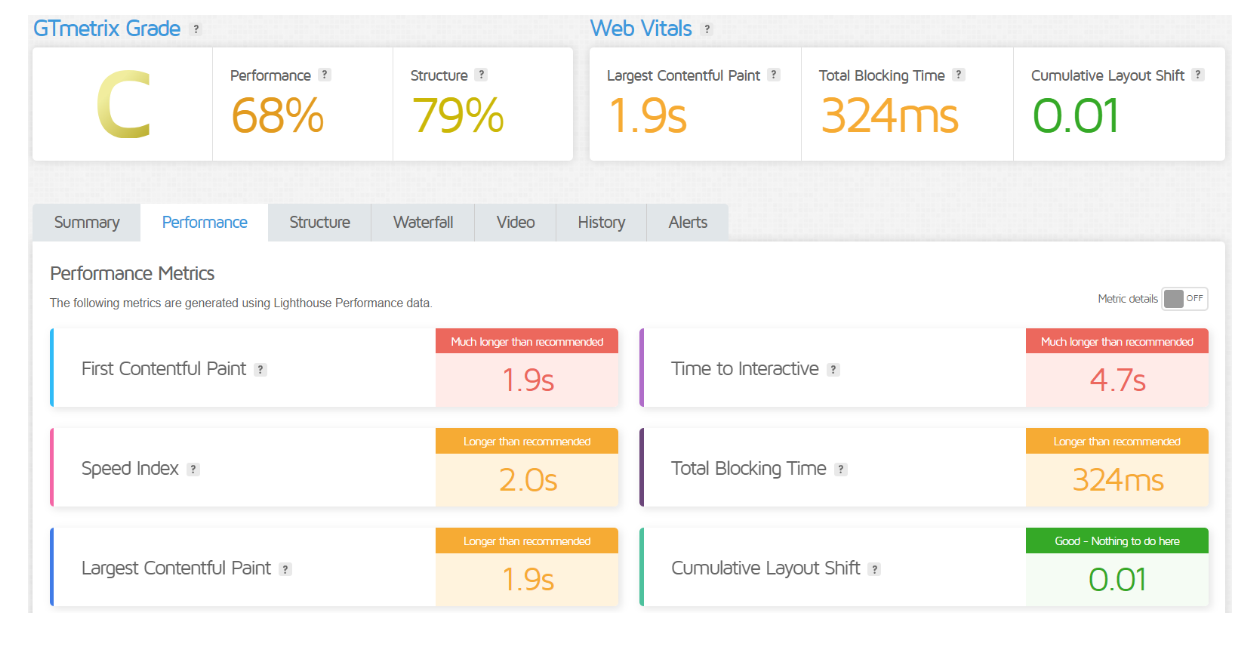
Performance of WP Engine
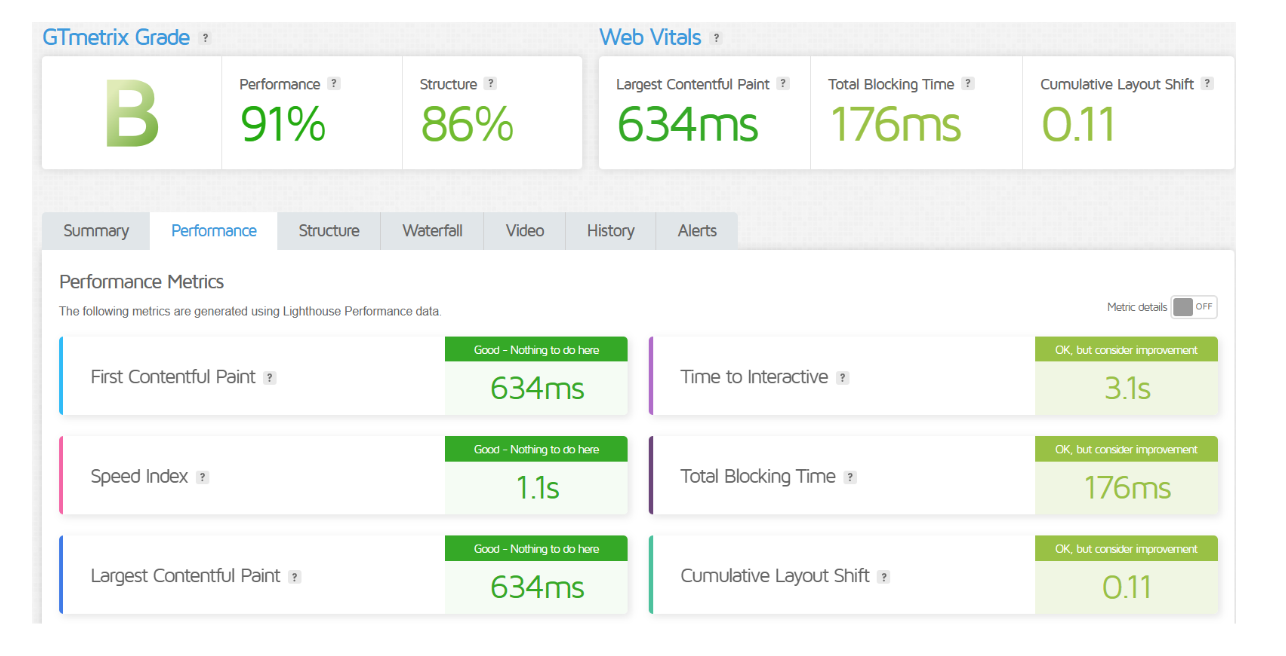
Performance of HostGator
Customer Service
WP Engine offers exceptional customer support with a focus on WordPress-specific issues. Their support team is available 24/7 via live chat, phone, and tickets, providing expert assistance for performance, security, and technical issues. WP Engine’s staff is highly knowledgeable about WordPress, making them ideal for handling complex problems or specific WordPress-related inquiries.
HostGator provides 24/7 customer support through live chat, phone, and email. While their support is reliable for general hosting issues, it is less specialized for WordPress problems compared to WP Engine. HostGator’s support is more suitable for beginners and those managing smaller websites, though users may need to seek additional resources for advanced WordPress troubleshooting.
Pricing Comparison
| Plan Type | WP Engine (Starting Price) | HostGator (Starting Price) |
|---|---|---|
| Entry-Level Plan | $20/month (Startup) | $2.75/month (Shared Hosting – Hatchling) |
| Mid-Tier Plan | $39/month (Professional) | $3.50/month (Shared Hosting – Baby) |
| High-Tier Plan | $77/month (Growth) | $5.25/month (Shared Hosting – Business) |
| VPS Hosting | $20/month (Starter) | $19.95/month |
| Dedicated Hosting | Custom pricing | $89.98/month |
| Managed WordPress | $39/month (Managed WordPress) | $5.95/month (Managed WordPress) |
| Get Started | Choose WP Engine | Choose HostGator |
Hosting Management
WP Engine offers fully managed WordPress hosting with automatic updates, daily backups, performance monitoring, and security features. It provides a custom dashboard, staging environments, and expert WordPress support for easy management.
HostGator uses a traditional approach with a user-friendly cPanel and one-click installs for WordPress. It supports shared, VPS, and dedicated hosting but lacks the WordPress-specific optimizations that WP Engine offers.
Ease of Use
WP Engine:
- WordPress-Focused: Optimized for WordPress management.
- User-Friendly Dashboard: Simplified WordPress site controls.
- Managed Services: Automatic updates and backups.
HostGator:
- Beginner-Friendly: Simple cPanel for easy management.
- One-Click Installs: Quick setup for WordPress.
- Versatile: Manages various hosting types easily.
Advantage and Disadvantage: WP Engine vs HostGator
Advantage
| Advantage | WP Engine | HostGator |
|---|---|---|
| Performance | Superior performance with WordPress optimization and CDN | Solid performance, especially for smaller sites, with SSD storage |
| Security | Advanced security features, daily backups, proactive monitoring | Free SSL, basic malware protection on higher plans |
| Support | WordPress-specific expert support available 24/7 | 24/7 general support via phone, chat, and tickets |
| Managed Services | Fully managed hosting with automatic updates, backups, and optimizations | More control with cPanel and flexible hosting options |
| WordPress Optimization | Advanced tools like staging environments and caching for WordPress | Easy WordPress management, but lacks advanced optimization features |
| Get Started | Choose WP Engine | Choose HostGator |
Disadvantage
| Disadvantage | WP Engine | HostGator |
|---|---|---|
| Pricing | Higher cost, suitable for businesses and high-traffic sites | More affordable but offers fewer advanced features |
| Limited Hosting Options | Focused only on managed WordPress hosting | Offers a variety of hosting types, but lacks WordPress optimization |
| Customization | Limited customization options for non-WordPress sites | Less performance-focused features for large, resource-heavy websites |
| Resource Limits | Limited storage and visits on lower-tier plans | Shared hosting plans have resource limitations that may affect larger sites |
| Get Started | Choose WP Engine | Choose HostGator |
What Our Customers Have To Say
WP Engine:
- Fast Performance: Customers praise WP Engine for its speed, especially on high-traffic WordPress sites.
- Expert Support: Users highlight the knowledgeable, WordPress-focused support team.
- Strong Security: Many appreciate the advanced security features, including daily backups and proactive threat monitoring.
HostGator:
- Affordable: Customers value HostGator for its budget-friendly pricing, especially for smaller websites.
- Easy to Use: Users find the cPanel interface simple and intuitive for website management.
- Reliable Support: While not as specialized as WP Engine, customers report satisfactory support for general hosting issues.
Security:
| Security Feature | WP Engine | HostGator |
|---|---|---|
| SSL Certificates | Free SSL on all plans | Free SSL on all plans |
| Daily Backups | Automatic daily backups for all plans | Basic backups included on most plans |
| Malware Protection | Advanced threat detection and proactive security monitoring | Malware detection and basic protection on higher plans |
| Firewall | Advanced firewall and security measures | Basic firewall protection included |
| Security Updates | Automatic WordPress core and plugin updates | Manual updates for WordPress and plugins |
| DDoS Protection | Built-in DDoS protection for higher-tier plans | Not specifically included |
| Get Started | Choose WP Engine | Choose HostGator |
Customer Support:
WP Engine:
- WordPress-Focused: Specialized support team with expertise in WordPress issues.
- 24/7 Availability: Offers support through live chat, phone, and tickets at any time.
- Proactive Assistance: Provides tailored advice and solutions for optimizing WordPress performance and security.
HostGator:
- General Support: Provides broad support for various hosting types, not just WordPress.
- 24/7 Availability: Available via phone, live chat, and email support round the clock.
- Beginner-Friendly: Offers helpful resources and assistance for new users and less technical customers.
Final Recommendations
| Criteria | WP Engine | HostGator |
|---|---|---|
| Best For | Businesses, high-traffic websites, and WordPress professionals | Budget-conscious users and small to medium-sized websites |
| Performance | Excellent for WordPress sites with advanced features and optimization | Solid for smaller sites, but less optimized for WordPress |
| Customer Support | Expert WordPress support available 24/7 | General support suitable for beginners and less complex sites |
| Pricing | Premium pricing for high-end features | Affordable plans with good value for basic hosting needs |
| Ease of Use | Ideal for WordPress users with advanced tools | Great for beginners with a simple cPanel and setup process |
| Get Started | Choose WP Engine | Choose HostGator |
Frequently Asked Questions
WP Engine is specifically optimized for WordPress, offering advanced features, performance, and security. HostGator also supports WordPress but is more general in its hosting offerings.
Yes, WP Engine is generally more expensive due to its premium WordPress-specific features and managed hosting. HostGator offers more affordable plans, especially for basic hosting needs.
Yes, WP Engine offers fully managed WordPress hosting, including automatic updates, backups, security, and performance optimization.
Yes, HostGator supports various types of websites, including WordPress, with its shared, VPS, and dedicated hosting plans.
WP Engine offers WordPress-specific support with experts available 24/7, while HostGator provides general hosting support, suitable for a variety of platforms but not as specialized for WordPress.
WP Engine provides advanced security features like daily backups, managed threat detection, and SSL certificates. HostGator offers free SSL, malware protection, and security features on higher-tier plans.
HostGator is more beginner-friendly with its simple cPanel and one-click WordPress installations. WP Engine, while user-friendly for WordPress users, may be more complex for those new to hosting.
Table of Contents
Explore More




