

Comparexpert
Comparison Between Company


Bluehost vs Wix (2026): Which Website Builder Should You Choose?
Choosing between Bluehost and Wix can be confusing—especially if you’re starting your first website. Both platforms are popular, but they serve very different purposes.
In this guide, we’ll compare Bluehost vs Wix in terms of features, pricing, performance, ease of use, and more—so you can confidently decide which one is right for you.
Table of Contents
General Info of Bluehost vs Wix
Bluehost and Wix serve different needs in the web hosting and site-building space. Bluehost is a traditional web hosting provider, known for its compatibility with WordPress and emphasis on robust hosting solutions like shared, VPS, and dedicated hosting. It provides users with full control over website management, offering powerful customization tools but requires some technical knowledge to get the most out of its features.
Wix, on the other hand, is a website builder that combines hosting and site-building tools in a single platform. It’s designed for simplicity, offering a drag-and-drop editor with numerous templates and a suite of built-in tools, making it ideal for users who want to quickly build a site without technical expertise. Wix includes hosting in its plans and emphasizes ease of use over deep customization or control.
Bluehost is better suited for those who want more control, scalability, and the ability to use WordPress or other CMS platforms. Wix is best for users who prefer an all-in-one solution for rapid, code-free website creation.
Overview
| Aspect | Bluehost | Wix |
|---|---|---|
| Type | Web hosting provider | Website builder with integrated hosting |
| Best For | WordPress and CMS users | Non-technical users needing easy setup |
| Hosting Options | Shared, VPS, Dedicated | Managed hosting included with site builder |
| Ease of Use | Moderate, with cPanel interface | Very easy, drag-and-drop editor |
| Customization | High, with access to coding | Limited; template-based |
| Performance | Good speed, especially on higher-tier plans | Optimized for small to medium sites |
| eCommerce | Available on advanced plans | Built-in eCommerce on all plans |
| Customer Support | 24/7 phone and chat support | Email, chat, phone; priority on premium |
| Pricing | Affordable, with various plan tiers | Competitive, with free and premium options |
| Get Started | Choose Bluehost | Choose Wix |
Performance
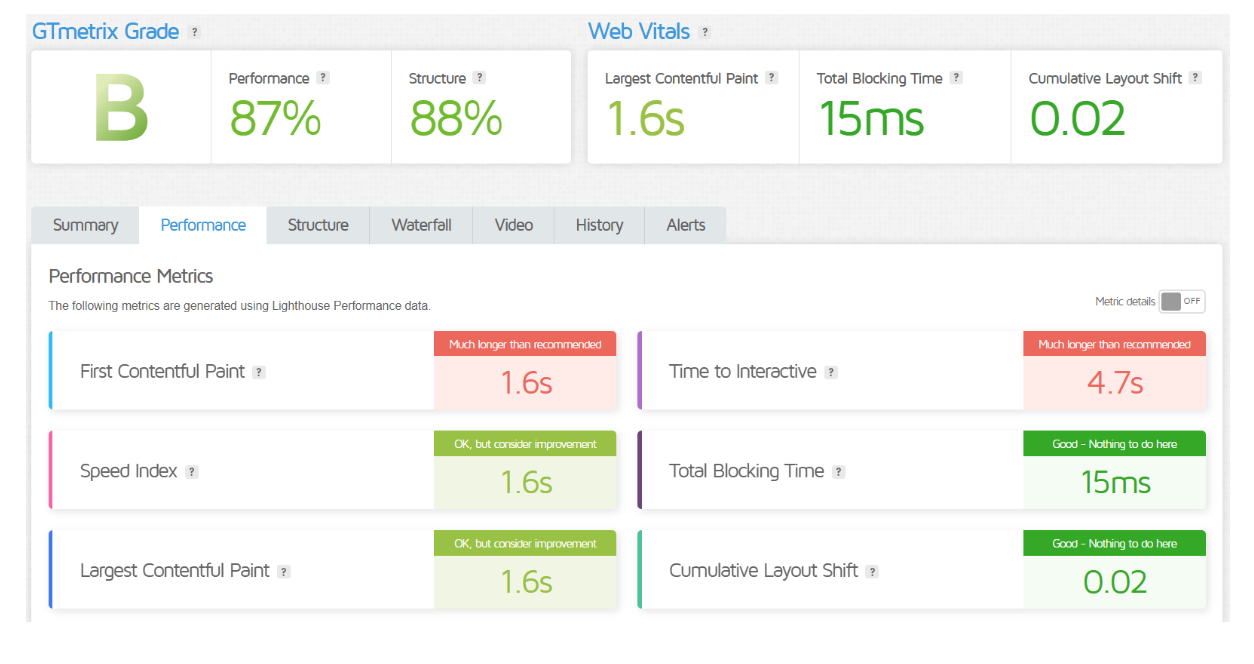
Bluehost generally provides solid performance for WordPress sites, with reliable uptime and good speed, especially on higher-tier plans. Its hosting options support scalability, though performance may vary on shared plans when sites receive heavy traffic.
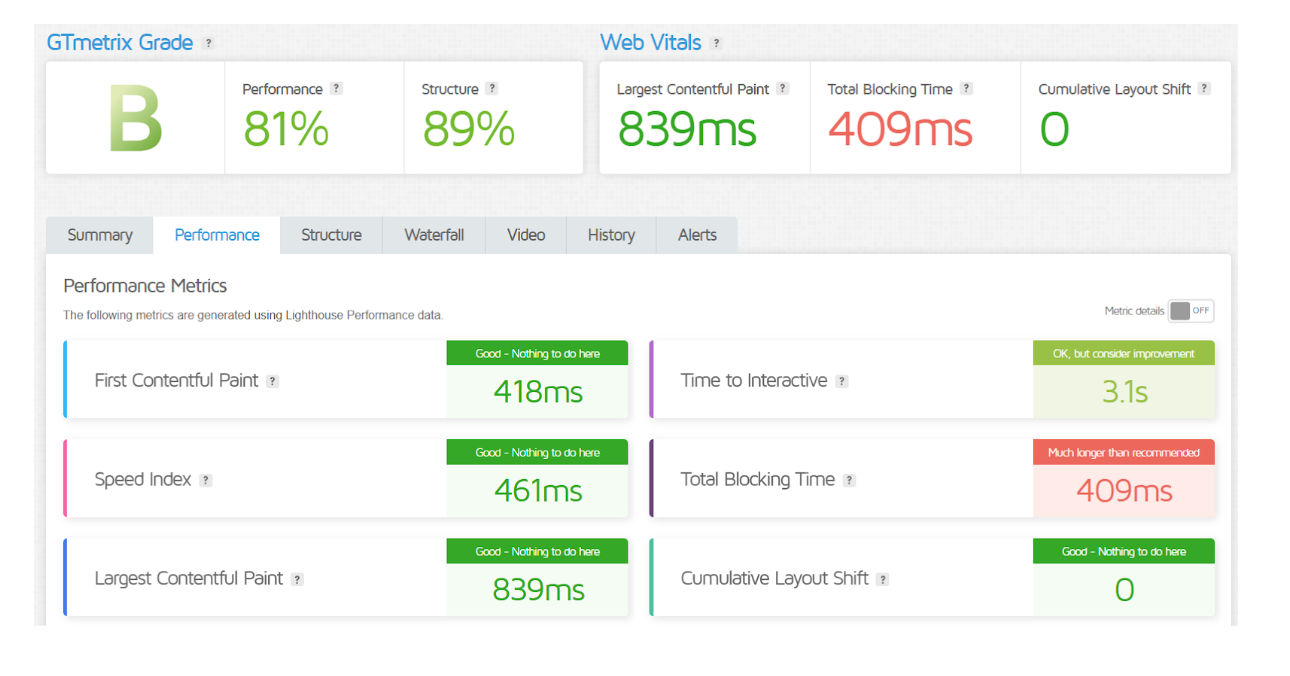
Wix offers stable performance for small to medium sites built on its platform, with fast load times due to its optimized infrastructure. However, Wix is less flexible for handling high-traffic spikes, making it better suited to smaller websites rather than high-demand applications.
Performance
| Bluehost | Wix |
| Offers shared, VPS, and dedicated hosting plans | Integrated hosting and site builder platform |
| Optimized for WordPress with 1-click installs | Drag-and-drop editor with customizable templates |
| Free domain for the first year | Free Wix subdomain; custom domain with premium plans |
| Advanced control panel (cPanel) | Intuitive interface; limited back-end control |
| eCommerce functionality on higher-tier plans | Built-in eCommerce tools for online stores |
| 24/7 customer support | Priority support on premium plans |
Uptime
Bluehost generally provides strong uptime, around 99.9%, especially on higher-tier plans where dedicated resources reduce downtime risks. Its uptime reliability makes it a solid choice for WordPress and other CMS sites that require stability.
Wix also maintains high uptime, close to 99.9%, thanks to its managed infrastructure, which is optimized for the sites built on its platform. However, Wix’s uptime performance is typically geared toward smaller websites rather than high-demand, complex sites.
Performance of BlueHost
Performance of Wix
Customer Service
Bluehost offers 24/7 customer support through chat, phone, and a knowledge base, making it accessible for users with varied technical questions. Their support is particularly helpful for WordPress-related issues, as the team is well-versed in common CMS needs.
Wix provides customer support via email, chat, and phone, though response times can vary based on the plan. Premium users receive priority support, and Wix’s comprehensive help center covers most platform-specific questions. However, Wix support may have limitations with more technical or advanced hosting queries.
Pricing Comparison
| Feature | Bluehost | Wix |
|---|---|---|
| Starting Price | ⭐⭐⭐⭐ $2.95/month (Basic Plan) | ⭐⭐⭐⭐ $16/month (Combo Plan) |
| Basic Plan | ⭐⭐⭐⭐ $2.95/month | ⭐⭐⭐⭐ $16/month |
| Most Popular Plan | ⭐⭐⭐⭐ $5.45/month (Plus Plan) | ⭐⭐⭐⭐ $27/month (Unlimited Plan) |
| eCommerce Plan | ⭐⭐⭐⭐ $9.95/month (Online Store) | ⭐⭐⭐⭐ $35/month (Business Basic) |
| Free Domain | ⭐⭐⭐⭐ Yes, for the first year | ⭐⭐⭐ No, available with premium plans |
| Free SSL Certificate | ⭐⭐⭐⭐ Yes | ⭐⭐⭐⭐ Yes |
| Money-Back Guarantee | ⭐⭐⭐⭐ 30 days | ⭐⭐⭐⭐ 14 days |
| Renewal Pricing | ⭐⭐⭐⭐ Higher than introductory rates | ⭐⭐⭐⭐ Higher than introductory rates |
| Get Started | Choose Bluehost | Choose Wix |
Bluehost
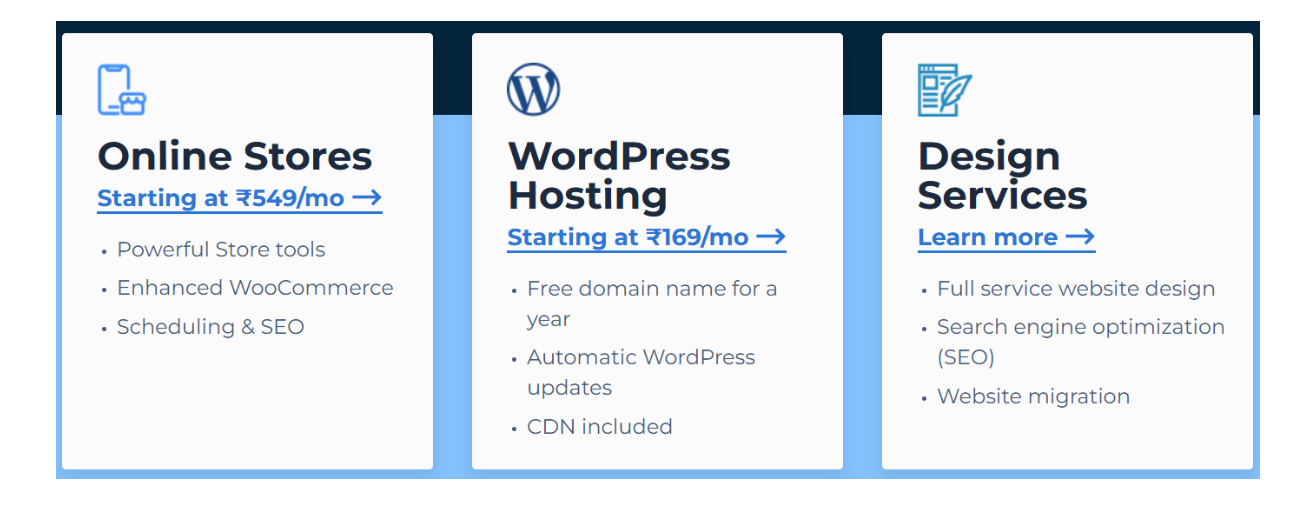
Wix

Hosting Management
| Aspect | Bluehost | Wix |
|---|---|---|
| Control Panel | cPanel for easy management | Custom dashboard |
| Setup Process | Requires some technical knowledge | Quick and user-friendly setup |
| Website Migration | Free site migration for WordPress | Limited migration options |
| Performance Monitoring | Resource usage and performance stats available | Basic performance metrics provided |
| Backup Options | Automatic backups available on higher plans | Manual backups; no automatic feature |
| Scalability | Highly scalable with various hosting options | Limited scalability for larger websites |
| Security Features | Free SSL, malware protection, and monitoring | Built-in security features |
| Updates Management | User-managed updates for plugins/themes | Automatic updates for the platform |
| Get Started | Choose Bluehost | Choose Wix |
Ease of Use
Bluehost:
- Moderate Complexity: While Bluehost offers a user-friendly interface, it requires some technical knowledge, especially for managing advanced features and settings.
- cPanel Access: Users have access to cPanel, which provides various tools for managing domains, databases, and files, but it may be overwhelming for beginners.
- WordPress Integration: The one-click WordPress installation simplifies setting up a WordPress site, but ongoing management may require familiarity with the platform.
- Support Resources: Comprehensive tutorials and customer support are available to help users navigate the platform.
Wix:
- User-Friendly Interface: Wix is designed for simplicity, featuring a drag-and-drop editor that allows users to build websites without any coding skills.
- Template Variety: Users can choose from numerous pre-designed templates, making it easy to create visually appealing sites quickly.
- All-in-One Solution: Hosting, domain registration, and site-building tools are integrated into one platform, reducing the complexity of managing multiple services.
- Intuitive Features: Built-in tools for SEO, eCommerce, and social media integration are straightforward, making it easy for users to enhance their sites.
Advantage and Disadvantage: Bluehost vs Wix
Advantage
| Aspect | Bluehost Advantages | Wix Advantages |
|---|---|---|
| Ease of Use | cPanel, WordPress-friendly | Simple drag-and-drop builder |
| Performance | Reliable with scalable options | Stable for small to medium sites |
| Customization | High, with coding and cPanel access | Wide template selection |
| Customer Support | 24/7 chat and phone | Priority support on premium plans |
| Ecommerce | Available on higher plans | Built-in on most plans |
| Pricing | Affordable starting rates, discounts | Free version; competitive for basic sites |
| Scalability | Highly scalable | Simple upgrades within Wix |
| Domain & SSL | Free domain (1st year); free SSL | Free SSL and subdomain |
| Get Started | Choose Bluehost | Choose Wix |
Disadvantage
| Aspect | Bluehost Disadvantages | Wix Disadvantages |
|---|---|---|
| Ease of Use | Complex for beginners | Limited backend control |
| Performance | Slower on shared plans | Not ideal for high-traffic sites |
| Customization | Technical setup needed for advanced | Limited beyond templates |
| Customer Support | Mixed response times | Slower support on basic plans |
| Ecommerce | Setup needed for advanced features | Limited for large stores |
| Pricing | Higher renewal rates | Costly premium plans |
| Scalability | Advanced plans pricier | Limited for resource-heavy sites |
| Domain & SSL | Domain renewals cost extra | Custom domain requires premium plan |
| Get Started | Choose Bluehost | Choose Wix |
Customer Feedback
Bluehost
- Reliability: Many users praise Bluehost for its reliable uptime and consistent performance, especially for WordPress sites.
- Customer Support: Customers appreciate the 24/7 support, often highlighting the helpfulness of the team in resolving technical issues.
- Ease of Use: While some users find the cPanel interface a bit complex, others appreciate the variety of tools available for managing their sites.
- Value for Money: Users often mention the affordability of Bluehost’s plans, especially for the features provided in entry-level packages.
Wix
- User-Friendly Interface: Customers love the drag-and-drop builder, noting that it makes website creation accessible for those with no technical skills.
- Design Flexibility: Users frequently praise the variety of templates and customization options available, allowing for visually appealing websites.
- Customer Support: Feedback on customer support is mixed, with some users reporting positive experiences while others mention delays in response times.
- Performance for Small Sites: Many users find Wix suitable for small to medium-sized sites, appreciating the built-in tools for SEO and eCommerce.
Bluehost vs Wix Security
| Aspect | Bluehost Security | Wix Security |
|---|---|---|
| SSL Certificate | Free SSL on all plans | Free SSL on all plans |
| Malware Protection | Malware scanning on premium plans | Built-in malware protection |
| Backup Options | Auto backups on higher plans | Manual backups; auto on premium |
| DDoS Protection | Included | Included |
| Firewall | Network firewall | Built-in firewall |
| Updates | User-managed for WordPress/plugins | Automatic platform updates |
| Security Alerts | Real-time alerts | Limited on basic plans |
| Access Control | Customizable on advanced plans | Basic access control |
| Get Started | Choose Bluehost | Choose Wix |
Bluehost vs Wix Customer support
Bluehost Customer Support
- Availability: Offers 24/7 support via live chat and phone, ensuring assistance is accessible at any time.
- Expertise: Support staff are knowledgeable, particularly in WordPress-related queries, providing efficient resolutions.
- Resources: Provides a comprehensive knowledge base with tutorials and guides for self-help.
- Response Time: Generally prompt, though some users report occasional delays during peak times.
Wix Customer Support
- Availability: Offers 24/7 support through live chat and phone for premium users, ensuring round-the-clock assistance.
- User-Friendliness: Support is tailored for beginners, assisting with website building and design queries.
- Resource Center: Extensive help center with articles and video tutorials to guide users through various features.
- Prioritization: Premium plan users receive priority support, leading to faster response times.
Final Recommendations
| Category | Recommended for Bluehost | Recommended for Wix |
|---|---|---|
| Ease of Use | Users with tech skills | Beginners wanting an easy builder |
| Performance | Scalable, high-performance sites | Small to medium sites with steady traffic |
| Customization | Advanced coding options | Quick setup with templates |
| Customer Support | 24/7 support for WordPress | Priority support for premium users |
| eCommerce | Customizable online stores | Small to medium eCommerce sites |
| Pricing | Affordable long-term plans | Free or low-cost starter plans |
| Scalability | Sites needing VPS or dedicated hosting | Simple sites without high demand |
| Security | Custom security options | Built-in platform security |
| Get Started | Choose Bluehost | Choose Wix |
Frequently Asked Questions
Bluehost is primarily used for web hosting, particularly for WordPress sites, offering various hosting plans like shared, VPS, and dedicated hosting.
Wix is a website builder that integrates hosting, allowing users to create and manage websites without coding knowledge.
Wix is generally easier for beginners due to its drag-and-drop interface and user-friendly setup.
Yes, both platforms allow you to use your own domain name; Bluehost offers a free domain for the first year, while Wix requires a premium plan for a custom domain.
Bluehost is better suited for high-traffic sites due to its scalable hosting options, including VPS and dedicated servers.
Bluehost offers 24/7 support via chat and phone, while Wix provides support primarily through chat and phone for premium users.
Yes, both platforms support eCommerce, with Bluehost offering advanced features on higher-tier plans and Wix providing built-in eCommerce tools on all plans.
Table of Contents
Explore More




