

Comparexpert
Comparison Between Company


Bluehost vs GoDaddy: Which Hosting Provider is Better in 2026?
Choosing the right web hosting provider is one of the most important decisions for your website. Two of the most popular options are Bluehost and GoDaddy. Both are well-known brands, but they serve different types of users.
In this detailed comparison, we’ll break down everything—features, pricing, performance, support, and more—to help you decide which one is right for you.
Table of Contents
General Info of Bluehost vs GoDaddy
Bluehost and GoDaddy are popular web hosting providers, each with unique strengths. Bluehost, known for its reliability, is officially recommended by WordPress, which makes it a top choice for WordPress-based sites. It offers various hosting options like shared, VPS, and dedicated hosting, with easy-to-use management tools, solid security, and a free domain for the first year.
GoDaddy is a versatile hosting and domain service provider with a strong reputation in domain registration and web hosting. It offers a range of hosting types, including shared, VPS, and dedicated hosting, and also provides website building tools, which are helpful for beginners. GoDaddy’s plans are often tailored to those looking for both hosting and a simple website builder in one package.
In terms of pricing and performance, Bluehost generally provides better value for WordPress users, while GoDaddy may appeal to users seeking a combined domain and hosting solution. Both offer 24/7 customer support, but Bluehost’s support is known for its WordPress expertise, while GoDaddy is popular for its accessible website builder.
Overview
| Feature | Bluehost | GoDaddy |
|---|---|---|
| Best for | WordPress users and reliable performance | Beginners needing all-in-one solutions |
| Hosting Types | Shared, VPS, Dedicated | Shared, VPS, Dedicated |
| WordPress Support | Officially recommended by WordPress | Basic WordPress support |
| Uptime | ~99.98% | ~99.9% |
| Speed Optimization | Built-in caching, SSD storage, CDN | Decent speed, better with higher plans |
| Customer Support | 24/7, WordPress-focused | 24/7, general support |
| Website Builder | Limited builder options | Easy-to-use website builder included |
| Domain Services | Free for the first year | Strong domain registration options |
| SSL Certificate | Free on all plans | Free on select plans |
| Money-Back Guarantee | 30 days | 30 days |
| Get Started | Choose Bluehost | Choose GoDaddy |
Performance
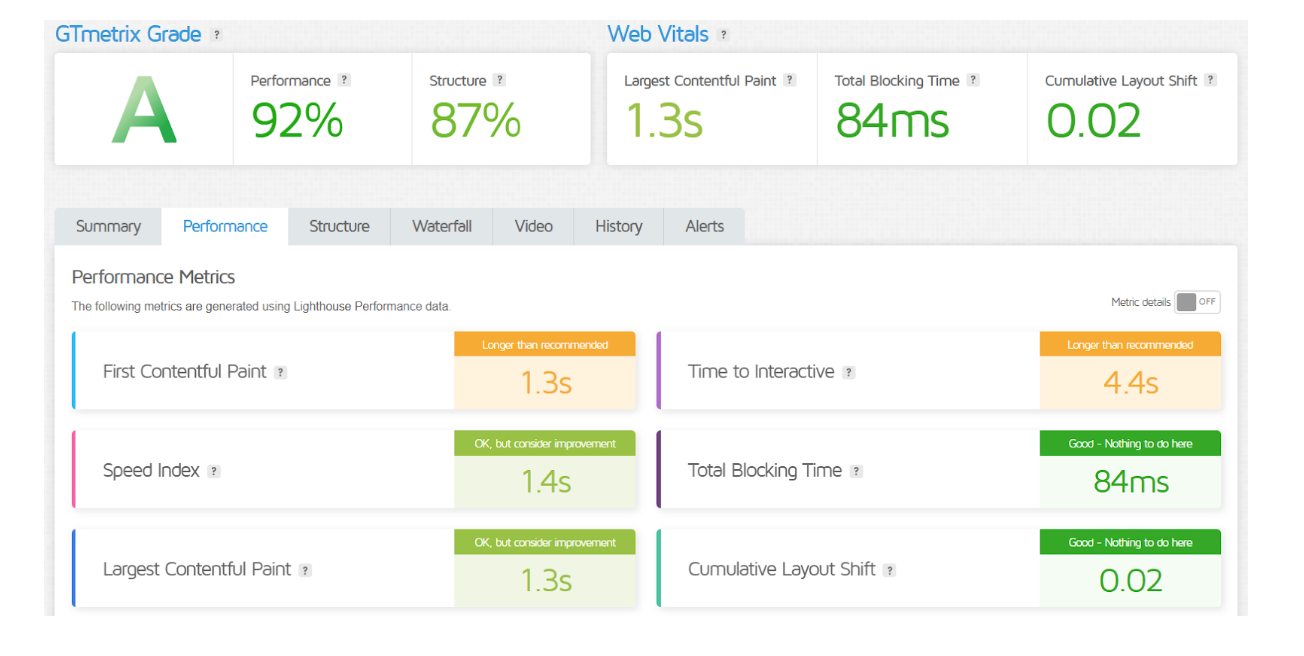
Bluehost is known for its optimized performance with WordPress, delivering consistent speeds and uptime. It includes built-in caching, SSD storage, and a CDN, helping boost load times, especially for WordPress sites.
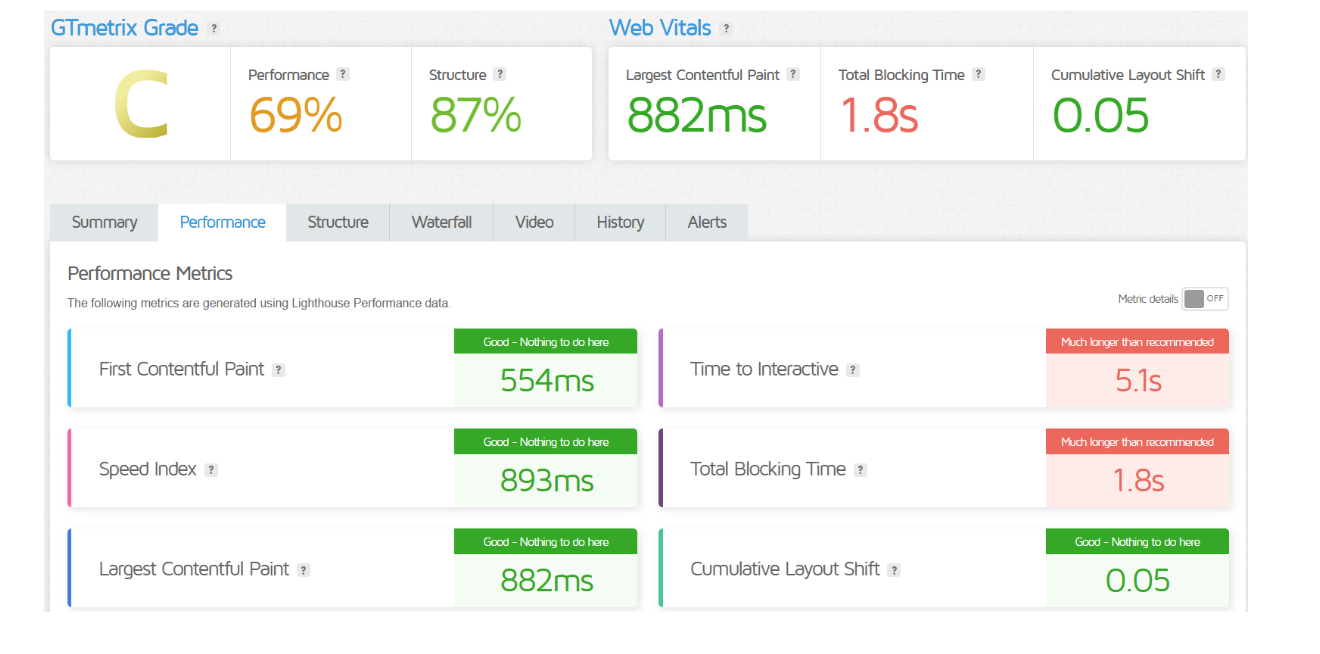
GoDaddy offers solid performance across its plans but is generally geared toward users needing a straightforward setup. Its speed and uptime are decent, though less optimized for WordPress compared to Bluehost, making it better suited for smaller sites or those focused on ease of use.
Features
| Bluehost Features | GoDaddy Features |
| Free domain for the first year | Free domain for the first year |
| Optimized for WordPress | Simple website builder included |
| Shared, VPS, and dedicated hosting | Shared, VPS, and dedicated hosting |
| Built-in caching and SSD storage | Domain registration services |
| 24/7 WordPress-focused support | 24/7 general support |
| Free SSL certificate | Free SSL on select plans |
| 30-day money-back guarantee | 30-day money-back guarantee |
Uptime
Bluehost offers a reliable uptime, typically around 99.98%, ensuring websites experience minimal downtime. Its infrastructure is designed to handle high traffic, and it includes tools like built-in caching to maintain site availability.
GoDaddy provides competitive uptime, often around 99.9%, though it can vary depending on the plan. While suitable for small to medium sites, it may experience slight fluctuations, making it less consistent than Bluehost for highly demanding sites.
Performance of BlueHost
Performance of GoDaddy
Customer Service
Bluehost offers 24/7 customer support through live chat, phone, and email, and its team is highly regarded for WordPress expertise. The support quality is consistent, with agents well-versed in hosting issues and platform-specific troubleshooting.
GoDaddy also provides 24/7 support through phone and live chat, along with a vast knowledge base. While support is accessible, response times can sometimes vary, especially during high-traffic periods, and its expertise may not be as strong with WordPress-specific queries.
Both providers offer comprehensive customer service, but Bluehost is often preferred by WordPress users for its specialized assistance, while GoDaddy is known for broad accessibility and support options that cover a wide range of hosting needs.
Pricing Comparison
| Plan Type | Bluehost Pricing | GoDaddy Pricing |
|---|---|---|
| Basic Shared | Starting at $2.95/month (3 years) | Starting at $5.99/month (3 years) |
| Plus Shared | Starting at $5.45/month (3 years) | Starting at $7.99/month (3 years) |
| Choice Plus Shared | Starting at $5.45/month (3 years) | Starting at $8.99/month (3 years) |
| VPS | Starting at $19.99/month | Starting at $29.99/month |
| Dedicated | Starting at $79.99/month | Starting at $89.99/month |
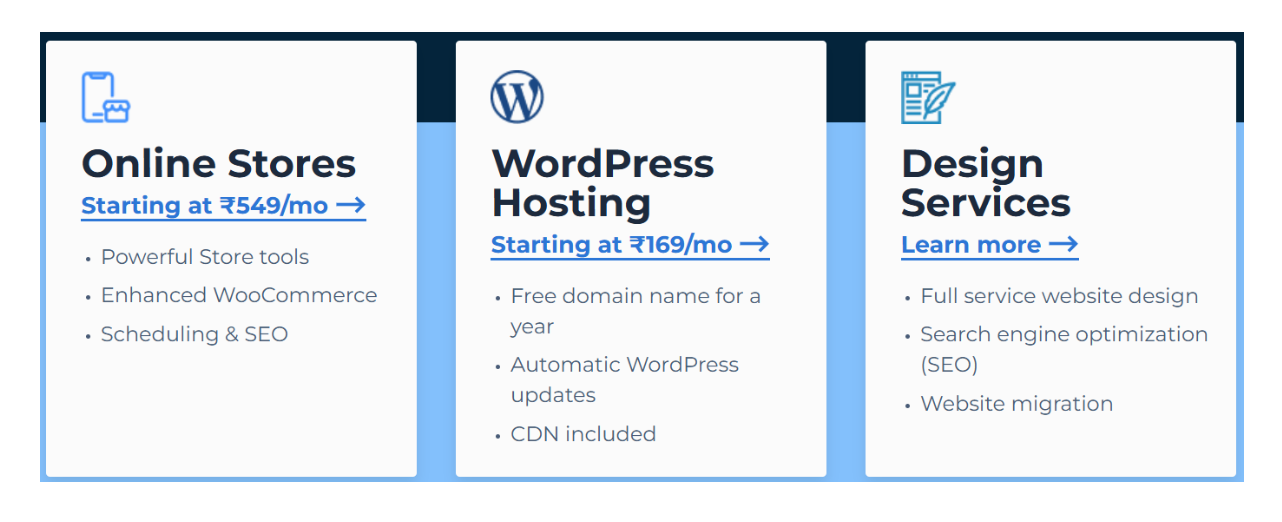
| WordPress Hosting | Starting at $2.95/month | Starting at $6.99/month |
| Renewal Rates | Higher upon renewal (varies by plan) | Higher upon renewal (varies by plan) |
| Money-Back Guarantee | 30 days | 30 days |
| Get Started | Choose Bluehost | Choose GoDaddy |
Bluehost
GoDaddy
Hosting Management
| Feature | Bluehost | GoDaddy |
|---|---|---|
| Control Panel | User-friendly interface (cPanel) | Custom control panel |
| Account Management | Easy navigation and setup | Straightforward but less intuitive |
| Domain Management | Integrated domain management | Strong domain management tools |
| One-Click Installations | Supports one-click WordPress install | One-click installations for various CMS |
| Website Migration | Free site migration services | Paid migration service available |
| Performance Monitoring | Built-in monitoring tools | Basic performance monitoring |
| Security Features | Free SSL, site backups, and security tools | Free SSL on select plans, additional security features available |
| Support Resources | Extensive knowledge base and tutorials | Comprehensive knowledge base |
| Scalability | Options to upgrade easily | Options to upgrade but can be complex |
| Get Started | Choose Bluehost | Choose GoDaddy |
Hosting Provided
Ease of Use
Bluehost:
- User-Friendly Control Panel: Utilizes cPanel, which is widely recognized for its intuitive layout and ease of navigation.
- WordPress Integration: Offers a one-click WordPress installation, making it simple for users to set up and manage their WordPress sites.
- Streamlined Setup Process: New users find the onboarding process straightforward, with guided steps to help set up their websites.
- Comprehensive Tutorials: Provides a wealth of tutorials and documentation tailored for beginners, enhancing the overall user experience.
- Managed WordPress Hosting: Bluehost handles many technical aspects, allowing users to focus on content creation rather than technical maintenance.
GoDaddy:
- Custom Control Panel: While it has a clean interface, some users find it less intuitive than cPanel, particularly for those familiar with traditional hosting dashboards.
- Website Builder: Offers an easy-to-use website builder, ideal for users who prefer a drag-and-drop approach to design.
- One-Click Installations: Provides one-click installations for popular CMSs, but the process may feel less integrated than Bluehost’s approach.
- Domain Management: GoDaddy excels in domain registration and management, offering easy access to domain settings within the dashboard.
- Learning Curve: Some users report a steeper learning curve, particularly when navigating more advanced features or migrating websites.
Advantage and Disadvantage
Advantages
| Bluehost | GoDaddy |
| Officially recommended by WordPress | Strong domain management features |
| User-friendly cPanel interface | Comprehensive range of hosting options |
| Excellent customer support | Easy-to-use website builder |
| Free domain for the first year | 24/7 customer support |
| Optimized for WordPress | Competitive initial pricing |
| Built-in caching and SSD storage | Integrated marketing tools |
Disadvantages
| Bluehost | GoDaddy |
| Higher renewal rates | Custom control panel may be less intuitive |
| Limited website builder options | Mixed reviews on customer support quality |
| Migration service may be limited | Higher prices for add-ons and renewals |
| Performance may vary during high traffic | Performance can fluctuate on lower-tier plans |
| Limited eCommerce tools | Migration services often come with fees |
| No Windows hosting option | Complex pricing structure for plans |
What Our Customers Have To Say?
Bluehost
- Positive Experiences: Many users praise Bluehost for its reliable uptime, performance, and seamless WordPress integration. Customers often highlight the ease of use of the cPanel interface.
- Support Quality: Users appreciate the responsive customer support, especially for WordPress-related queries, citing quick and knowledgeable assistance.
- Migration Services: Customers are generally satisfied with Bluehost’s free site migration service, noting a smooth transition process.
GoDaddy
- Domain Management Praise: Users frequently commend GoDaddy for its robust domain management tools, making it easy to register and manage multiple domains.
- Mixed Reviews on Support: While some customers appreciate the availability of 24/7 support, others report longer wait times and less helpful responses, especially for more complex issues.
- Ease of Use: Many users find the website builder user-friendly but express that navigating the custom control panel can be confusing for newcomers.
Security
| Security Feature | Bluehost | GoDaddy |
|---|---|---|
| SSL Certificate | Free SSL included with all plans | Free SSL on select plans |
| Site Backups | Optional daily backups (paid feature) | Backups available at an additional cost |
| Security Monitoring | Built-in security features and monitoring | Basic security features |
| Malware Protection | Free SiteLock feature on higher plans | Paid SiteLock feature available |
| DDoS Protection | Basic DDoS protection | Advanced DDoS protection available |
| Firewall | Integrated firewall | Firewall options available |
| Security Plugins | Supports various security plugins for WordPress | Limited plugin support |
| Password Protection | Options for directory password protection | Offers password protection for accounts |
| 2-Factor Authentication | Available for account security | Available for account security |
| Get Started | Choose Bluehost | Choose GoDaddy |
Customer Support
Bluehost
- 24/7 Availability: Offers round-the-clock support via live chat, phone, and email, ensuring assistance is always accessible.
- WordPress Expertise: Customer service agents are well-versed in WordPress, making them particularly helpful for users on that platform.
- Responsive Support: Users generally report quick response times and effective problem resolution.
- Comprehensive Knowledge Base: Provides extensive articles, tutorials, and FAQs that help users troubleshoot common issues independently.
- Ticketing System: Allows users to submit support tickets for non-urgent inquiries, with timely follow-ups.
GoDaddy
- 24/7 Support: Also offers 24/7 support through phone and live chat, with global reach for international users.
- Mixed Reviews on Quality: While some users praise the support, others report longer wait times and less effective responses for complex issues.
- Large Knowledge Base: Features a broad range of articles and guides, but users may find it less organized compared to Bluehost’s resources.
- Account Management Assistance: Strong focus on domain management and hosting account assistance, catering to users with diverse needs.
- Community Forums: Offers community forums where users can ask questions and share solutions, though response times may vary.
Final Recommendations
| Criteria | Recommendation for Bluehost | Recommendation for GoDaddy |
|---|---|---|
| Best for | WordPress users and those seeking ease of use | Users needing a comprehensive domain management solution |
| Performance | Strong uptime and optimized for WordPress | Reliable for small to medium sites |
| Customer Support | Excellent support, especially for WordPress | Good support, but quality may vary |
| Ease of Use | Intuitive interface and streamlined setup | User-friendly website builder available |
| Pricing | Competitive initial pricing with free domain | Good initial pricing, but higher renewal costs |
| Security Features | Comprehensive security features included | Basic security features with optional upgrades |
| Scalability | Easy upgrades as sites grow | Scalable plans, but can be complex to navigate |
| Migration Services | Free site migration service | Paid migration service |
| Recommended For | Beginners and WordPress-focused sites | Users wanting all-in-one domain and hosting solutions |
| Get Started | Choose Bluehost | Choose GoDaddy |
Frequently Asked Questions
Bluehost offers shared, VPS, dedicated, and WordPress hosting plans, catering to a variety of website needs.
Yes, GoDaddy provides WordPress hosting plans that include one-click installations and optimized performance for WordPress sites.
Bluehost typically offers around 99.98% uptime, while GoDaddy provides about 99.9% uptime, making both generally reliable options.
Both Bluehost and GoDaddy offer 24/7 customer support via live chat and phone. Bluehost is noted for its WordPress expertise, while GoDaddy has mixed reviews on support quality.
Yes, Bluehost includes free SSL certificates with all hosting plans, while GoDaddy offers free SSL on select plans.
Bluehost provides free site migration services, while GoDaddy offers paid migration services for transferring websites.
Both Bluehost and GoDaddy offer a 30-day money-back guarantee on their hosting plans.
Table of Contents
Explore More




