

Comparexpert
Comparison Between Company


BoldGrid vs Wix: Which Website Builder is Better in 2026?
Choosing the right website builder is crucial for creating a professional online presence. Two popular options—BoldGrid and Wix—offer powerful tools but cater to different types of users.
In this detailed comparison, we’ll break down features, pricing, ease of use, customization, and performance to help you decide which platform is best for your needs.
Table of Contents
General Info of BoldGrid vs Wix
BoldGrid is a WordPress plugin that simplifies website creation with a drag-and-drop interface and customizable templates. It offers SEO tools, making it user-friendly for those seeking the flexibility of WordPress without extensive coding skills.
Wix is a standalone website builder that enables users to create sites quickly using a drag-and-drop editor and a wide range of templates. It includes integrated tools for blogging, e-commerce, and SEO, catering to various users from personal projects to small businesses.
Key Differences: BoldGrid is tied to WordPress and requires third-party hosting, while Wix is an all-in-one platform with included hosting. Wix is typically easier for beginners, while BoldGrid offers more versatility for users who want to leverage WordPress’s plugin ecosystem.
Overview
| Feature | BoldGrid | Wix |
|---|---|---|
| Platform Type | WordPress plugin for website building | Standalone website builder |
| Ease of Use | User-friendly but requires some WordPress knowledge | Extremely user-friendly for all skill levels |
| Design Flexibility | Highly customizable with various themes and plugins | Offers numerous templates and customization options |
| E-commerce Support | Requires plugins like WooCommerce | Built-in e-commerce functionality |
| SEO Features | Integrated SEO tools and plugins | Built-in SEO features for easy optimization |
| Performance | Dependent on chosen hosting provider | Consistently optimized performance on the platform |
| Customer Support | Varies by hosting provider; ticket-based support | 24/7 support via email and chat |
| Storage | Depends on hosting provider | Unlimited storage on higher-tier plans |
| Ideal Users | Suitable for those familiar with WordPress | Great for beginners and small businesses |
| Get Started | Choose BoldGrid | Choose Wix |
Performance
BoldGrid’s performance largely depends on the chosen WordPress hosting provider. With good hosting and proper optimization, BoldGrid can deliver fast load times and responsive site performance. However, users may experience variability based on their host’s infrastructure and settings.
Wix provides a consistently optimized environment, ensuring stable performance across all sites hosted on its platform. Its built-in features, such as automatic image optimization and integrated content delivery networks (CDNs), contribute to quick load times and a smooth user experience, even during high traffic.
Features
| BoldGrid | Wix |
| Drag-and-drop website builder | Drag-and-drop editor |
| Customizable WordPress themes | Wide variety of templates |
| SEO tools and plugins | Integrated SEO tools |
| E-commerce capabilities with plugins | Built-in e-commerce features |
| Blogging tools and management | Integrated blogging platform |
| Supports multiple content types | Supports various media formats |
| Community forums and knowledge base | Extensive help center and video tutorials |
| Requires third-party hosting | All-in-one platform with included hosting |
| Flexibility for advanced users | User-friendly for beginners |
Uptime
The uptime for BoldGrid sites is contingent on the reliability of the chosen WordPress hosting provider. Reputable hosts typically offer uptime guarantees of 99.9%, but actual performance can vary, making it essential to select a reliable hosting service to ensure consistent availability.
Wix offers strong uptime performance, with a guarantee of 99.9% availability. Its dedicated infrastructure is designed to handle high traffic and maintain site reliability, making it a dependable choice for users seeking consistent accessibility for their websites.
Customer Service
BoldGrid primarily offers support through a ticketing system, with additional resources available depending on the hosting provider. Users can access a knowledge base filled with tutorials and guides, as well as community forums for peer assistance, but the quality of support can vary based on the hosting service.
Wix provides multiple support channels, including a help center with extensive articles, video tutorials, and a dedicated customer support team available via email and chat. Users often praise the responsiveness and helpfulness of Wix’s support staff, making it easier to resolve issues quickly.
While BoldGrid relies on its hosting provider for support quality, Wix offers a more robust and consistent support experience directly through its platform. This makes Wix generally more user-friendly for those needing immediate assistance or guidance.
Pricing Comparison
| Feature Plan | BoldGrid | Wix |
|---|---|---|
| Free Plan | ★★★☆☆ (Limited features available) | ★★☆☆☆ (No free plan available) |
| Basic Paid Plan | ★★★★☆ ($5/month, hosting separate) | ★★★☆☆ ($13/month) |
| Mid-Tier Plan | ★★★★☆ ($10/month with more features) | ★★★★☆ ($20/month) |
| Top-Tier Plan | ★★★★☆ ($15–$20/month with full customization) | ★★★★☆ ($33/month) |
| E-commerce Support | ★★★☆☆ (Requires WooCommerce plugin) | ★★★★★ (Included in Portfolio and Pro plans) |
| Storage Limits | ★★★☆☆ (Varies by hosting provider) | ★★★★★ (Unlimited on all paid plans) |
| Trial Period | ★★★☆☆ (Varies by hosting provider) | ★★★★★ (14-day free trial) |
| Ideal Users | ★★★★☆ (General users needing WordPress) | ★★★★★ (Photographers needing dedicated storage) |
| Get Started | Choose BoldGrid | Choose Wix |
Hosting Provided by BoldGrid vs Wix
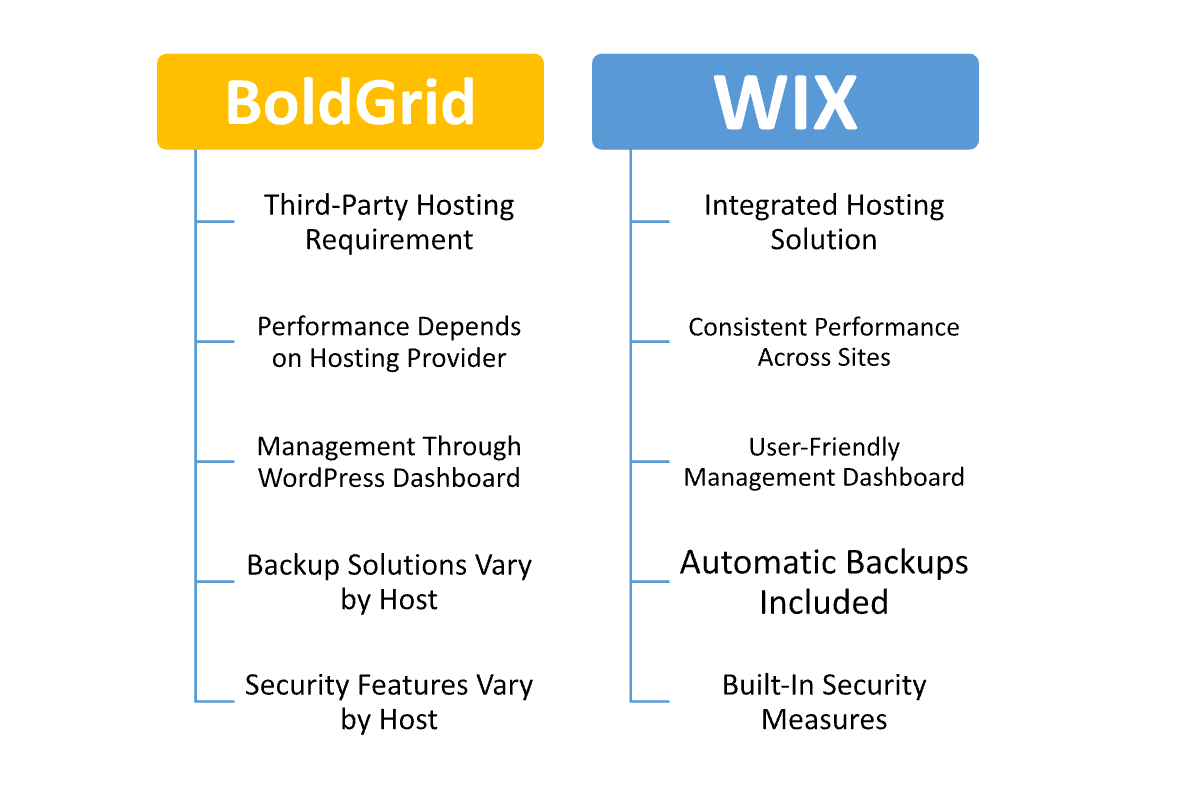
Hosting Management
| Feature | BoldGrid | Wix |
|---|---|---|
| Hosting Requirement | Requires third-party WordPress hosting | Integrated hosting included |
| Management Interface | Managed through WordPress dashboard | User-friendly dashboard for easy site management |
| Performance Control | Depends on the hosting provider’s capabilities | Optimized for performance with built-in features |
| Backup Solutions | Depends on the hosting provider; may require plugins | Automatic backups included |
| Security Features | Varies by hosting provider; needs additional plugins | Built-in security measures, including SSL |
| Scalability | Limited by the hosting provider’s plan | Easy scalability with tiered pricing plans |
| Technical Support | Varies based on the hosting provider | 24/7 dedicated support directly from Wix |
| Migration Options | Manual migration required if changing hosts | Easy import options for transferring content |
| Updates and Maintenance | User responsible for WordPress updates | Automatic updates and maintenance for the platform |
| Get Started | Choose BoldGrid | Choose Wix |
Ease of Use
BoldGrid
- Intuitive Interface: BoldGrid features a drag-and-drop editor that simplifies website building, making it accessible for users with limited technical skills.
- WordPress Familiarity: Since it operates as a plugin for WordPress, users familiar with WordPress will find it easy to navigate and utilize its features.
- Template Library: Offers a variety of pre-designed templates, allowing users to quickly start building their sites without starting from scratch.
- Built-in Tutorials: Provides helpful guides and video tutorials to assist users in understanding features and troubleshooting issues.
- Plugin Compatibility: Users can easily integrate numerous WordPress plugins for additional functionalities, enhancing ease of customization.
Wix
- Fully Visual Builder: Wix’s drag-and-drop editor allows users to create websites without any coding knowledge, making it extremely beginner-friendly.
- Extensive Template Selection: Offers a large library of customizable templates tailored for various industries, helping users start quickly.
- Simplified Setup Process: Users can create and publish websites in just a few steps, with minimal technical barriers.
- Integrated Tools: Includes built-in tools for blogging, e-commerce, and SEO, streamlining the process of adding functionalities.
- Support Resources: Provides a comprehensive help center with FAQs, video tutorials, and a community forum for quick assistance.
Advantage and Disadvantage: BoldGrid vs Wix
Advantage
| BoldGrid | Wix |
| Integrated with WordPress for extensive flexibility | All-in-one platform with included hosting |
| High customization options through plugins | User-friendly drag-and-drop editor |
| Suitable for users familiar with WordPress | Quick setup process for beginners |
| Wide variety of themes and templates | Extensive template library for various industries |
| SEO tools and optimization capabilities | Built-in SEO tools and features |
| E-commerce capabilities via plugins | Comprehensive e-commerce solutions included |
| Strong community support and resources | 24/7 customer support available |
| Control over hosting options | Automatic updates and maintenance handled by Wix |
| Ideal for users wanting advanced functionalities | Perfect for users looking for simplicity |
Disadvantages
| BoldGrid | Wix |
| Relies on third-party hosting providers | Limited customization options for advanced users |
| Performance may vary based on hosting choice | Pricing can increase significantly with add-ons |
| Support quality can vary depending on the host | Some users report limitations in SEO capabilities |
| Requires knowledge of WordPress for full utilization | Less flexibility in migrating sites away from Wix |
| Learning curve for users unfamiliar with WordPress | Templates may feel restrictive for experienced designers |
What Our Customers Have To Say?
BoldGrid
- User-Friendly Interface: Many customers appreciate the intuitive drag-and-drop builder, highlighting its ease of use, especially for those new to WordPress.
- Flexibility and Customization: Users often commend the extensive customization options available through WordPress plugins and themes, allowing them to create unique sites tailored to their needs.
- Support Experiences: Feedback on customer support is mixed, with some users expressing satisfaction while others report challenges in receiving timely assistance from hosting providers.
- Learning Curve: Some users note that there is a learning curve associated with using WordPress, particularly for those unfamiliar with the platform.
- Overall Satisfaction: Many users find value in the combination of BoldGrid’s tools with WordPress, enabling them to create professional websites effectively.
Wix
- Ease of Use: Customers frequently praise Wix for its straightforward drag-and-drop editor, making it easy for anyone to create a website without technical skills.
- Design Options: Users love the variety of templates and design flexibility, allowing for visually appealing websites that cater to different industries.
- Customer Support: Many users report positive experiences with Wix’s customer support, noting quick responses and helpful assistance via chat and email.
- Performance Consistency: Users appreciate the consistent uptime and performance, making their sites reliable for visitors.
- E-commerce Features: Customers involved in online selling value the built-in e-commerce features, which streamline the process of setting up and managing online stores.
Security:
| Feature | BoldGrid | Wix |
|---|---|---|
| Security Measures | Depends on hosting provider | Built-in security features |
| SSL Support | Requires SSL setup through hosting | Automatic SSL for all sites |
| Data Protection | Varies by host; may need plugins for backups | Strong data protection with automatic backups |
| Malware Protection | Varies by hosting provider; additional plugins may be needed | Regular scans for vulnerabilities and malware |
| User Authentication | Standard WordPress user roles and permissions | Customizable privacy settings for galleries |
| Compliance | Compliance depends on the hosting provider | PCI compliance for e-commerce functionality |
| Support for Security Issues | Varies based on the hosting provider’s support | Dedicated support for security-related concerns |
| Backup Solutions | Depends on the hosting provider; may require plugins | Automatic backups included |
| Firewall Protection | Generally relies on the hosting provider | Built-in firewall and security measures |
| Get Started | Choose BoldGrid | Choose Wix |
Customer Support:
BoldGrid
- Support Channels: BoldGrid primarily offers support through a ticketing system, with some hosting providers potentially offering chat or phone support.
- Knowledge Base: Users can access a comprehensive knowledge base filled with tutorials, guides, and FAQs to help troubleshoot common issues.
- Community Forums: BoldGrid has community forums where users can ask questions and share experiences, providing a platform for peer assistance.
- Response Times: Response times can vary significantly based on the hosting provider, leading to mixed user experiences regarding support speed.
- Quality of Support: Customer feedback on support quality is mixed; while some users report satisfactory experiences, others express frustration with delays and limited assistance.
Wix
- Multiple Support Options: Wix offers various support channels, including a help center, email support, and live chat, ensuring users have access to assistance when needed.
- Extensive Help Center: The help center includes a wide array of articles, video tutorials, and FAQs that cover common questions and issues, making self-service support accessible.
- Community Forum: Wix features an active community forum where users can connect, share tips, and seek advice from fellow Wix users.
- Quick Response Times: Many users report quick response times when reaching out for support, contributing to a generally positive experience.
- Expert Assistance: The support team is often praised for its knowledge and helpfulness, particularly regarding site-building and technical issues.
Final Recommendations
| Final Recommendations | BoldGrid | Wix |
|---|---|---|
| Best For | Users looking for flexibility and customization through WordPress | Beginners and small businesses wanting an all-in-one solution |
| Ease of Use | Good for users familiar with WordPress | Extremely user-friendly for all skill levels |
| Customization | Highly customizable with WordPress plugins | Offers a variety of templates but less flexibility for advanced users |
| E-commerce Features | Requires additional plugins for full functionality | Built-in e-commerce features |
| Performance | Dependent on hosting provider; variable performance | Consistent performance with optimized infrastructure |
| Support | Varies by hosting provider; generally mixed reviews | 24/7 support with positive user feedback |
| Security | Security varies based on hosting provider | Strong built-in security measures |
| Pricing | Lower initial costs but varies by hosting | Higher pricing but includes many features |
| Overall Recommendation | Ideal for users wanting advanced features and control | Best for users seeking a straightforward website-building experience |
| Get Started | Choose BoldGrid | Choose Wix |
Frequently Asked Questions
BoldGrid is a website-building tool that acts as a plugin for WordPress, simplifying the creation and management of websites with a user-friendly interface.
Yes, BoldGrid requires a third-party WordPress hosting provider to operate, as it is built on the WordPress platform.
Yes, BoldGrid is designed to be user-friendly, making it accessible for beginners, especially those familiar with WordPress.
Yes, you can set up e-commerce functionality using plugins like WooCommerce, allowing you to sell products online.
BoldGrid provides support primarily through a ticketing system, with additional resources such as a knowledge base and community forums, though the quality may vary based on your hosting provider.
Wix is a standalone website builder that allows users to create and manage websites easily through a drag-and-drop interface without needing coding skills.
Wix does not offer a free plan, but it does provide a 14-day free trial to explore its features.
Table of Contents
Explore More




