

Comparexpert
Comparison Between Company


Kinsta vs DreamHost: Which Hosting Provider Excels in Compression and Performance?
Choosing the right web hosting provider is crucial for website speed, performance, and overall user experience. Among popular options, Kinsta and DreamHost stand out, each offering a range of features to optimize website performance. In this comparison, we focus on compression capabilities, performance optimization, and overall hosting efficiency.
Table of Contents
General Info of Kinsta vs DreamHost
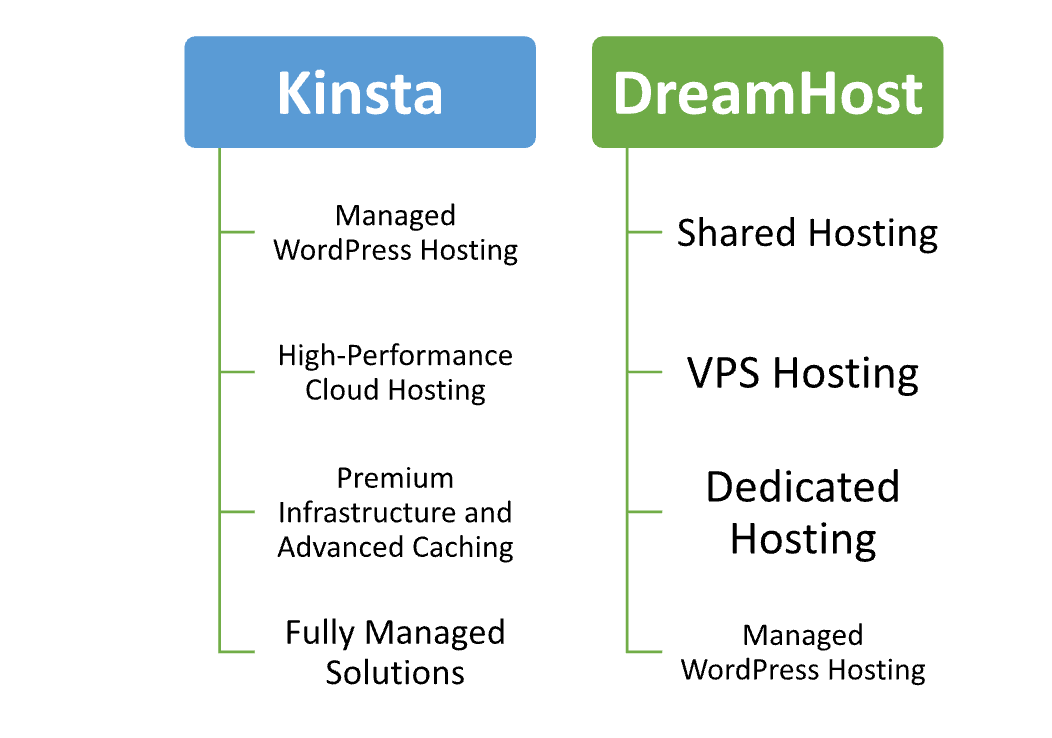
Kinsta is a premium managed WordPress hosting provider known for high performance and scalability. It operates on Google Cloud’s infrastructure, offering features like automatic scaling, daily backups, and advanced site monitoring. Kinsta is particularly suited for businesses and developers who prioritize speed, uptime, and ease of management, though its higher pricing may not appeal to budget-conscious users.
DreamHost, on the other hand, is a versatile hosting provider offering a wide range of services, including shared, VPS, and dedicated hosting alongside managed WordPress plans. It emphasizes affordability, user-friendly tools, and unlimited storage and bandwidth options. DreamHost is ideal for beginners, small businesses, or those seeking cost-effective solutions with reliable customer support.
In summary, Kinsta excels in performance and premium managed hosting, making it a great choice for professionals and enterprises, while DreamHost offers broader hosting options and affordability, catering to a wider audience, including entry-level users.
Overview
| Feature | Kinsta | DreamHost |
|---|---|---|
| Hosting Type | Managed WordPress only | Shared, VPS, WordPress, and dedicated hosting |
| Infrastructure | Google Cloud Platform | Custom-built servers with SSD storage |
| Performance | Enterprise-grade speed with server-level caching | Solid performance, best for small to medium sites |
| Uptime Guarantee | 99.9% SLA-backed | 100% uptime guarantee with compensation |
| Backup Options | Automatic daily backups | Automatic backups on managed plans |
| Customer Support | 24/7 live chat with WordPress experts | 24/7 ticket support, live chat during business hours |
| Ease of Use | Intuitive custom dashboard | User-friendly control panel |
| Target Audience | Businesses, developers, high-traffic sites | Budget-conscious users, small businesses |
| Pricing | Premium pricing for advanced features | Affordable with flexible plans |
| Get Started | Choose Kinsta | Choose DreamHost |
Performance
Kinsta delivers exceptional performance with its use of Google Cloud’s premium-tier network and C2 virtual machines, ensuring fast load times and minimal latency. It employs server-level caching, a custom CDN integration, and advanced tools like PHP 8.1 and HTTP/3 to optimize website speed. Kinsta is highly reliable, making it ideal for high-traffic websites or applications requiring top-tier performance.
DreamHost offers solid performance for its price point, especially with its managed WordPress and VPS plans, which include SSD storage and caching tools like Varnish. However, it doesn’t match Kinsta’s enterprise-grade speed or infrastructure. While suitable for most small to medium-sized sites, DreamHost may not consistently deliver the same high performance under heavy traffic or complex requirements.
Features
| Kinsta | DreamHost |
| Managed WordPress hosting only | Offers shared, VPS, WordPress, and dedicated hosting |
| Google Cloud infrastructure | Custom-built servers with SSD storage |
| Free CDN and server-level caching | Caching tools like Varnish (for managed plans) |
| Automatic daily backups | Automated backups for managed plans |
| Custom performance monitoring tools | Basic monitoring and stats tools |
| 24/7 expert live chat support | 24/7 ticket support, live chat during business hours |
| Staging environments for all plans | Staging environments for managed WordPress plans |
| High-tier performance optimizations | Cost-effective solutions with reliable performance |
Uptime
Kinsta provides excellent uptime, leveraging Google Cloud’s robust infrastructure and redundancy features to ensure near-perfect availability. Its monitoring tools check sites every two minutes, identifying and resolving potential issues quickly. Kinsta’s SLA-backed 99.9% uptime guarantee ensures reliability for mission-critical websites.
DreamHost also boasts strong uptime performance, with a 100% uptime guarantee backed by compensation for downtime. It uses SSD storage and custom server configurations to maintain reliability. While dependable for most users, DreamHost’s uptime can occasionally be less consistent under peak traffic compared to Kinsta’s enterprise-grade systems.
Pricing Comparison
| Feature | Kinsta | DreamHost |
|---|---|---|
| Starting Price | ★ $35/month (basic WordPress plan) | ★ $2.59/month (shared hosting plan) |
| Managed WordPress | ★ $35–$1,650+/month | ★ $16.95/month |
| VPS Hosting | Not offered | ★ $10–$80/month |
| Dedicated Hosting | Not offered | ★ Starting at $149/month |
| Billing Options | ★ Monthly and annual plans | ★ Monthly, annual, and 3-year plans |
| Refund Policy | ★ 30-day money-back guarantee | ★ 97-day money-back guarantee |
| Get Started | Choose Kinsta | Choose DreamHost |
Customer Service
Kinsta offers exceptional customer service through 24/7 live chat support via an integrated dashboard. Its support team consists of WordPress experts who provide fast, detailed, and personalized assistance. Kinsta also maintains a rich knowledge base and proactive problem resolution, catering to developers and business users needing premium support.
DreamHost provides reliable customer service with 24/7 ticket-based support and a live chat option available during business hours. It also offers an extensive help center and community forums. While responsive and helpful, DreamHost’s support may not match Kinsta’s speed or depth of expertise, particularly for advanced or technical issues.
Hosting Provided by Kinsta vs DreamHost
Hosting Management
| Feature | Kinsta | DreamHost |
|---|---|---|
| Control Panel | Custom Kinsta Dashboard | Custom DreamHost Panel |
| Managed Hosting | Fully managed WordPress hosting | Managed WordPress hosting (select plans) |
| Backups | Automatic daily backups | Automatic backups (managed plans) |
| Performance Optimization | Built-in caching, CDN integration, and performance monitoring | Caching (Varnish for managed plans) |
| Security Features | DDoS protection, daily malware scans, SSL support | Free SSL, custom firewall |
| Staging Environment | Staging environment for all plans | Staging environment for managed WordPress plans |
| Updates | Automatic updates for WordPress core and plugins | Automatic updates for managed WordPress plans |
| Support | 24/7 live chat with WordPress experts | 24/7 ticket support, live chat during business hours |
| Get Started | Choose Kinsta | Choose DreamHost |
Ease of Use
Kinsta:
- Custom Dashboard: Kinsta offers a user-friendly and intuitive custom dashboard that makes site management, performance tracking, and configuration easy.
- One-Click Staging: Create and deploy staging environments with a single click, simplifying testing and site updates.
- Automatic Backups: Backups are handled automatically, with easy restore options, reducing manual work and ensuring data security.
- Performance Monitoring: Built-in performance tools provide detailed insights on site speed and server health, without needing third-party tools.
- Automatic Updates: WordPress core and plugins are automatically updated, ensuring the latest features and security patches without manual intervention.
- 24/7 Expert Support: Kinsta’s WordPress experts are available round-the-clock via live chat, assisting users with any challenges quickly.
DreamHost:
- Custom Control Panel: DreamHost’s custom control panel is designed for simplicity, making it easy to manage hosting services without complexity.
- Quick Setup: One-click WordPress installation and easy setup for all hosting types.
- Manage Multiple Sites: Supports managing multiple sites and hosting plans from a single dashboard.
- User-Friendly Tools: DreamHost offers simple tools for managing domains, emails, and websites, ideal for beginners.
- Automatic Backups: Similar to Kinsta, DreamHost includes automatic backups with managed hosting plans, simplifying data recovery.
- Support Availability: 24/7 ticket-based support and live chat (during business hours) offer responsive assistance when needed.
Advantage and Disadvantage:
Advantage
| Kinsta | DreamHost |
| Premium infrastructure on Google Cloud | Affordable hosting plans for various budgets |
| High-performance managed WordPress hosting | Variety of hosting options (shared, VPS, dedicated) |
| Excellent support with WordPress experts | Easy-to-use control panel and user-friendly tools |
| Automatic daily backups with easy restore options | Reliable uptime and 100% uptime guarantee |
| Built-in performance monitoring and optimization tools | Strong focus on supporting small to medium websites |
| Staging environments for seamless testing and deployment | Free domain included with certain plans |
Disadvantage:
| Kinsta | DreamHost |
| Expensive pricing, especially for small businesses | Higher renewal rates after initial term |
| Limited to managed WordPress hosting | Shared hosting can experience slower performance during high traffic |
| No VPS or dedicated hosting options | Limited support hours for live chat (business hours only) |
| No email hosting included in basic plans | Some advanced features are less intuitive |
| Only offers cloud-based hosting | Customer support can have slower response times during peak periods |
| No cPanel or traditional control panel | Fewer premium performance optimization tools compared to competitors |
What Our Customers Have To Say?
Kinsta:
- Excellent Performance: Customers consistently praise Kinsta for its fast load times and high uptime, especially for high-traffic websites.
- Superior Support: Users highlight Kinsta’s knowledgeable and responsive customer support, particularly WordPress expertise.
- Ease of Use: Many users appreciate the intuitive dashboard and simple site management tools that make hosting straightforward.
- Reliable Backups: Kinsta’s automatic backups and easy restore options are frequently mentioned as a major benefit for website owners.
- Premium Experience: Reviewers often note the premium experience, emphasizing the high-end infrastructure and enterprise-level performance.
DreamHost:
- Affordable and Reliable: Customers value DreamHost for offering cost-effective hosting with reliable uptime and performance for smaller websites.
- User-Friendly Interface: The DreamHost control panel is frequently praised for being intuitive and easy to navigate.
- Strong Customer Service: Many users appreciate DreamHost’s support team, though some wish for quicker response times during peak periods.
- Versatile Hosting Options: Reviewers like the range of hosting plans, from shared to VPS, providing flexibility for different website needs.
- Great for Beginners: DreamHost is often recommended for beginners and small business owners who need simple and affordable hosting solutions.
Security:
| Security Feature | Kinsta | DreamHost |
|---|---|---|
| SSL Certificates | Free SSL certificates included | Free SSL certificates included |
| DDoS Protection | Advanced DDoS protection | Basic DDoS protection |
| Malware Scanning | Daily malware scans and proactive monitoring | Malware scanning on managed WordPress plans |
| Firewalls | Custom firewalls and security measures | Custom firewall configurations |
| Two-Factor Authentication (2FA) | Available for all accounts | Available for all accounts |
| Automatic Backups | Daily automatic backups with easy restore | Automatic backups on managed plans |
| Security Patches | Automatic updates for WordPress core and plugins | Automatic updates for WordPress core and plugins |
| Hack Protection | Proactive hack detection and remediation | Security monitoring on managed WordPress plans |
| Get Started | Choose Kinsta | Choose DreamHost |
Customer Support:
Kinsta:
- 24/7 Expert Support: Available around the clock via live chat, providing quick and reliable assistance.
- WordPress Specialists: Support agents are highly knowledgeable in WordPress, offering expert help on complex issues.
- Fast Response Times: Customers report quick and efficient responses, often resolving issues in minutes.
- Proactive Monitoring: Kinsta proactively monitors websites and alerts users to potential issues before they arise.
- In-Depth Knowledge Base: Kinsta has a well-organized knowledge base with detailed articles and tutorials for self-service support.
- Personalized Assistance: Users praise the personalized service, as agents are familiar with their account details and issues.
DreamHost:
- 24/7 Ticket Support: DreamHost offers 24/7 support via ticket-based system, with response times typically within a few hours.
- Live Chat Availability: Live chat is available during business hours, offering real-time assistance during peak times.
- Community Forums: DreamHost has active community forums where users can ask questions and share knowledge.
- Knowledge Base: DreamHost provides an extensive knowledge base and step-by-step guides to help users troubleshoot issues.
- Phone Support (Paid Plans): Premium support, including phone support, is available for higher-tier hosting plans.
- Helpful for Beginners: Many customers find DreamHost’s support useful for troubleshooting basic issues, especially for beginners.
Final Recommendations
| Criteria | Kinsta | DreamHost |
|---|---|---|
| Best For | High-traffic websites, businesses, developers | Budget-conscious users, small businesses |
| Performance | Excellent, fast load times, enterprise-grade | Solid for smaller sites, reliable performance |
| Ease of Use | Intuitive custom dashboard, simple management | User-friendly control panel, easy setup |
| Support | 24/7 WordPress expert support, fast response | 24/7 ticket support, live chat during business hours |
| Security | Advanced DDoS protection, daily malware scans | Basic DDoS protection, malware scanning for managed plans |
| Pricing | Premium pricing, higher cost for small sites | Affordable, budget-friendly options |
| Backup & Restoration | Automatic daily backups, easy restores | Automatic backups on managed plans |
| Target Audience | Enterprises, high-traffic or complex sites | Beginners, personal sites, small businesses |
| Hosting Options | Managed WordPress hosting only | Shared, VPS, dedicated, and WordPress hosting |
| Get Started | Choose Kinsta | Choose DreamHost |
Frequently Asked Questions
Kinsta offers managed WordPress hosting on Google Cloud’s premium-tier infrastructure, focusing on performance and scalability.
Yes, DreamHost is beginner-friendly with an intuitive control panel and easy setup for shared hosting and managed WordPress plans.
No, Kinsta does not include email hosting. You would need to use a third-party service for email functionality.
DreamHost offers automatic backups for all managed WordPress plans, and users can restore their websites easily from these backups.
Yes, Kinsta provides 24/7 live chat support with WordPress experts who can assist with technical issues.
DreamHost offers live chat support during business hours, and 24/7 support is available via a ticket-based system.
Yes, DreamHost allows you to easily upgrade from shared hosting to VPS or dedicated hosting as your website grows.
Table of Contents
Explore More




