

Comparexpert
Comparison Between Company


Kinsta vs WPX Hosting: Which Managed WordPress Hosting is Right for You?
Choosing the right WordPress hosting provider can make a huge difference in your website’s speed, security, and overall performance. Among the top contenders in the managed WordPress hosting market are Kinsta and WPX Hosting. Both offer premium services, but which one is the better fit for your needs? In this post, we’ll break down their features, performance, pricing, and more to help you decide.
Table of Contents
General Info of Kinsta vs WPX Hosting
Kinsta and WPX Hosting are premium WordPress hosting providers known for performance, speed, and security. Kinsta uses Google Cloud Platform, delivering fast load times and scalable performance, with features like automatic backups, staging environments, and a user-friendly interface, making it ideal for developers and businesses needing advanced solutions.
WPX Hosting offers optimized WordPress hosting with its custom CDN for fast content delivery. It’s praised for excellent customer support available 24/7 via live chat. WPX provides similar features like free SSL, daily backups, and staging, with a simple interface perfect for beginners and users seeking ease of use.
Both Kinsta and WPX offer strong uptime, security, and support, making them suitable for reliable, fast websites. Kinsta excels with its scalability and enterprise features, while WPX stands out for its customer service and user-friendly experience, catering to both beginners and small businesses.
Overview
| Aspect | Kinsta | WPX Hosting |
|---|---|---|
| Hosting Type | Managed WordPress Hosting | Managed WordPress Hosting |
| Performance | Powered by Google Cloud, high speed and scalability | Custom-built infrastructure with CDN, fast performance |
| Uptime Guarantee | 99.9% | 99.95% |
| Customer Support | 24/7 expert support via live chat & email | 24/7 friendly support via live chat |
| Security | Free SSL, DDoS protection, malware scanning | Free SSL, DDoS protection, malware scanning |
| Price Range | Premium pricing | More affordable, lower pricing |
| Get Started | Choose Kinsta | Choose WPX Hosting |
Performance
Kinsta offers top-tier performance using Google Cloud Platform’s infrastructure, ensuring fast loading times and scalability. With server-level caching and a built-in CDN, Kinsta delivers optimized speed and reliability, making it ideal for larger websites or businesses with high traffic demands.
WPX Hosting also provides strong performance with its custom infrastructure and CDN, ensuring fast page loading. While it lacks some of Kinsta’s enterprise-level features, WPX still delivers excellent speed and optimization, making it a great option for small to medium-sized businesses needing reliable hosting.
Features
| Feature | Kinsta | WPX Hosting |
|---|---|---|
| Uptime Guarantee | 99.9% | 99.95% |
| Speed Optimization | Built-in CDN, server-level caching | Custom CDN, caching |
| Daily Backups | Yes | Yes |
| Free SSL | Yes | Yes |
| Customer Support | 24/7 via live chat & email, expert team | 24/7 via live chat, friendly support |
| Get Started | Choose Kinsta | Choose WPX Hosting |
Uptime
Kinsta guarantees a 99.9% uptime, backed by its use of Google Cloud Platform’s global infrastructure. With multiple data centers around the world, Kinsta can quickly redirect traffic in case of a server failure, minimizing downtime. Their robust monitoring system ensures that issues are detected and resolved swiftly, keeping websites consistently accessible with minimal interruptions.
WPX Hosting also offers a strong uptime guarantee of 99.95%, with a focus on fast recovery times in case of an issue. Their custom-built infrastructure, along with a dedicated CDN, ensures that content is served efficiently across the globe. WPX’s proactive monitoring and support team work to address any potential problems quickly, ensuring reliable website performance without significant downtime.
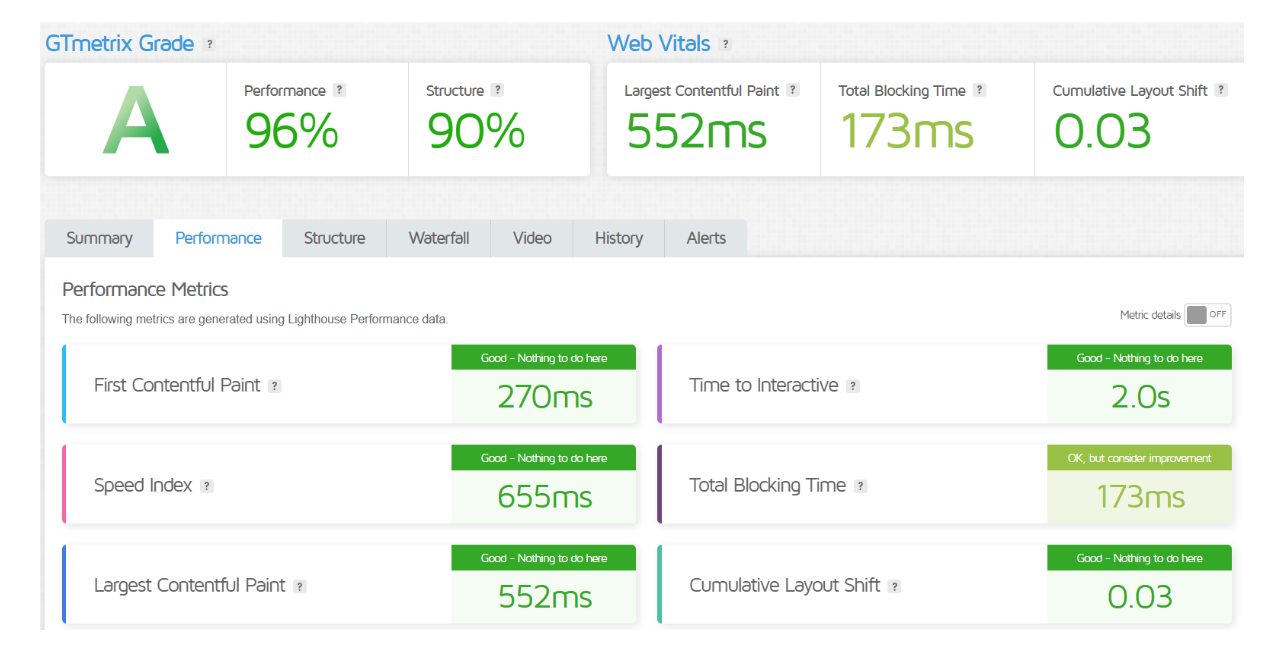
Performance of Kinsta
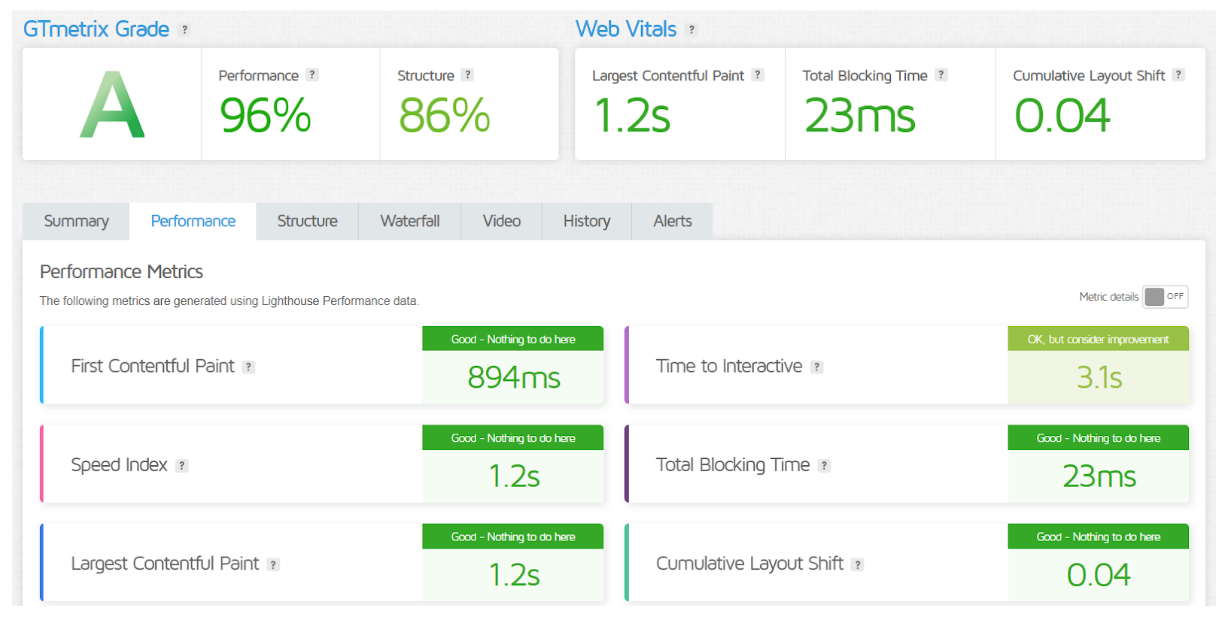
Performance of WPX Hosting
Price Comparison
| Plan | Kinsta | WPX Hosting |
|---|---|---|
| Entry-Level Plan | Starts at $39/month (1 site, 25 GB disk) | Starts at $20.83/month (1 site, 10 GB disk) |
| Mid-Level Plan | Starts at $84/month (3 sites, 40 GB disk) | Starts at $41.58/month (3 sites, 20 GB disk) |
| High-End Plan | Starts at $164/month (5 sites, 75 GB disk) | Starts at $83.25/month (5 sites, 40 GB disk) |
| Custom Plans | Available for higher requirements | Available for higher requirements |
| Free Trial | No | Yes (30-day money-back guarantee) |
| Money-Back Guarantee | 30 days | 30 days |
| Get Started | Choose Kinsta | Choose WPX Hosting |
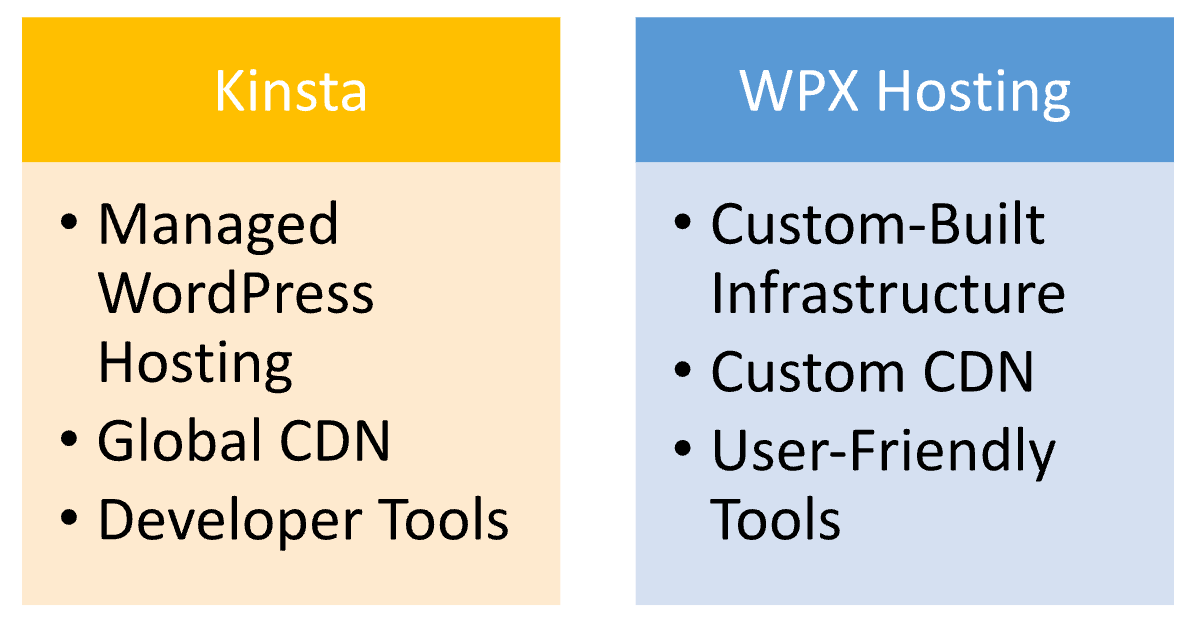
Hosting Provided
Performance
Kinsta offers top-tier performance using Google Cloud Platform’s infrastructure, ensuring fast loading times and scalability. With server-level caching and a built-in CDN, Kinsta delivers optimized speed and reliability, making it ideal for larger websites or businesses with high traffic demands.
WPX Hosting also provides strong performance with its custom infrastructure and CDN, ensuring fast page loading. While it lacks some of Kinsta’s enterprise-level features, WPX still delivers excellent speed and optimization, making it a great option for small to medium-sized businesses needing reliable hosting.
Hosting Management
| Feature | Kinsta | WPX Hosting |
|---|---|---|
| Dashboard | Custom, user-friendly interface | Custom, simple interface |
| Managed WordPress Hosting | Fully managed, includes updates, backups, security | Fully managed, includes updates, backups, security |
| Backup Frequency | Daily backups | Daily backups |
| Staging Environment | Yes | Yes |
| Caching | Built-in server-level caching, CDN | Custom caching, built-in CDN |
| Migration | 2 free migrations | Free unlimited migrations |
| Get Started | Choose Kinsta | Choose WPX Hosting |
Ease of Use
Kinsta:
- User Interface: Kinsta offers a sleek, modern dashboard with advanced features, but it may feel more complex for beginners due to its focus on performance and scalability.
- Setup Process: Quick setup, but the platform includes more configuration options, which may require familiarity with technical aspects like caching and server settings.
- Features for Developers: Kinsta is designed with developers in mind, offering staging environments, PHP management, and other advanced tools, but these features can be overwhelming for non-technical users.
- Support: 24/7 expert support is available, but users need to be more technically proficient to fully benefit from the assistance, as the focus is often on troubleshooting advanced issues.
WPX Hosting:
- User Interface: WPX Hosting provides a simple, intuitive dashboard that’s easy to navigate for beginners, making it accessible for those with limited technical experience.
- Setup Process: The setup process is very straightforward and quick, with automatic WordPress installation and minimal user input required.
- Features for Beginners: WPX focuses on ease of use, with simplified performance tools, one-click staging, and a user-friendly CDN setup, all of which make it a great choice for WordPress beginners.
- Support: 24/7 live chat support is friendly and helpful, offering clear guidance for users at all experience levels, particularly for those new to WordPress hosting.
Advantage and Disadvantage
Advantage
| Advantage | Kinsta | WPX Hosting |
|---|---|---|
| Performance | Google Cloud for speed and scalability | Custom CDN and SSD storage for fast performance |
| Advanced Features | Staging, developer tools, enterprise-level features | User-friendly tools, unlimited migrations |
| Security | DDoS protection, malware scanning | Strong security, free SSL |
| Support | 24/7 expert support | 24/7 responsive, beginner-friendly support |
| Get Started | Choose Kinsta | Choose WPX Hosting |
Disadvantage
| Disadvantage | Kinsta | WPX Hosting |
|---|---|---|
| Pricing | Higher pricing, especially for lower-tier plans | Pricing can be higher for advanced features |
| Ease of Use | More complex for beginners, advanced features may be overwhelming | Lacks some advanced features for developers |
| Free Migrations | Only 2 free migrations per plan | Limited to migration requests, could be restrictive |
| Resource Limits | Limited resources on lower plans, may require upgrades for high-traffic sites | Some resource restrictions on lower-tier plans |
| Get Started | Choose Kinsta | Choose WPX Hosting |
What Our Customers Have To Say
Kinsta:
- Excellent Performance: Customers praise Kinsta for fast load times and reliable uptime, with many highlighting the platform’s scalability for growing businesses.
- Top-Notch Support: Users frequently mention the helpful and knowledgeable support team that provides quick and effective solutions.
- Advanced Features: Many customers appreciate the robust features such as staging environments, automatic backups, and custom caching options.
- Developer-Friendly: Developers often commend Kinsta for its developer tools and flexibility, though some note that the interface can be complex for beginners.
WPX Hosting:
- Outstanding Customer Service: Customers consistently highlight WPX’s fast, friendly, and effective customer support, especially for beginners.
- Ease of Use: Many users enjoy the simple, intuitive interface, making it a popular choice for those new to WordPress hosting.
- Reliable Performance: Customers report solid performance with fast load times, especially when using WPX’s custom CDN and SSD storage.
- Value for Money: WPX users often feel they get great value with affordable pricing and unlimited free migrations, considering the level of service provided.
Security:
| Security Feature | Kinsta | WPX Hosting |
|---|---|---|
| SSL Certificates | Free SSL included | Free SSL included |
| DDoS Protection | Advanced DDoS protection | Basic DDoS protection |
| Malware Scanning | Automatic malware scanning | Regular malware scanning |
| Firewall | Custom firewall for enhanced security | Built-in security firewall |
| Two-Factor Authentication | Available for added account security | Available for added account security |
| Backups | Daily backups with one-click restore | Daily backups with easy restore |
| Get Started | Choose Kinsta | Choose WPX Hosting |
Customer Support:
Kinsta:
- Expert Support: 24/7 support from WordPress experts who can handle complex technical issues.
- Response Time: Fast response times, with most issues addressed within minutes.
- Support Channels: Available via live chat and email, but no phone support.
- Knowledge Base: Extensive resources and guides available for self-help, though best suited for advanced users.
WPX Hosting:
- Friendly Support: 24/7 support with a focus on friendly and helpful interactions, especially for beginners.
- Response Time: Extremely fast response times, often resolving issues in minutes.
- Support Channels: Available via live chat, with no email or phone support.
- Knowledge Base: Simple, easy-to-understand guides and tutorials, designed for non-technical users.
Final Recommendations
| Criteria | Kinsta | WPX Hosting |
|---|---|---|
| Best For | Large businesses, developers, advanced features | Small to medium businesses, beginners |
| Performance Needs | High-traffic, performance-demanding sites | Fast, reliable performance for simpler needs |
| Support Preference | Expert support for technical users | Friendly, fast support for beginners |
| Budget Considerations | Higher budget for premium features | Affordable pricing with great value |
| Get Started | Choose Kinsta | Choose WPX Hosting |
Frequently Asked Questions
WPX Hosting is more beginner-friendly with its simple interface and easy setup. Kinsta is more suited for advanced users or developers.
Both Kinsta and WPX Hosting offer free SSL certificates for all websites.
Kinsta provides top-tier performance with its Google Cloud infrastructure, offering scalability and speed for high-traffic sites. WPX Hosting also offers fast performance with its custom-built infrastructure and CDN.
Kinsta offers a 30-day money-back guarantee, while WPX Hosting also provides a 30-day money-back guarantee for all plans.
Both offer excellent support, but WPX Hosting is often praised for its quick, friendly support, especially for beginners. Kinsta has expert support but is more technical.
Kinsta is ideal for high-traffic sites due to its scalable infrastructure on Google Cloud and advanced caching options.
Both Kinsta and WPX Hosting offer staging environments to easily test changes before going live.
Table of Contents
Explore More




